Audit logging gives security and database teams node-local evidence for Cassandra logins, role changes, schema changes, reads, writes, and request failures. Enable it before a compliance handoff or an investigation window so requests handled by a coordinator node leave an audit trail outside the normal application logs.
Cassandra can enable audit logging from /etc/cassandra/cassandra.yaml at startup or through nodetool at runtime. The persistent configuration path is safer for routine operations because it survives service restarts, keeps filters in source-controlled configuration, and avoids per-node runtime drift.
The BinAuditLogger writes binary audit segments that auditlogviewer converts to readable entries. Store those segments on durable local storage, keep directory permissions limited to the Cassandra service account and operators who review audit evidence, and repeat the change on every node that must produce audit records.
Steps to enable Apache Cassandra audit logging:
- Check the current audit logging state on the node.
$ nodetool getauditlog
enabled: false
logger: BinAuditLogger
audit_logs_dir: /var/log/cassandra/audit
excluded_keyspaces: system,system_schema,system_virtual_schema
roll_cycle: HOURLY
block: true
nodetool getauditlog prints the active audit log configuration when audit logging is enabled. When it is disabled, it prints the configuration reflected in cassandra.yaml.
- Create the audit log directory.
$ sudo install -d -o cassandra -g cassandra -m 0750 /var/log/cassandra/audit
Use durable storage for this directory when audit records are compliance evidence. Audit log entries are written on the enabled coordinator node and are not replicated like Cassandra data.
- Back up the Cassandra configuration file.
$ sudo cp -a /etc/cassandra/cassandra.yaml /etc/cassandra/cassandra.yaml.auditlog.bak
- Open the Cassandra configuration file.
$ sudoedit /etc/cassandra/cassandra.yaml
The packaged Linux path is usually /etc/cassandra/cassandra.yaml. Use the active configuration path for tarball, container, or custom service layouts.
- Set the audit_logging_options block.
audit_logging_options:
    enabled: true
    logger:
      - class_name: BinAuditLogger
    audit_logs_dir: /var/log/cassandra/audit
    included_categories: AUTH,DCL,DDL,DML,QUERY,ERROR
    excluded_keyspaces: system,system_schema,system_virtual_schema
    roll_cycle: HOURLY
    block: true
    max_queue_weight: 268435456
    max_log_size: 17179869184
AUTH records login events, DCL records role and permission changes, DDL records schema changes, DML records writes, QUERY records reads, and ERROR records request failures. Remove QUERY if read auditing would create too much volume for the node.
- Restart the Cassandra service to load the persistent audit configuration.
$ sudo systemctl restart cassandra
Use nodetool enableauditlog only when audit logging must be enabled before a restart. Runtime changes are per node, so keep cassandra.yaml aligned before the next service restart.
- Confirm the Cassandra service is active after the restart.
$ sudo systemctl is-active cassandra
active
Check /var/log/cassandra/system.log if the service does not return active after the configuration change.
Related: How to view Apache Cassandra logs
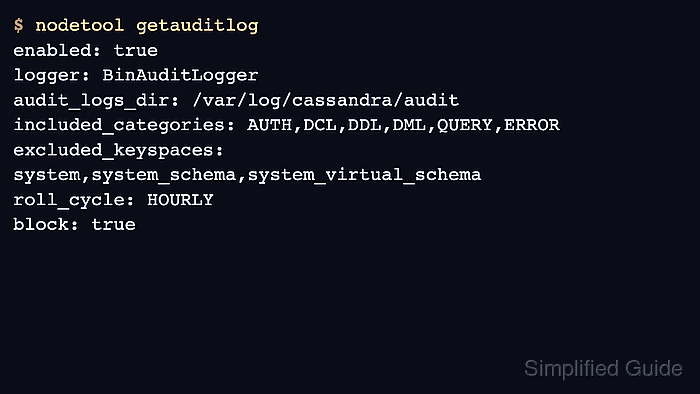
- Confirm audit logging is enabled at runtime.
$ nodetool getauditlog
enabled: true
logger: BinAuditLogger
audit_logs_dir: /var/log/cassandra/audit
included_categories: AUTH,DCL,DDL,DML,QUERY,ERROR
excluded_keyspaces: system,system_schema,system_virtual_schema
roll_cycle: HOURLY
block: true
max_queue_weight: 268435456
max_log_size: 17179869184
- Create a small audit-check keyspace through cqlsh.
$ cqlsh 127.0.0.1 -e "CREATE KEYSPACE IF NOT EXISTS sg_audit_check WITH replication = {'class':'SimpleStrategy','replication_factor':1};"Add the normal cqlsh authentication options for secured clusters, but avoid saving passwords in shell history or shared transcripts.
- Read the binary audit log with auditlogviewer.
$ sudo auditlogviewer /var/log/cassandra/audit
Type: AuditLog
LogMessage:
user:cassandra|host:127.0.0.1:7000|source:/127.0.0.1|port:9042|timestamp:1781668800000|type:CREATE_KEYSPACE|category:DDL|ks:sg_audit_check|operation:CREATE KEYSPACE IF NOT EXISTS sg_audit_check WITH replication = {'class':'SimpleStrategy','replication_factor':1};
##### snipped #####
FileAuditLogger writes readable entries through the normal logging path instead of requiring auditlogviewer. Keep BinAuditLogger for the lower-overhead binary audit log path unless a text log is an explicit operational requirement.
- Remove the audit-check keyspace.
$ cqlsh 127.0.0.1 -e "DROP KEYSPACE IF EXISTS sg_audit_check;"

Mohd Shakir Zakaria is a cloud architect with deep roots in software development and open-source advocacy. Certified in AWS, Red Hat, VMware, ITIL, and Linux, he specializes in designing and managing robust cloud and on-premises infrastructures.


