Corporate proxies and TLS inspection can make Conda package commands fail even when the same repository opens in a browser. Saving the proxy route and certificate trust setting in Conda's active configuration lets package searches, installs, and environment solves use the approved network path without turning certificate checks off.
Conda reads .condarc files from system, installation, environment, and user locations, and conda config writes to the user file by default. The proxy_servers setting maps HTTP and HTTPS requests to the proxy URL, while the proxy URL scheme describes the proxy itself rather than the repository traffic.
For TLS-inspecting proxies, use ssl_verify to point Conda at a trust source that contains the company root certificate. Use truststore when the root certificate is already installed in the operating system trust store, or set ssl_verify to a PEM certificate bundle path when IT provides a file. Leaving ssl_verify as False disables certificate verification and should stay limited to temporary diagnosis.
Related: How to configure Conda channels
Related: How to search for Conda package versions
Steps to configure Conda proxy and certificate trust:
- List the Conda configuration sources.
$ conda config --show-sources
==> /home/operator/.condarc <==
channels:
  - defaults
No output means Conda did not find a populated configuration file. Use --env for the active environment or --file for a chosen file when the proxy setting should not be user-wide.
- Set the proxy for HTTP repository requests.
$ conda config --set proxy_servers.http http://proxy.corp.example:8080
Replace the hostname and port with the proxy assigned by the network team. Use https:// in the value only when the proxy server itself expects TLS.
- Set the proxy for HTTPS repository requests.
$ conda config --set proxy_servers.https http://proxy.corp.example:8080
If the proxy requires credentials in the URL, percent-encode special characters and protect the .condarc file. Prefer a proxy that prompts, uses network authentication, or is configured outside the file when policy allows it.
- Set Conda to use the operating system certificate store.
$ conda config --set ssl_verify truststore
Use truststore when the company root certificate is already trusted by the operating system. This setting requires Conda 23.9.0 or later with Python 3.10 or later.
- Set Conda to use a PEM certificate bundle instead when IT provides one.
$ conda config --set ssl_verify /etc/ssl/certs/corp-root-ca.pem
Run this instead of the truststore command when the root certificate is supplied as a file. Point to a CA bundle, not a leaf server certificate, private key, or browser export that is still in DER format.
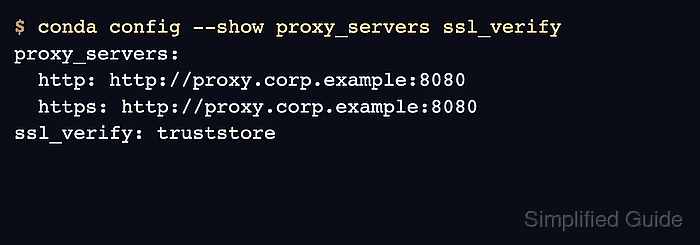
- Check the saved proxy and TLS settings.
$ conda config --show proxy_servers ssl_verify
proxy_servers:
  http: http://proxy.corp.example:8080
  https: http://proxy.corp.example:8080
ssl_verify: truststore
If a PEM bundle path was used, ssl_verify should show that path instead of truststore.
- Validate the Conda configuration files.
$ conda config --validate
No output indicates that Conda parsed the active configuration files without YAML or setting errors.
- Run a package metadata request through an approved channel.
$ conda search --override-channels --channel conda-forge ca-certificates
Loading channels: done
# Name                       Version           Build  Channel
ca-certificates           2018.11.29      ha4d7672_0  conda-forge
ca-certificates             2019.3.9      hecc5488_0  conda-forge
ca-certificates            2019.6.16      hecc5488_0  conda-forge
##### snipped #####
ca-certificates            2026.4.22      hbd8a1cb_0  conda-forge
ca-certificates            2026.5.20      h4c7d964_0  conda-forge
ca-certificates            2026.5.20      hbd8a1cb_0  conda-forge
Replace conda-forge with the channel allowed for the environment. A Terms of Service message from Anaconda channels is a channel-policy blocker rather than a proxy failure; an HTTP connection or certificate error means the proxy URL or trust source still needs review.
Related: How to search for Conda package versions

Mohd Shakir Zakaria is a cloud architect with deep roots in software development and open-source advocacy. Certified in AWS, Red Hat, VMware, ITIL, and Linux, he specializes in designing and managing robust cloud and on-premises infrastructures.


