How to make WordPress trust forwarded HTTPS behind a reverse proxy
A reverse-proxied WordPress site can serve visitors over HTTPS while PHP receives a plain HTTP connection from the proxy. Mapping the trusted forwarded-protocol header in /wp-config.php/ lets WordPress recognize the original secure request, keeping admin redirects and generated login URLs on the public HTTPS scheme.
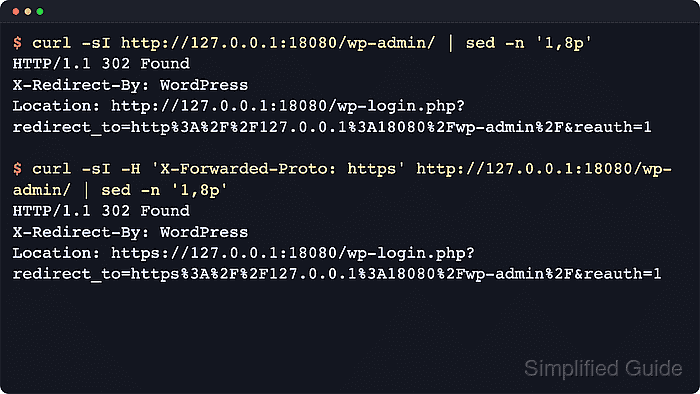
WordPress checks request state through is_ssl(), which reads $_SERVER['HTTPS'] or port 443 early in the bootstrap process. Load balancers and reverse proxies commonly send the viewer protocol in X-Forwarded-Proto, and WordPress needs that proxy signal translated before wp-settings.php loads.
Only map a header that the final trusted edge injects or overwrites before the request reaches the origin. A public origin that accepts direct traffic must not treat a caller-supplied forwarded header as proof of HTTPS, and CloudFront deployments should use the header that CloudFront is actually configured to send.
Steps to make WordPress trust forwarded HTTPS behind a reverse proxy:
- Confirm direct public traffic cannot bypass the proxy and reach the WordPress origin.
Do not add the mapping until firewall, security group, CDN, or web-server rules prevent untrusted clients from supplying their own forwarded-protocol header to the origin.
- Confirm the edge sets the protocol header that WordPress will trust.
location / {
    proxy_pass http://wordpress-origin;
    proxy_set_header Host $http_host;
    proxy_set_header X-Forwarded-Proto $scheme;
}
X-Forwarded-Proto is common for load balancers and Nginx proxy blocks. Use the real header name from the edge that fronts WordPress.
Tool: Proxy Server Checker - Back up the active /wp-config.php/ file.
$ sudo cp /var/www/example.com/public_html/wp-config.php /var/www/example.com/public_html/wp-config.php.bak-before-proxy-https
- Check for existing HTTPS proxy mapping or admin SSL constants.
$ sudo grep -n "FORCE_SSL_ADMIN\|HTTP_X_FORWARDED_PROTO\|HTTP_CLOUDFRONT_FORWARDED_PROTO\|HTTPS" /var/www/example.com/public_html/wp-config.php
No output means none of those lines are present in that file. Update existing definitions in place instead of adding duplicate constants or competing proxy checks.
- Open /wp-config.php/ in an editor.
$ sudoedit /var/www/example.com/public_html/wp-config.php
- Add the trusted forwarded-HTTPS mapping above the final require_once ABSPATH . 'wp-settings.php'; line.
<?php
define( 'FORCE_SSL_ADMIN', true );

if (
    isset( $_SERVER['HTTP_X_FORWARDED_PROTO'] ) &&
    'https' === strtolower( $_SERVER['HTTP_X_FORWARDED_PROTO'] )
) {
    $_SERVER['HTTPS'] = 'on';
}
Replace HTTP_X_FORWARDED_PROTO with the PHP server variable for the real trusted header, such as HTTP_CLOUDFRONT_FORWARDED_PROTO when CloudFront-Forwarded-Proto is forwarded by a CloudFront origin request policy.
Normalize the protocol header at the proxy when possible so WordPress receives one trusted value, such as https, instead of a caller-controlled or comma-appended chain.
- Validate the /wp-config.php/ syntax.
$ php -l /var/www/example.com/public_html/wp-config.php
No syntax errors detected in /var/www/example.com/public_html/wp-config.php
The change applies on the next PHP request. Clear the site cache or opcode cache only when the hosting stack keeps old PHP config in memory.
- Probe the origin without the forwarded-HTTPS header.
$ curl -sI http://wordpress-origin.internal/wp-admin/
HTTP/1.1 302 Found
X-Redirect-By: WordPress
Location: https://www.example.com/wp-admin/
##### snipped #####
A redirect back to wp-admin or a login URL that contains http:// means WordPress still sees the origin request as insecure.
- Probe the origin with the trusted forwarded-HTTPS header.
$ curl -sI -H 'X-Forwarded-Proto: https' http://wordpress-origin.internal/wp-admin/
HTTP/1.1 302 Found
X-Redirect-By: WordPress
Location: https://www.example.com/wp-login.php?redirect_to=https%3A%2F%2Fwww.example.com%2Fwp-admin%2F&reauth=1
##### snipped #####
Add -H 'Host: www.example.com' when the origin virtual host depends on the public hostname.
- Load /wp-login.php/ or /wp-admin/ through the real reverse proxy and confirm the browser stays on HTTPS for login, admin, and generated asset URLs.
If the browser still loops or falls back to plain-HTTP URLs, the public site URL, trusted header name, or origin-side redirect logic is still misaligned.