How to authenticate with a bearer token in wget
Bearer tokens let wget send an authenticated HTTP request without exposing a reusable account password. That fits OAuth access tokens, short-lived service tokens, and other delegated credentials that already exist before the transfer starts.
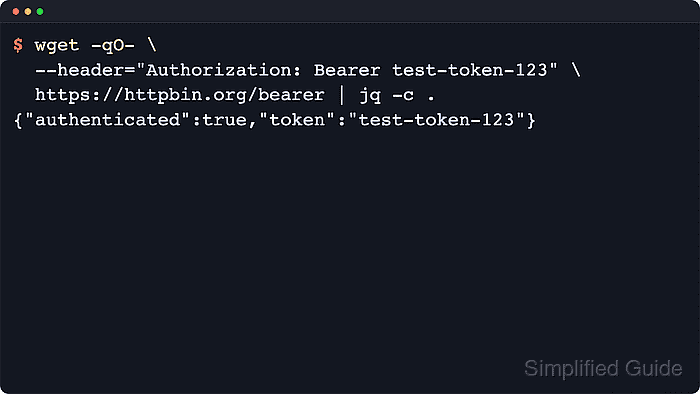
GNU wget does not have a dedicated bearer-auth option. Authentication works by sending an Authorization header with --header, using the exact format Authorization: Bearer <token> that the server expects.
Bearer tokens remain valid until expiry or revocation, so keep them out of shell history, copied logs, and saved config files whenever possible. Loading the token from a restricted file for one request and clearing the shell variable afterward reduces the chances of leaking it. Add --max-redirect=0 while testing a new URL if the token must not follow redirects beyond the exact endpoint already reviewed.
Related: How to authenticate with an API key in wget
Related: How to send custom headers with wget
Tool: Wget Command Generator
Steps to authenticate with a bearer token in wget:
- Load the bearer token into a shell variable from a restricted file.
$ ACCESS_TOKEN="$(tr -d '\n' < ~/.config/wget/bearer.token)"
The file should contain only the token text and should be readable only by the current account.
- Send the authenticated request with the bearer header.
$ wget --quiet --output-document=- --header="Authorization: Bearer ${ACCESS_TOKEN}" https://api.example.net/v1/reports/daily.json
{
  "report_id": "daily-current",
  "status": "ready",
  "download_url": "https://api.example.net/v1/reports/daily-current.csv"
}
Replace api.example.net with the protected host that expects the bearer token.
- Check the HTTP status when the endpoint returns an unexpected body or no body at all.
$ wget --server-response --output-document=/dev/null --header="Authorization: Bearer ${ACCESS_TOKEN}" https://api.example.net/v1/reports/daily.json
--2026-06-06 01:41:50--  https://api.example.net/v1/reports/daily.json
Connecting to api.example.net... connected.
HTTP request sent, awaiting response...
  HTTP/1.1 200 OK
  Content-Type: application/json
##### snipped #####
2026-06-06 01:41:50 (59.5 MB/s) - '/dev/null' saved [130/130]
A 401 Unauthorized or 403 Forbidden response usually means the token is expired, missing scope, tied to a different audience, or sent with the wrong Authorization scheme.
- Clear the token from the current shell when the request completes.
$ unset ACCESS_TOKEN
Unsetting the variable does not remove tokens from copied logs, saved files, or terminal output that already exposed the value.