API keys let wget call a protected download URL or HTTP endpoint without a browser login or an interactive session. That keeps scheduled jobs, quick CLI checks, and one-off API requests easy to reproduce from the shell.
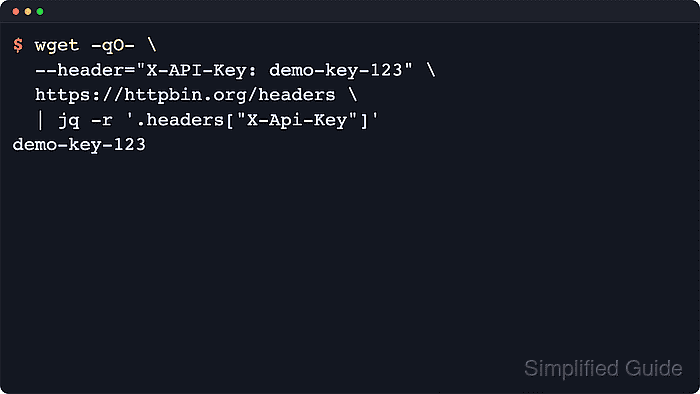
GNU wget authenticates API-key requests by sending the exact header line the service expects with --header. The header is sent as written, so the field name, colon, spacing, and any value prefix must match the provider documentation exactly.
API keys are reusable secrets. Avoid leaving real keys in shared shell history or debug logs, and use --max-redirect=0 while validating a new endpoint if the request must not follow redirects before the final URL is confirmed.
Steps to authenticate with an API key in wget:
- Put the issued API key in a shell variable for the current session.
$ API_KEY='ak_live_01JQ5T2H8K9N_MASKED_6C4R7W1M'
A command typed with a real key can land in shell history, so use a restricted secret source or an interactive prompt on shared systems.
- Send the key in the documented request header and confirm that the server receives it.
$ wget -qO- --header="X-API-Key: ${API_KEY}" https://httpbin.org/headers
{
  "headers": {
    "Accept": "*/*",
    "Host": "httpbin.org",
    "User-Agent": "Wget/1.25.0",
    "X-Api-Key": "ak_live_01JQ5T2H8K9N_MASKED_6C4R7W1M"
  }
}
Replace X-API-Key with the exact header name the API documents, such as x-api-key or Authorization: ApiKey ….
- Repeat the same header against the real API URL and check the HTTP status before using the command in automation.
$ wget --server-response --quiet --output-document=/dev/null --max-redirect=0 --header="X-API-Key: ${API_KEY}" https://api.example.net/v1/account
  HTTP/1.1 200 OK
  Content-Type: application/json
  Content-Length: 312
A 200 OK, 201 Created, or the provider's documented success code is a stronger auth check than assuming any saved response body means the key was accepted.
- Clear the key from the current shell when the request is finished.
$ unset API_KEY
Removing the shell variable does not revoke the key, so rotate it separately if it was exposed in history, logs, or screenshots.

Mohd Shakir Zakaria is a cloud architect with deep roots in software development and open-source advocacy. Certified in AWS, Red Hat, VMware, ITIL, and Linux, he specializes in designing and managing robust cloud and on-premises infrastructures.


