How to interpret traceroute timeout hops
Traceroute timeout hops are the asterisks that appear when a probe reaches a hop but no diagnostic reply returns before the wait timer expires. They matter during route and outage triage because a missing reply in the middle of a path can look like a failure even when later hops and the destination still respond.
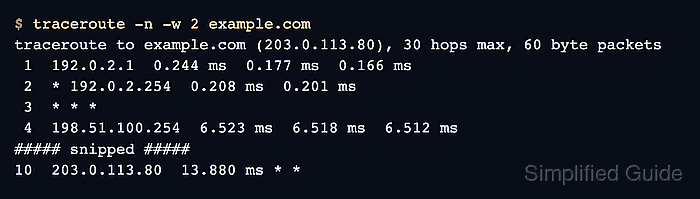
Linux traceroute sends probes with increasing TTL values and prints each returned round-trip time or an asterisk for that probe. A row with some timings and some asterisks means only part of that hop's probe set answered; a row of * * * means none answered before the timeout. Later rows decide whether that missing reply is only diagnostic filtering or the point where the trace stopped.
Timeout-hop interpretation starts at the destination row and works backward through the pattern. Intermediate routers can rate-limit or filter diagnostic replies while still forwarding traffic, and different probe methods can expose different paths through the same firewall or provider network.
Tool: Traceroute Hops Analyzer
Steps to interpret traceroute timeout hops:
- Run a numeric trace to the target.
$ traceroute -n -w 2 example.com
traceroute to example.com (203.0.113.80), 30 hops max, 60 byte packets
 1  192.0.2.1  0.244 ms  0.177 ms  0.166 ms
 2  * 192.0.2.254  0.208 ms  0.201 ms
 3  * * *
 4  198.51.100.254  6.523 ms  6.518 ms  6.512 ms
##### snipped #####
10  203.0.113.80  13.880 ms * *
-n keeps the output numeric so DNS lookup delays do not hide the route pattern. -w 2 shortens the wait per probe for a quick triage pass; raise it on slow satellite, cellular, or congested WAN paths.
- Read mixed rows as partial probe replies.
2 * 192.0.2.254 0.208 ms 0.201 ms
The row received two replies and missed one probe. It is weaker evidence than a destination row with repeated loss or a trace that stops before the target.
- Check whether later hops respond after a full timeout row.
 3  * * *
 4  198.51.100.254  6.523 ms  6.518 ms  6.512 ms
A later responding hop means forwarding continued past the no-reply hop. The missing row usually points to diagnostic reply filtering, ICMP rate limiting, MPLS or provider handling, or an asymmetric return path.
- Check the destination row before blaming an intermediate hop.
10 203.0.113.80 13.880 ms * *
The destination answered one probe, so the trace reached the target even though some probes timed out. Treat a destination row of only * * * as stronger evidence of reachability failure or final-hop filtering.
- Test destination reachability with a separate check.
$ ping -c 2 example.com
PING example.com (203.0.113.80) 56(84) bytes of data.
64 bytes from 203.0.113.80: icmp_seq=1 ttl=63 time=12.7 ms
64 bytes from 203.0.113.80: icmp_seq=2 ttl=63 time=13.9 ms

--- example.com ping statistics ---
2 packets transmitted, 2 received, 0% packet loss, time 1005ms
rtt min/avg/max/mdev = 12.668/13.295/13.922/0.627 ms
If the target blocks ICMP echo, test the real application protocol instead, such as HTTPS, SSH, or the service port users are reporting.
- Repeat the trace with a matching probe method when the default trace looks filtered.
$ traceroute -n -T -p 443 -w 2 example.com
traceroute to example.com (203.0.113.80), 30 hops max, 60 byte packets
 1  192.0.2.1  0.088 ms  0.018 ms  0.018 ms
 2  203.0.113.80  17.352 ms  17.240 ms  19.966 ms
Use TCP probes when testing an HTTPS path, and use ICMP probes when comparing with ping-like reachability. A different probe type can pass through policy that blocks default UDP traceroute probes.
Related: How to use TCP probes with traceroute
Related: How to use ICMP probes with traceroute - Classify the timeout pattern before escalating.
pattern: intermediate no-reply hop
evidence: hop 3 timed out, later hops and the destination responded
next check: application reachability or a repeated trace from the affected network
Escalate a provider or routing ticket with the destination result, repeated captures during the symptom window, and the probe method used. Do not report an isolated middle * * * row as packet loss unless the loss continues to later hops or the destination.