How to troubleshoot TCP retransmissions with tcpdump
A TCP retransmission investigation starts when a request stalls, throughput drops, or a client times out even though the connection opens. Tcpdump shows repeated sequence ranges and acknowledgement movement so the failure can be narrowed to lost data, delayed ACKs, or the wrong capture point instead of a vague network slowness report.
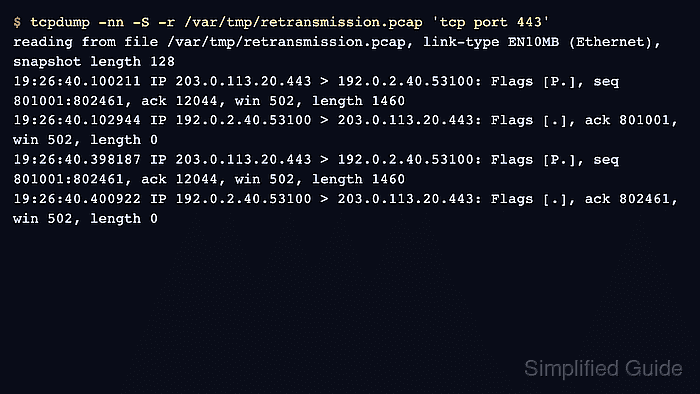
Tcpdump does not label retransmissions as a separate event. Save a narrow PCAP, read it back with absolute TCP sequence numbers using -S, and keep name resolution disabled with -nn so repeated byte ranges can be compared without unrelated sessions filling the terminal.
Repeated data from one side is packet behavior, not root cause by itself. Congestion, filtering, asymmetric routing, overloaded endpoints, path MTU problems, and capture placement can all create similar output, so treat one capture point as evidence about what that point saw and compare another side when the conclusion affects a change.
Steps to troubleshoot TCP retransmissions with tcpdump:
- Start a focused header capture for the affected TCP flow.
$ sudo tcpdump --interface=eth0 -nn -S -s 128 -w /var/tmp/retransmission.pcap 'host 203.0.113.20 and tcp port 443'
tcpdump: listening on eth0, link-type EN10MB (Ethernet), snapshot length 128 bytes
The -s 128 snapshot keeps the Ethernet, IP, and TCP headers needed for sequence and ACK review while avoiding full payload capture. Raise it only when later protocol decoding needs more bytes.
- Reproduce the slow or failing client request from another terminal.
$ curl --max-time 20 https://api.example.net/download
curl: (28) Operation timed out after 20000 milliseconds with 1048576 out of 4194304 bytes received
- Stop the capture after the failure window ends.
^C
16 packets captured
16 packets received by filter
0 packets dropped by kernel
A nonzero packets dropped by kernel count means tcpdump missed packets at the capture host. Retake the focused capture before using the PCAP as packet-loss evidence.
- Read the PCAP and look for a repeated data sequence range.
$ tcpdump -nn -S -r /var/tmp/retransmission.pcap 'host 203.0.113.20 and tcp port 443'
reading from file /var/tmp/retransmission.pcap, link-type EN10MB (Ethernet), snapshot length 128
19:26:40.100211 IP 203.0.113.20.443 > 192.0.2.40.53100: Flags [P.], seq 801001:802461, ack 12044, win 502, length 1460
19:26:40.102944 IP 192.0.2.40.53100 > 203.0.113.20.443: Flags [.], ack 801001, win 502, length 0
19:26:40.398187 IP 203.0.113.20.443 > 192.0.2.40.53100: Flags [P.], seq 801001:802461, ack 12044, win 502, length 1460
19:26:40.400922 IP 192.0.2.40.53100 > 203.0.113.20.443: Flags [.], ack 802461, win 502, length 0
The server sends seq 801001:802461 twice. The first client ACK stays at 801001, then the later ACK advances to 802461 after the retransmitted bytes arrive.
- Check for reset packets when the data sequence range does not repeat.
$ tcpdump -nn -r /var/tmp/retransmission.pcap 'host 203.0.113.20 and tcp port 443 and tcp[tcpflags] & tcp-rst != 0'
reading from file /var/tmp/retransmission.pcap, link-type EN10MB (Ethernet), snapshot length 128
No packet lines after the file header means this PCAP has no TCP reset packets matching the filter. If the failure happens before data flows, inspect the SYN, SYN-ACK, and ACK sequence instead.
- Compare an opposite-side capture before changing the network path.
$ tcpdump -nn -S -r /var/tmp/retransmission-peer.pcap 'host 192.0.2.40 and tcp port 443'
reading from file /var/tmp/retransmission-peer.pcap, link-type EN10MB (Ethernet), snapshot length 128
19:26:40.099802 IP 203.0.113.20.443 > 192.0.2.40.53100: Flags [P.], seq 801001:802461, ack 12044, win 502, length 1460
If the server-side capture shows the first segment but the client-side capture sees only the retransmission, the loss is likely between those points. If both sides show both sends, inspect receiver ACK behavior, application stalls, or capture placement.
- Remove temporary PCAPs after evidence has been saved.
$ sudo rm -f /var/tmp/retransmission.pcap /var/tmp/retransmission-peer.pcap
Keep the PCAPs when an incident ticket, vendor case, or postmortem needs the original packet evidence. Packet captures can contain sensitive addresses, timing, and payload bytes.