How to add Symfony translations
Symfony translation catalogs let application text change by locale while controllers and templates keep stable message IDs. A catalog entry is useful when the same label, notification, or response needs to appear in another language without adding conditional text in PHP code.
Symfony loads translation resources from the configured translator path, commonly translations/ in current projects. A filename such as messages.fr.yaml targets the messages domain and the fr locale, so calls to trans() can return the French value for a known message ID.
Use an existing project root where php bin/console already boots. A temporary preview route keeps the smoke test isolated from the real UI; remove that route after checking the response unless the application already has a page that renders the same message.
Steps to add Symfony translations:
- Open the Symfony project root.
$ cd ~/projects/acme-app
Use the directory that contains composer.json, bin/console, and the public/ document root.
- Install translator support if the project does not already include it.
$ composer require symfony/translation symfony/yaml
symfony/translation installs the translator service. symfony/yaml lets the project read *.yaml catalog files. Install PHP's intl extension in the same runtime when the application uses non-English localization or ICU message formats.
- Confirm the translator configuration file.
$ vi config/packages/translation.yaml
- translation.yaml
framework:
    default_locale: 'en'
    translator:
        default_path: '%kernel.project_dir%/translations'
The default_path value tells Symfony where project-level translation catalogs live. Keep the default locale aligned with the language used by untranslated message IDs.
- Create the French message catalog.
$ vi translations/messages.fr.yaml
- messages.fr.yaml
app:
  greeting: 'Bonjour depuis Symfony'
The filename format is domain.locale.loader. In messages.fr.yaml, messages is the translation domain, fr is the locale, and yaml is the loader format.
Tool: YAML Validator - Add a temporary preview route for the translated value.
$ vi src/Controller/TranslationPreviewController.php
- TranslationPreviewController.php
<?php

namespace App\Controller;

use Symfony\Component\HttpFoundation\Response;
use Symfony\Component\Routing\Attribute\Route;
use Symfony\Contracts\Translation\TranslatorInterface;

final class TranslationPreviewController
{
    #[Route('/fr/greeting', name: 'translation_preview_fr', methods: ['GET'])]
    public function __invoke(TranslatorInterface $translator): Response
    {
        return new Response($translator->trans('app.greeting', locale: 'fr'));
    }
}
Save the file as src/Controller/TranslationPreviewController.php. The explicit locale: 'fr' argument keeps the smoke test independent of request-locale routing.
Related: How to create a Symfony route - Confirm that Symfony loads the message in the fr catalog.
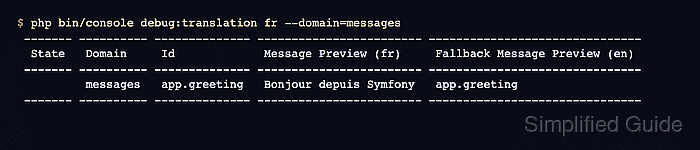
$ php bin/console debug:translation fr --domain=messages
 ------- ---------- -------------- ------------------------ -------------------------------
  State   Domain     Id             Message Preview (fr)     Fallback Message Preview (en)
 ------- ---------- -------------- ------------------------ -------------------------------
          messages   app.greeting   Bonjour depuis Symfony   app.greeting
 ------- ---------- -------------- ------------------------ -------------------------------
The Message Preview (fr) column should show the translated text from messages.fr.yaml. The fallback column can show the message ID when no English catalog contains the same key.
- Start the local Symfony web server.
$ symfony server:start --no-tls --port=8000 -d
[OK] Web server listening
     The Web server is using PHP CLI 8.5.4
     http://127.0.0.1:8000
The Symfony local web server is for development only. Do not expose it as a production web server.
Related: How to run a Symfony project locally - Request the preview route.
$ curl --silent --show-error http://127.0.0.1:8000/fr/greeting
Bonjour depuis Symfony
- Stop the local web server.
$ symfony server:stop
Stopping PHP
Stopping Web Server

[OK] Stopped 2 process(es) successfully
- Remove the temporary preview controller.
$ rm src/Controller/TranslationPreviewController.php
Keep the controller only if it is part of the real application behavior. The translation catalog remains in translations/messages.fr.yaml.