How to enable the Symfony profiler
The Symfony Profiler records request details that help debug controllers, services, templates, database queries, and response headers during local development. Enabling it in a development project adds the web debug toolbar and the /_profiler interface so each request can be inspected without changing application code.
Symfony Flex installs the profiler through symfony/profiler-pack and writes environment-scoped configuration for dev and test. The profiler and toolbar should stay out of prod because profiler pages expose request data, service details, environment values, and stack traces.
Use the Symfony CLI local server with the default dev environment for a direct local check. HTML responses show the toolbar at the bottom of the page when the browser loads JavaScript, while API, redirect, and error responses can still be confirmed from the X-Debug-Token-Link response header or the /_profiler route.
Steps to enable the Symfony profiler:
- Open a terminal in the Symfony project root.
- Install the profiler pack as a development dependency.
$ composer require --dev symfony/profiler-pack
./composer.json has been updated
Running composer update symfony/profiler-pack
##### snipped #####
  - Installing symfony/profiler-pack (v1.0.6)
Generating autoload files
##### snipped #####
  - Unpacked symfony/profiler-pack
Executing script cache:clear [OK]
Executing script assets:install public [OK]
No security vulnerability advisories found.
Symfony Flex may unpack the pack into individual dependencies such as symfony/web-profiler-bundle, so the pack itself does not have to remain listed by composer show.
- Confirm Flex created the profiler configuration for development.
$ cat config/packages/web_profiler.yaml
when@dev:
    web_profiler:
        toolbar: true

    framework:
        profiler: true

when@test:
    framework:
        profiler:
            collect: false
Keep the profiler in dev and test only. A profiler-enabled production environment can expose request data, stack traces, service details, and environment-derived values.
- Confirm the web profiler route is registered.
$ php bin/console debug:router _profiler_home
+--------------+-------------------------------------------------------------+
| Property     | Value                                                       |
+--------------+-------------------------------------------------------------+
| Route Name   | _profiler_home                                              |
| Path         | /_profiler/                                                 |
| Defaults     | _controller: web_profiler.controller.profiler::homeAction() |
+--------------+-------------------------------------------------------------+
- Start the Symfony local web server.
$ symfony server:start --no-tls --allow-http
[OK] Web server listening
     The Web server is using PHP FPM 8.5.7
     http://127.0.0.1:8000
Use the existing local web server instead if the project is already served through Nginx, Apache, Docker, or another development host.
Related: How to run a Symfony project locally - Request an existing application page and confirm Symfony returns a profiler token.
$ curl -sS -I http://127.0.0.1:8000/
HTTP/1.1 200 OK
Cache-Control: no-cache, private
Content-Type: text/html; charset=UTF-8
X-Debug-Token: abc123
X-Debug-Token-Link: http://127.0.0.1:8000/_profiler/abc123
The status code should match the requested route. A brand-new project with no homepage route can return 404 and still include the profiler token.
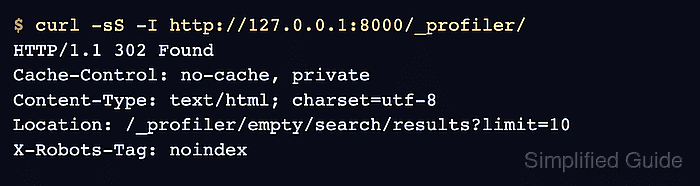
- Check the profiler interface route directly.
$ curl -sS -I http://127.0.0.1:8000/_profiler/
HTTP/1.1 302 Found
Cache-Control: no-cache, private
Content-Type: text/html; charset=utf-8
Location: /_profiler/empty/search/results?limit=10
X-Robots-Tag: noindex
Open the X-Debug-Token-Link URL or /_profiler/ in a browser to inspect request panels. HTML pages also show the web debug toolbar when web_profiler.toolbar.enabled is true.
- Stop the local server when the profiler check is finished.
$ symfony server:stop
[OK] Stopped 2 process(es) successfully