How to configure WireGuard VPN in openSUSE and SLES
Configuring a WireGuard tunnel on openSUSE or SLES provides a fast encrypted path to remote private networks, site-to-site links, or a full-tunnel VPN without the operational weight of older VPN stacks. Correct peer values matter because a tunnel can come up locally while still failing to carry traffic if the keys, endpoint, or routed networks do not match the remote side.
On Linux, WireGuard keeps peer state in kernel space while the wg and wg-quick tools load the interface, addresses, and routes from /etc/wireguard/<interface>.conf. The AllowedIPs list defines which networks should use the tunnel, while Endpoint and PersistentKeepalive control how the peer is reached and how NAT mappings stay alive on idle links.
Current openSUSE and SLES systems do not all expose the same packaging channels or default DNS helpers, but the wg0.conf plus wg-quick workflow stays the same once WireGuard support is installed. On SUSE hosts that keep resolver management under NetworkManager or wicked with netconfig, omit the DNS = line unless a compatible resolvconf implementation is present, and use a console or other recovery path before switching a remote system to a full-tunnel default route.
Steps to configure WireGuard VPN in openSUSE and SLES:
- Create the secure configuration directory that wg-quick uses by default.
$ sudo install -d -m 700 /etc/wireguard
- Open the tunnel configuration file and define the local interface plus the remote peer.
$ sudo vi /etc/wireguard/wg0.conf
[Interface]
Address = 10.8.0.2/24
MTU = 1420
PrivateKey = CLIENT_PRIVATE_KEY_BASE64
# DNS = 10.8.0.1

[Peer]
PublicKey = VPN_SERVER_PUBLIC_KEY_BASE64
Endpoint = 198.51.100.10:51820
AllowedIPs = 10.8.0.0/24, 10.20.0.0/16
PersistentKeepalive = 25
Replace the sample address, keys, endpoint, and routed networks with the values assigned by the remote peer or VPN provider. Use 0.0.0.0/0, ::/0 only when the tunnel should carry all IPv4 and IPv6 traffic.
If the remote side did not provide a local private key, generate one first with wg genkey | tee privatekey | wg pubkey > publickey, paste the private key into PrivateKey =, and share only the generated public key with the remote administrator.
Add ListenPort = 51820 under [Interface] only when this host must accept inbound peers on a fixed UDP port.
Use the optional DNS = line only when a compatible resolvconf implementation is installed. On SUSE systems that keep DNS under NetworkManager or wicked, leave that line out and manage resolvers separately.
- Bring the tunnel up from the saved configuration file.
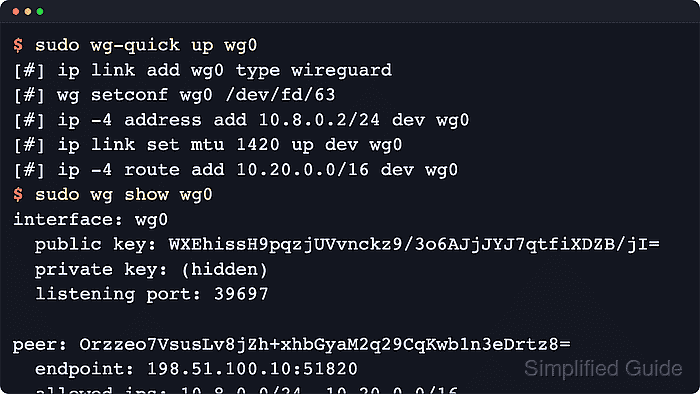
$ sudo wg-quick up wg0
[#] ip link add wg0 type wireguard
[#] wg setconf wg0 /dev/fd/63
[#] ip -4 address add 10.8.0.2/24 dev wg0
[#] ip link set mtu 1420 up dev wg0
[#] ip -4 route add 10.20.0.0/16 dev wg0
When AllowedIPs includes 0.0.0.0/0 or ::/0, wg-quick rewrites the default route automatically. Apply that kind of change from a local console, hypervisor console, or another recovery path when the host is remote.
- Verify that the interface, peer definition, and expected routes are now present.
$ sudo wg show wg0
interface: wg0
  public key: WXEhissH9pqzjUVvnckz9/3o6AJjJYJ7qtfiXDZB/jI=
  private key: (hidden)
  listening port: 39697

peer: Orzzeo7VsusLv8jZh+xhbGyaM2q29CqKwb1n3eDrtz8=
  endpoint: 198.51.100.10:51820
  allowed ips: 10.8.0.0/24, 10.20.0.0/16
  transfer: 0 B received, 148 B sent
  persistent keepalive: every 25 seconds
$ ip -br address show dev wg0
wg0              UNKNOWN        10.8.0.2/24
$ ip route show | grep -E '10\\.8\\.0\\.0/24|10\\.20\\.0\\.0/16'
10.8.0.0/24 dev wg0 proto kernel scope link src 10.8.0.2
10.20.0.0/16 dev wg0 scope link
Transfer counters can rise before a handshake is visible because the local peer is already sending keepalives or test packets. End-to-end success still requires the remote peer to answer.
- Send traffic to an address inside AllowedIPs and confirm that latest handshake becomes recent.
$ ping -c 3 10.20.0.1
$ sudo wg show wg0
Use a real host or gateway that is reachable through the tunnel. If latest handshake stays absent or never, re-check the remote peer's public key, the endpoint address and port, and whether the remote side has a matching route back to this host's Address value.
- Enable the tunnel at boot so systemd can restore the same configuration on the next restart.
$ sudo systemctl enable wg-quick@wg0
Created symlink /etc/systemd/system/multi-user.target.wants/wg-quick@wg0.service -> /usr/lib/systemd/system/wg-quick@.service.
Enable the unit without --now when the tunnel is already active from the previous step. Starting the unit again while wg0 already exists can fail with an interface-already-exists error.