How to configure folder sharing on openSUSE and SLES
Sharing a folder from openSUSE or SUSE Linux Enterprise Server (SLES) makes it easier to expose project files, team drop zones, or common documents to Windows and Linux clients on the local network. A single authenticated SMB share is easier to manage than ad hoc copies because the directory stays in one place and the access rules stay on the server.
On current SUSE systems, the usual way to publish a folder is with Samba. The share definition lives in /etc/samba/smb.conf, the actual data can live in a stable path such as /srv/samba/teamshare, and access is controlled with an existing local user account plus a separate Samba password created with smbpasswd. The smb and nmb systemd units provide the server-side services.
A writable guest share is rarely the right default because anyone who can reach TCP port 445 can read or modify files once the firewall is opened. This guide keeps the share restricted to one named local account, validates the configuration before the service starts, and opens the predefined samba service in firewalld only when remote clients actually need access.
Steps to share a folder over Samba in openSUSE and SLES:
- Install the Samba server and client tools with zypper.
$ sudo zypper install --no-confirm samba samba-client
The samba-client package supplies smbclient, which is used later to verify that the share is visible.
- Create the folder that will be shared and assign it to the local account that should own the files.
$ sudo install -d -o USERNAME -g GROUPNAME -m 2770 /srv/samba/teamshare
$ ls -ld /srv/samba/teamshare
drwxrws--- 2 USERNAME GROUPNAME 4096 Mar 29 11:22 /srv/samba/teamshare
Replace USERNAME with an existing local account and GROUPNAME with that account's primary group, for example the value returned by
$ id -gn USERNAME
.
- Add that local account to the Samba password database.
$ sudo smbpasswd -a USERNAME
New SMB password:
Retype new SMB password:
Added user USERNAME.
smbpasswd -a only works when USERNAME already exists in the system account database.
- Create a backup copy of /etc/samba/smb.conf before editing it.
$ sudo cp --archive /etc/samba/smb.conf /etc/samba/smb.conf.bak
- Add a share definition for the folder in /etc/samba/smb.conf.
$ sudo vi /etc/samba/smb.conf

[teamshare]
  path = /srv/samba/teamshare
  browseable = yes
  read only = no
  guest ok = no
  valid users = USERNAME
  create mask = 0664
  directory mask = 0775
Change teamshare to the public name clients should see on the network, and keep guest ok = no unless anonymous access is a deliberate requirement.
Do not point a writable share at a sensitive system directory such as /etc, /home, or an application data path that was not prepared for remote writes.
- Validate the Samba configuration before starting the share.
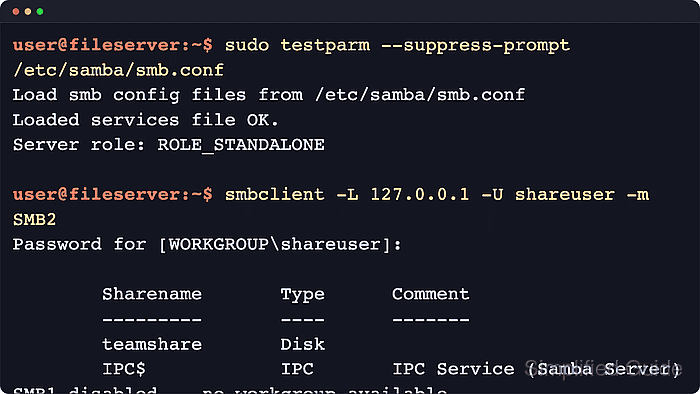
$ sudo testparm --suppress-prompt /etc/samba/smb.conf
Load smb config files from /etc/samba/smb.conf
Loaded services file OK.
Server role: ROLE_STANDALONE
No parsing errors here means smb can load the configuration file.
- Enable the Samba services and start them immediately.
$ sudo systemctl enable --now smb nmb
nmb mainly helps legacy NetBIOS name discovery; modern clients can still connect directly to the server's DNS name or IP over SMB.
- Confirm that the smb service is active.
$ sudo systemctl status smb --no-pager
● smb.service - Samba SMB Daemon
     Loaded: loaded (/usr/lib/systemd/system/smb.service; enabled; preset: disabled)
     Active: active (running)
##### snipped #####
If this step fails, review /etc/samba/smb.conf again and inspect the recent logs with
$ sudo journalctl -u smb -n 50 --no-pager
.
- Check which firewalld zone the host uses for new interfaces.
$ sudo firewall-cmd --get-default-zone
public
If the system returns a zone other than public, substitute that zone name in the next two steps.
- Allow the predefined samba service in the active firewall zone.
$ sudo firewall-cmd --zone=public --permanent --add-service=samba
success
Opening the samba service exposes the share to systems that can route to this host, so keep the share restricted to trusted accounts and networks.
- Reload firewalld to apply the new rule.
$ sudo firewall-cmd --reload
success
- Verify that firewalld now advertises the samba service in that zone.
$ sudo firewall-cmd --zone=public --list-services
cockpit dhcpv6-client samba ssh
The exact service list varies by host, but samba must appear before remote clients can connect through the firewall.
- List the exported shares from the local host with smbclient.
$ smbclient -L 127.0.0.1 -U USERNAME -m SMB2
Password for [WORKGROUP\\USERNAME]:

        Sharename       Type      Comment
        ---------       ----      -------
        teamshare       Disk
        IPC$            IPC       IPC Service (Samba Server)
The teamshare entry confirms that the server is exporting the share name defined in /etc/samba/smb.conf.
- Open the share and list its contents to confirm end-to-end access.
$ smbclient //127.0.0.1/teamshare -U USERNAME -m SMB2 -c 'ls'
Password for [WORKGROUP\\USERNAME]:
  .                                   D        0  Sun Mar 29 11:27:24 2026
  ..                                  D        0  Sun Mar 29 11:27:24 2026
Windows clients can open the share as \\\\server-name\\teamshare, while SUSE desktops can use the follow-up guide: How to access an SMB shared folder in openSUSE and SLES.