How to read Suricata stats logs
Suricata writes runtime counters that show how much traffic the engine has decoded, tracked, and inspected. The human-readable stats.log file is a quick health surface for checking whether a sensor is processing packets, building flows, and accumulating drops or stream gaps during a capture.
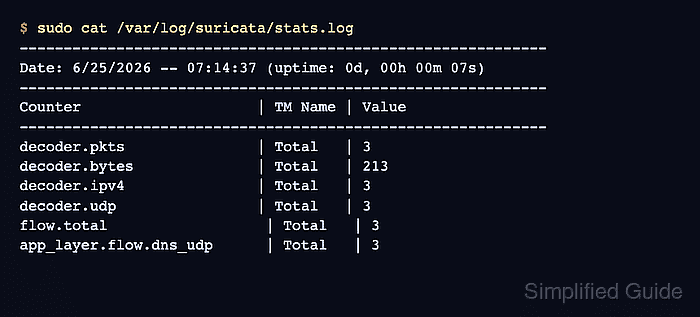
Packaged Linux installs commonly write the file at /var/log/suricata/stats.log when local file output is enabled. Each block starts with a Date line and uptime, followed by Counter, TM Name, and Value columns. Suricata writes stats records at a fixed interval, and the default interval documented by upstream is 8 seconds.
The counters in stats.log are easiest to read as a newest-block snapshot rather than as isolated lines. The file normally omits zero-valued counters, so a missing drop or gap counter usually means that counter was zero in the current block; a nonzero drop, gap, memcap, or emergency-mode counter deserves follow-up in capture, tuning, or rule-performance work.
Related: How to read Suricata eve.json logs
Related: How to tune Suricata performance
Steps to read Suricata stats logs:
- Print the current stats.log block.
$ sudo cat /var/log/suricata/stats.log
------------------------------------------------------------
Date: 6/25/2026 -- 07:14:37 (uptime: 0d, 00h 00m 07s)
------------------------------------------------------------
Counter                    | TM Name | Value
------------------------------------------------------------
decoder.pkts               | Total   | 3
decoder.bytes              | Total   | 213
decoder.ipv4               | Total   | 3
decoder.ethernet           | Total   | 3
decoder.udp                | Total   | 3
##### snipped #####
flow.total                  | Total   | 3
app_layer.flow.dns_udp      | Total   | 3
flow.memuse                 | Total   | 11428608
Column padding is shortened here for readability; the counter names and values match the stats.log block. Use the newest complete block for the current packet-processing state, and compare two complete blocks only when checking whether counters are still increasing during active traffic.
- Check the Date line and uptime at the top of the block.
A stale timestamp means the sensor is not writing new stats, the service stopped, or a different log path is being read.
- Read the decoder counters for traffic volume and protocol mix.
decoder.pkts            | Total | 3
decoder.bytes           | Total | 213
decoder.ipv4            | Total | 3
decoder.udp             | Total | 3
decoder.pkts and decoder.bytes show processed packet and byte totals for the current engine run. Protocol counters such as decoder.tcp, decoder.udp, decoder.ipv4, and decoder.ipv6 show what the decoder recognized.
- Read the flow and application-layer counters.
flow.total              | Total | 3
flow.udp                | Total | 3
app_layer.flow.dns_udp  | Total | 3
app_layer.tx.dns_udp    | Total | 3
flow.total confirms that Suricata built flow state. app_layer.flow.* and app_layer.tx.* counters show protocol parsers that saw traffic, such as DNS over UDP.
- Check live-capture drop counters when they appear.
capture.kernel_packets | W#01-enp1s0 | 12094418
capture.kernel_drops   | W#01-enp1s0 | 234
tcp.reassembly_gap     | Detect      | 17
capture.kernel_drops means the capture layer discarded packets before Suricata could inspect them. tcp.reassembly_gap means TCP stream data was missing or could not be reassembled; packet loss, checksum problems, and memory pressure can all contribute.
- Check alert and detection counters when alert volume matters.
detect.alert | Detect | 12
detect.alert is cumulative for the engine run. A rising packet count with no expected alert activity usually points to rules, HOME_NET scope, suppression, or logging configuration rather than to the stats file itself.
- Confirm the block matches the sensor state before escalating.
decoder.pkts            | Total | 3
decoder.bytes           | Total | 213
decoder.udp             | Total | 3
flow.total              | Total | 3
app_layer.flow.dns_udp  | Total | 3
The block shows packet decoding, flow creation, and DNS parser activity from the same run, with no nonzero drop or TCP gap counters in the printed stats block.