How to enforce strong SSH MAC algorithms
Weak SSH MAC fallbacks can remain enabled even when ordinary logins appear healthy. The MAC algorithm checks message integrity for non-AEAD SSH traffic, so removing SHA-1, MD5, truncated, and non-policy names keeps remote shells, SFTP transfers, and forwarded sessions from negotiating outdated integrity checks.
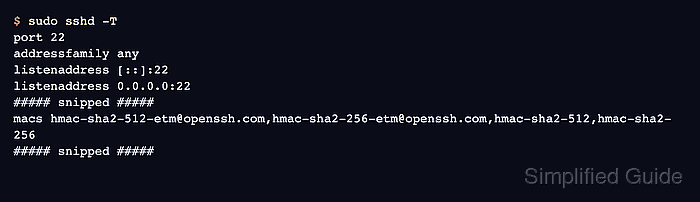
OpenSSH exposes the installed algorithm inventory and the daemon policy through different commands. ssh -Q mac lists names compiled into the local client, while sshd -T prints the effective server configuration after defaults, included files, and local overrides are parsed.
The MACs directive replaces the default list unless it starts with +, -, or ^. A strict allowlist is clearer for audit remediation, but it can block older clients and some network appliances. Keep an active session or console path open, test syntax before reload, and use a non-AEAD cipher for the client probe when the test needs to prove MAC negotiation directly.
Related: How to change SSH ciphers
Related: How to enforce strong SSH key exchange algorithms
Tool: SSH Algorithm Policy Checker
Steps to enforce strong SSH MAC algorithms:
- Open a terminal on the SSH server with an account that can use sudo.
- List the MAC algorithms supported by the installed OpenSSH build.
$ ssh -Q mac
hmac-sha1
hmac-sha1-96
hmac-sha2-256
hmac-sha2-512
hmac-md5
hmac-md5-96
umac-64@openssh.com
umac-128@openssh.com
hmac-sha1-etm@openssh.com
hmac-sha1-96-etm@openssh.com
hmac-sha2-256-etm@openssh.com
hmac-sha2-512-etm@openssh.com
hmac-md5-etm@openssh.com
hmac-md5-96-etm@openssh.com
umac-64-etm@openssh.com
umac-128-etm@openssh.com
This command shows names the binaries understand. It does not prove that sshd offers every listed name to clients.
- Check the current effective server MAC policy.
$ sudo sshd -T
port 22
addressfamily any
listenaddress [::]:22
listenaddress 0.0.0.0:22
##### snipped #####
macs umac-64-etm@openssh.com,umac-128-etm@openssh.com,hmac-sha2-256-etm@openssh.com,hmac-sha2-512-etm@openssh.com,hmac-sha1-etm@openssh.com,umac-64@openssh.com,umac-128@openssh.com,hmac-sha2-256,hmac-sha2-512,hmac-sha1
##### snipped #####
The lower-case macs line is the daemon policy after defaults and included configuration files are applied.
Related: How to view SSH server configuration - Confirm whether the main daemon configuration loads drop-in files.
$ cat /etc/ssh/sshd_config
# This is the sshd server system-wide configuration file.
##### snipped #####
Include /etc/ssh/sshd_config.d/*.conf
##### snipped #####
Use the drop-in path when the Include line is active. If the server does not load /etc/ssh/sshd_config.d/*.conf, make the same MACs change in /etc/ssh/sshd_config.
- Back up the main SSH daemon configuration file.
$ sudo cp /etc/ssh/sshd_config /etc/ssh/sshd_config.backup
A bad MACs policy can prevent new SSH logins. Keep the current session open and make sure console, rescue, or another administrative path is available.
- Open the server MAC policy file.
$ sudoedit /etc/ssh/sshd_config.d/90-mac-algorithms.conf
Use /etc/ssh/sshd_config instead when the server does not include drop-in files.
- Add one active MACs directive with the hardened server allowlist.
/etc/ssh/sshd_config.d/90-mac-algorithms.conf
MACs hmac-sha2-512-etm@openssh.com,hmac-sha2-256-etm@openssh.com,hmac-sha2-512,hmac-sha2-256
This strict allowlist keeps SHA-2 MACs only. Do not use it on hosts that still need UMAC or SHA-1 compatibility without first testing those clients.
- Remove conflicting active MACs lines from other loaded daemon configuration files.
sshd_config uses the first value it obtains for most keywords, so the later sshd -T check is the source of truth for which line won.
- Validate the updated SSH daemon configuration.
$ sudo sshd -t
No output means the daemon parsed the configuration and host-key settings successfully.
Related: How to test SSH server configuration - Reload the SSH service to apply the MAC policy.
$ sudo systemctl reload ssh
Use sudo systemctl reload sshd on systems that package the service as sshd instead of ssh.
Related: How to manage the SSH server service with systemctl - Confirm that the effective daemon policy now offers only the hardened MAC list.
$ sudo sshd -T
port 22
addressfamily any
listenaddress [::]:22
listenaddress 0.0.0.0:22
##### snipped #####
macs hmac-sha2-512-etm@openssh.com,hmac-sha2-256-etm@openssh.com,hmac-sha2-512,hmac-sha2-256
##### snipped #####
- Test that a weak SHA-1 MAC is rejected from a separate client.
$ ssh -o Ciphers=aes256-ctr -o MACs=hmac-sha1 user@host.example.net 'exit'
Unable to negotiate with host.example.net port 22: no matching MAC found. Their offer: hmac-sha2-512-etm@openssh.com,hmac-sha2-256-etm@openssh.com,hmac-sha2-512,hmac-sha2-256
The forced aes256-ctr cipher keeps MAC negotiation visible for the test. AEAD ciphers such as chacha20-poly1305@openssh.com use implicit integrity and can hide the configured MACs list in verbose output.
- Test that an allowed SHA-2 MAC still connects from a separate client.
$ ssh -o Ciphers=aes256-ctr -o MACs=hmac-sha2-512-etm@openssh.com user@host.example.net 'echo SSH MAC policy accepted'
SSH MAC policy accepted