How to fix the SSH remote host identification has changed warning
The REMOTE HOST IDENTIFICATION HAS CHANGED warning means the SSH server is presenting a host key that no longer matches the key saved on the client. OpenSSH blocks the connection before authentication, because accepting a changed key blindly can send a password, command, or file transfer to an impersonated server.
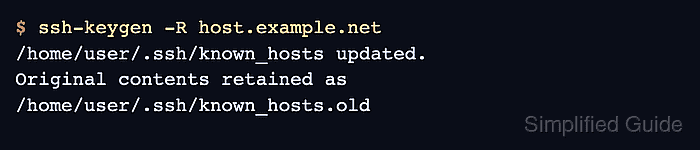
Each OpenSSH client account keeps trusted server keys in a user known-hosts file. The warning names the offending file and line, and ssh-keygen -R removes every saved key for the same host pattern, including hashed known_hosts entries that are awkward to edit by hand.
Only remove the stale entry after the new server fingerprint matches a trusted source such as a server console, cloud console, configuration management record, or administrator-supplied value. Use the same hostname, address, and port pattern that appeared in the failing connection, because each form is stored and matched separately.
Related: How to log in to an SSH server from Linux
Related: How to regenerate SSH host keys
Steps to fix the SSH remote host identification warning:
- Run the failing SSH command and read the changed-key warning.
$ ssh user@host.example.net hostname
@@@@@@@@@@@@@@@@@@@@@@@@@@@@@@@@@@@@@@@@@@@@@@@@@@@@@@@@@@@
@    WARNING: REMOTE HOST IDENTIFICATION HAS CHANGED!     @
@@@@@@@@@@@@@@@@@@@@@@@@@@@@@@@@@@@@@@@@@@@@@@@@@@@@@@@@@@@
IT IS POSSIBLE THAT SOMEONE IS DOING SOMETHING NASTY!
Someone could be eavesdropping on you right now (man-in-the-middle attack)!
It is also possible that a host key has just been changed.
The fingerprint for the ED25519 key sent by the remote host is
SHA256:uZfiEWhssLfrwKkhxX3F0jcXihcT9McK06abg9tZ4RE.
Please contact your system administrator.
Add correct host key in /home/user/.ssh/known_hosts to get rid of this message.
Offending ED25519 key in /home/user/.ssh/known_hosts:1
  remove with:
  ssh-keygen -f '/home/user/.ssh/known_hosts' -R 'host.example.net'
Host key for host.example.net has changed and you have requested strict checking.
Host key verification failed.
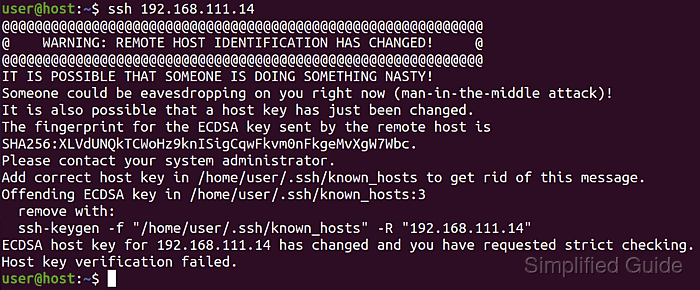
Stop if the host key change is unexpected, the hostname or address is unfamiliar, or the new fingerprint cannot be verified through another trusted path.
- Compare the new fingerprint with a trusted value from the server owner or console.
# ssh-keygen -lf /etc/ssh/ssh_host_ed25519_key.pub
256 SHA256:uZfiEWhssLfrwKkhxX3F0jcXihcT9McK06abg9tZ4RE root@host (ED25519)

This server-side command prints the ED25519 host key fingerprint for comparison. If access to the server console is unavailable, ask the administrator for the current fingerprint before changing the client trust record.
Related: How to verify SSH host key fingerprints before connecting
Tool: Secure Shell (SSH) Key Fingerprint Checker - Remove the stale known-hosts entry for the exact host pattern shown in the warning.
$ ssh-keygen -R host.example.net
# Host host.example.net found: line 1
/home/user/.ssh/known_hosts updated.
Original contents retained as /home/user/.ssh/known_hosts.old
For a non-default port, include the bracketed host pattern, such as ssh-keygen -R '[host.example.net]:2222'. If the warning names a custom file, use the generated command with -f so the correct known_hosts file is edited.
- Reconnect to the server and accept the key only after the fingerprint matches.
$ ssh user@host.example.net hostname
The authenticity of host 'host.example.net (203.0.113.50)' can't be established.
ED25519 key fingerprint is SHA256:uZfiEWhssLfrwKkhxX3F0jcXihcT9McK06abg9tZ4RE.
This key is not known by any other names.
Are you sure you want to continue connecting (yes/no/[fingerprint])? yes
Warning: Permanently added 'host.example.net' (ED25519) to the list of known hosts.
host
Type yes only for an exact fingerprint match. Typing yes to an unverified key replaces the protection that stopped the changed-key warning.
- Confirm that OpenSSH can find the refreshed host key entry.
$ ssh-keygen -F host.example.net
# Host host.example.net found: line 1
|1|vOESb0fefS2yAmOKshlLKUD4nqk=|oLAu211nKSrmBeKBZam4P6BEaxw= ssh-ed25519 AAAAC3NzaC1lZDI1NTE5AAAAICoOnBRX/q9V5fj1cXDv6Y1BWmPfzmL12mr2tp54W9fK
A hashed line is normal when HashKnownHosts is enabled. ssh-keygen -F proves the entry is searchable without exposing the hostname in the file.
- Run the original connection again and confirm that the changed-key warning is gone.
$ ssh user@host.example.net hostname
host
If the warning returns, repeat the removal for the exact name, IP address, or bracketed port pattern shown in the warning output.