How to automatically block failed SSH login attempts
Repeated failed SSH logins become a server risk when bot scans, password spraying, or stale automation keep retrying against a public endpoint. Fail2Ban can watch those authentication failures and add a temporary firewall ban after one source address crosses the retry threshold.
On current Ubuntu and Debian packages, the packaged sshd jail is enabled from /etc/fail2ban/jail.d/defaults-debian.conf and reads OpenSSH failures from the systemd journal. The same default uses the nftables ban action, so minimal hosts should have the nftables package installed with fail2ban instead of relying on package recommendations.
Automatic bans can lock out administrators who share one public address behind NAT, a VPN gateway, or a bastion host. Keep the current administrative session open, store local jail changes in /etc/fail2ban/jail.d/ or /etc/fail2ban/jail.local, and test from a separate source address before depending on the ban policy in production.
Related: How to limit failed login attempts in SSH
Related: How to show failed SSH attempts
Steps to automatically block failed SSH login attempts with Fail2Ban:
- Keep a current administrative session open on the server before changing ban settings.
Do not close the only working SSH session until a second host confirms the new Fail2Ban jail still allows legitimate access.
- Refresh the package metadata.
$ sudo apt update
Hit:1 http://archive.ubuntu.com/ubuntu resolute InRelease
Hit:2 http://archive.ubuntu.com/ubuntu resolute-updates InRelease
Hit:3 http://security.ubuntu.com/ubuntu resolute-security InRelease
Reading package lists... Done
- Install fail2ban and nftables from the distribution repository.
$ sudo apt install --assume-yes fail2ban nftables
Reading package lists...
Building dependency tree...
Reading state information...
fail2ban is already the newest version.
nftables is already the newest version.
0 upgraded, 0 newly installed, 0 to remove and 3 not upgraded.
Fail2Ban can use different firewall actions, but the current Debian-family sshd jail defaults to nftables. Installing both packages avoids a silent ban-action failure on minimal systems.
- Enable and start the fail2ban service.
$ sudo systemctl enable --now fail2ban
- Create a local override for the sshd jail.
$ sudoedit /etc/fail2ban/jail.d/sshd.local
[sshd]
enabled = true
maxretry = 5
findtime = 10m
bantime = 1h
Use /etc/fail2ban/jail.local instead when that is already the local override file on the server. Do not edit /etc/fail2ban/jail.conf directly because package upgrades can replace it.
Add ignoreip = 127.0.0.1/8 ::1 203.0.113.10 only for stable trusted source addresses that must never be banned.
Tool: What Is My Internet Protocol (IP) Address? - Test the Fail2Ban configuration.
$ sudo fail2ban-client --test
OK: configuration test is successful
- Reload Fail2Ban so the sshd override takes effect.
$ sudo fail2ban-client reload
OK
- Check that the live sshd jail is running.
$ sudo fail2ban-client status sshd
Status for the jail: sshd
|- Filter
|  |- Currently failed:	0
|  |- Total failed:	0
|  `- Journal matches:	_SYSTEMD_UNIT=ssh.service + _COMM=sshd
`- Actions
   |- Currently banned:	0
   |- Total banned:	0
   `- Banned IP list:
On systems that use file-based authentication logs instead of the systemd journal, the same status area may show a log file path rather than Journal matches.
- Confirm that the retry threshold loaded from the local override.
$ sudo fail2ban-client get sshd maxretry
5
findtime and bantime are reported in seconds when checked with sudo fail2ban-client get sshd findtime and sudo fail2ban-client get sshd bantime.
- Generate failed logins from a separate test client.
$ ssh invaliduser@host.example.net
invaliduser@host.example.net's password:
Permission denied, please try again.
##### snipped #####
Permission denied (publickey,password).
Run this test from a separate host or a temporary source address, not from the only connection that can administer the server.
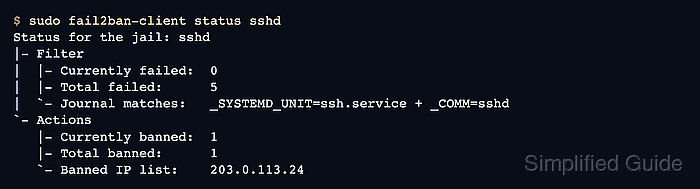
- Verify that the sshd jail banned the test source.
$ sudo fail2ban-client status sshd
Status for the jail: sshd
|- Filter
|  |- Currently failed:	0
|  |- Total failed:	5
|  `- Journal matches:	_SYSTEMD_UNIT=ssh.service + _COMM=sshd
`- Actions
   |- Currently banned:	1
   |- Total banned:	1
   `- Banned IP list:	203.0.113.24
The address shown is a documentation placeholder. The server should show the real test client's public source address.
- Check the nftables rule when the ban list shows an address but connections still reach SSH.
$ sudo nft list ruleset
table inet f2b-table {
	set addr-set-sshd {
		type ipv4_addr
		elements = { 203.0.113.24 }
	}

	chain f2b-chain {
		type filter hook input priority filter - 1; policy accept;
		tcp dport 22 ip saddr @addr-set-sshd reject with icmp port-unreachable
	}
}
If this command is missing or returns a permission error, install nftables and confirm the host firewall policy allows Fail2Ban to manage its own table.
- Unban the test source after verification if it was only used for the setup test.
$ sudo fail2ban-client set sshd unbanip 203.0.113.24
1