How to manage cookies with Selenium
Browser cookies control whether a Selenium session enters an application as a new visitor, a returning user, or an authenticated account. Tests become unreliable when they inherit state from another scenario or add a cookie outside the host that should receive it.
Python WebDriver manages cookies in the current browsing context through add_cookie(), get_cookie(), get_cookies(), delete_cookie(), and delete_all_cookies(). The driver must first open a URL on the cookie's target host because WebDriver rejects a domain that does not match the active page.
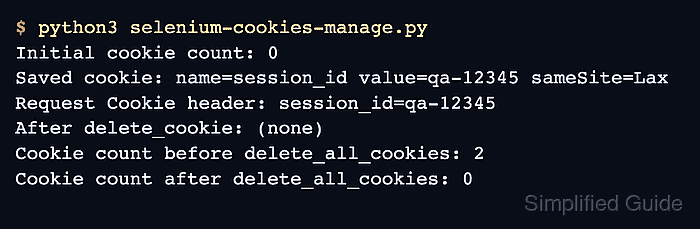
A local HTTP fixture makes cookie delivery observable without using a production account or authentication token. The completed program checks both WebDriver's saved cookie state and the HTTP Cookie header received by the page, then proves that named and session-wide deletion remove the intended state.
Steps to manage Selenium cookies:
- Define the local HTTP fixture at the start of selenium-cookies-manage.py.
- selenium-cookies-manage.py
from http.server import BaseHTTPRequestHandler, ThreadingHTTPServer
from shutil import which
from threading import Thread

from selenium import webdriver
from selenium.webdriver.chrome.options import Options
from selenium.webdriver.chrome.service import Service
from selenium.webdriver.common.by import By


class CookieDemoHandler(BaseHTTPRequestHandler):
    def do_GET(self):
        cookie_header = self.headers.get("Cookie", "(none)")
        body = (
            '<!doctype html><html lang="en"><body>'
            f'<p id="cookie-header">{cookie_header}</p>'
            "</body></html>"
        ).encode("utf-8")

        self.send_response(200)
        self.send_header("Content-Type", "text/html; charset=utf-8")
        self.send_header("Content-Length", str(len(body)))
        self.end_headers()
        self.wfile.write(body)

    def log_message(self, format, *args):
        return
- Append the server and headless Chrome setup below CookieDemoHandler.
server = ThreadingHTTPServer(("127.0.0.1", 0), CookieDemoHandler)
Thread(target=server.serve_forever, daemon=True).start()

options = Options()
options.add_argument("--headless=new")

chrome_binary = which("chromium") or which("chromium-browser") or which("google-chrome")
if chrome_binary:
    options.binary_location = chrome_binary

chromedriver = which("chromedriver")
service = Service(chromedriver) if chromedriver else None
driver = (
    webdriver.Chrome(service=service, options=options)
    if service
    else webdriver.Chrome(options=options)
)
- Append the cookie creation check below the browser setup.
try:
    driver.get(f"http://127.0.0.1:{server.server_port}/")
    driver.delete_all_cookies()
    print(f"Initial cookie count: {len(driver.get_cookies())}")

    driver.add_cookie({
        "name": "session_id",
        "value": "qa-12345",
        "path": "/",
        "sameSite": "Lax",
    })

    saved_cookie = driver.get_cookie("session_id")
    print(
        "Saved cookie: "
        f"name={saved_cookie['name']} "
        f"value={saved_cookie['value']} "
        f"sameSite={saved_cookie.get('sameSite')}"
    )

    driver.refresh()
    cookie_header = driver.find_element(By.ID, "cookie-header").text
    assert cookie_header == "session_id=qa-12345"
    print(f"Request Cookie header: {cookie_header}")
The qa-12345 value represents controlled test data; production session cookies do not belong in browser automation.
- Extend the existing try block with the named-cookie deletion check.
    driver.delete_cookie("session_id")
    driver.refresh()
    cookie_header = driver.find_element(By.ID, "cookie-header").text
    assert cookie_header == "(none)"
    print(f"After delete_cookie: {cookie_header}")
- Extend the existing try block with the all-cookie reset check.
    driver.add_cookie({"name": "cart", "value": "empty", "path": "/"})
    driver.add_cookie({"name": "theme", "value": "dark", "path": "/"})
    print(f"Cookie count before delete_all_cookies: {len(driver.get_cookies())}")

    driver.delete_all_cookies()
    cookie_count = len(driver.get_cookies())
    assert cookie_count == 0
    print(f"Cookie count after delete_all_cookies: {cookie_count}")
Calling delete_all_cookies() removes preference, consent, authentication, and tracking state from the current WebDriver session. A scenario boundary prevents that reset from interrupting a flow that still depends on those cookies.
- Close the browser session in a final finally block.
finally:
    driver.quit()
    server.shutdown()
- Run the completed cookie management program.
$ python3 selenium-cookies-manage.py
Initial cookie count: 0
Saved cookie: name=session_id value=qa-12345 sameSite=Lax
Request Cookie header: session_id=qa-12345
After delete_cookie: (none)
Cookie count before delete_all_cookies: 2
Cookie count after delete_all_cookies: 0