How to split a region horizontally in Screen
When one Screen session needs a monitor, log, or editor above an active shell, a horizontal split keeps both views attached to the same terminal. The layout divides the focused region into upper and lower display areas instead of opening another terminal emulator window.
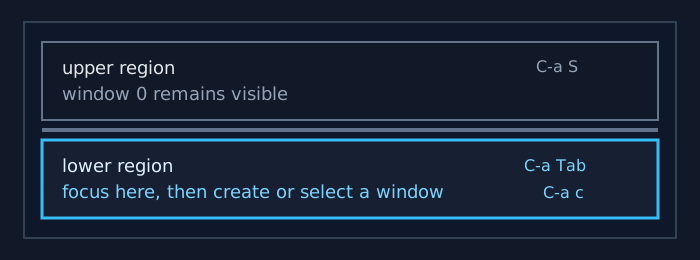
The default C-a S binding runs Screen's split command. Screen resizes the visible regions, leaves the original window in the upper region, and shows a blank window below until focus moves there and a window is created or selected.
Screen regions are display areas, not tmux-style panes. The split changes which windows are visible on the display; it does not create an independent process for the region, and removing the region later does not kill the window that was shown inside it.
Related: How to split a region vertically in Screen
Related: How to focus a region in Screen
Related: How to resize regions in Screen
Related: How to create a window in Screen
Steps to split a Screen region horizontally:
- Start in the Screen region that should remain visible on top.
The split applies to the currently focused region.
- Split the active region horizontally.
C-a S
The command-prompt equivalent is C-a : split. Screen places a blank window in the new lower region.
- Move focus into the lower region.
C-a Tab
C-a Tab cycles input focus through visible regions. In a larger layout, C-a : focus bottom can target the lowest region directly.
- Create a new shell window in the focused lower region.
C-a c
The new Screen window is selected only in the region that currently has focus.
- Select an existing window instead when the command is already running.
C-a "
The window list displays existing Screen windows without creating another shell.
- Verify that keyboard input reaches the lower region.
$ printf 'lower region ready\n'
lower region ready
The output should appear in the lower region while the upper region remains visible. If it appears on top, change focus before running the command you intend to keep below.
- Return focus to the upper region when needed.
C-a : focus top
C-a Tab also returns to the upper region in a simple two-region layout. Focus changes the region that receives keyboard input; it does not stop the windows shown elsewhere.