How to create spider middleware in Scrapy
Spider middleware lets a Scrapy project change what reaches a spider and what comes back out of it without repeating the same logic in every callback. That makes it a good fit for item tagging, follow-up request rewriting, response filtering, or crawl-wide rules that belong around the spider instead of inside one spider method.
Scrapy loads custom spider middleware from the SPIDER_MIDDLEWARES setting and places it into the built-in middleware chain by numeric order. The middleware can inspect responses before the spider callback runs, then inspect each item or request that the spider yields after parsing.
Current Scrapy releases iterate spider output asynchronously and use start() for start seeds, so a new middleware that subclasses BaseSpiderMiddleware stays compatible with current spider output handling without duplicating both sync and async hook code. Downloader concerns such as headers, proxies, retries, redirects, or raw download errors still belong in downloader middleware instead.
Related: How to create downloader middleware in Scrapy
Related: How to create a Scrapy spider
Steps to create spider middleware in Scrapy:
- Change to the Scrapy project root that contains scrapy.cfg.
$ cd /home/user/inventorybot
Run the remaining commands from the project root so the settings module and spider imports resolve against the correct project.
- Replace the placeholder spider middleware class in middlewares.py with a custom middleware that tags yielded items.
$ vi inventorybot/middlewares.py
- inventorybot/middlewares.py
from itemadapter import ItemAdapter
from scrapy.spidermiddlewares.base import BaseSpiderMiddleware


class CatalogSpiderMiddleware(BaseSpiderMiddleware):
    def get_processed_item(self, item, response):
        adapter = ItemAdapter(item)
        adapter["source_url"] = response.url if response else None
        adapter["processed_by_spider_middleware"] = True
        return item
Override get_processed_request() as well when the middleware needs to rewrite or drop follow-up requests yielded by the spider.
- Enable the middleware class in the project settings.
$ vi inventorybot/settings.py
- inventorybot/settings.py
SPIDER_MIDDLEWARES = {
    "inventorybot.middlewares.CatalogSpiderMiddleware": 543,
}
Scrapy merges SPIDER_MIDDLEWARES with the built-in SPIDER_MIDDLEWARES_BASE setting, so lower numbers run closer to the engine and higher numbers run closer to the spider. Related: How to use custom settings in Scrapy
If the project already defines SPIDER_MIDDLEWARES, add the new class to that dictionary instead of replacing the existing entries.
- Make sure the spider yields at least one item for the middleware to process.
$ vi inventorybot/spiders/catalog.py
- inventorybot/spiders/catalog.py
import scrapy


class CatalogSpider(scrapy.Spider):
    name = "catalog"
    allowed_domains = ["catalog.example.net"]
    start_urls = ["https://catalog.example.net/products"]

    def parse(self, response):
        yield {
            "title": response.css("h1::text").get(default="").strip(),
            "price": response.css(".price::text").get(default="").strip(),
        }
Replace the placeholder URL with a page that reliably yields the fields the middleware should see.
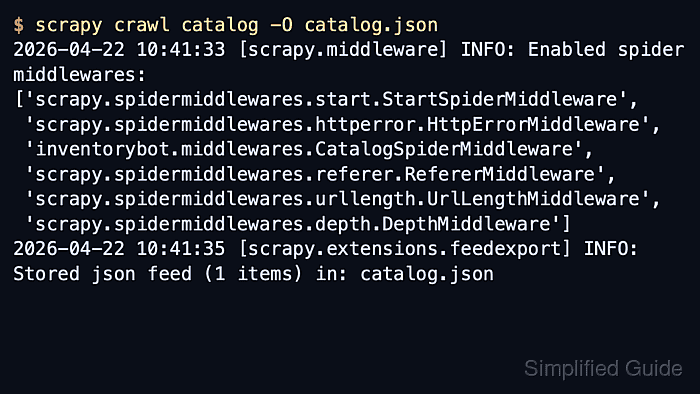
- Run the spider and confirm the startup log lists the custom spider middleware.
$ scrapy crawl catalog -O catalog.json
2026-04-22 10:41:33 [scrapy.utils.log] INFO: Scrapy 2.15.0 started (bot: inventorybot)
##### snipped #####
2026-04-22 10:41:33 [scrapy.middleware] INFO: Enabled spider middlewares:
['scrapy.spidermiddlewares.start.StartSpiderMiddleware',
 'scrapy.spidermiddlewares.httperror.HttpErrorMiddleware',
 'inventorybot.middlewares.CatalogSpiderMiddleware',
 'scrapy.spidermiddlewares.referer.RefererMiddleware',
 'scrapy.spidermiddlewares.urllength.UrlLengthMiddleware',
 'scrapy.spidermiddlewares.depth.DepthMiddleware']
2026-04-22 10:41:35 [scrapy.extensions.feedexport] INFO: Stored json feed (1 items) in: catalog.json
With ROBOTSTXT_OBEY enabled, Scrapy may request robots.txt before the page crawl and log that request earlier in the output.
- Open the exported feed and confirm the middleware added its fields to the yielded item.
$ cat catalog.json
[
{"title": "Widget A", "price": "$19.00", "source_url": "https://catalog.example.net/products", "processed_by_spider_middleware": true}
]
Missing source_url or processed_by_spider_middleware fields usually means the import path is wrong, the middleware is still commented out in settings.py, or the spider is not yielding the item shape the middleware expects.