How to authenticate with a CSRF login form in Scrapy
CSRF-protected login pages reject a POST request that does not include the hidden anti-forgery token and the session cookie that issued it. A Scrapy spider can still log in cleanly when it starts from the live login form instead of hard-coding a token or posting credentials straight to the endpoint.
FormRequest.from_response() builds the login request from the returned HTML form, so hidden inputs such as csrf_token, submit-button values, and the cookie jar from the login page stay aligned with the site while only the credential fields are overridden. That keeps the request close to the browser flow and matches the current login pattern shown in the Scrapy documentation.
Token field names, form selectors, and post-login success markers vary by application, and some targets add JavaScript-generated fields, CAPTCHA, or multi-factor prompts that a plain form POST cannot satisfy. Keep credentials out of source control, use a safe test account when possible, and treat a returned login form after the POST as a failed login instead of a page worth parsing.
Related: How to authenticate with a password in Scrapy
Related: How to use cookies in Scrapy
Steps to authenticate with a CSRF login form in Scrapy:
- Inspect the live login form in scrapy shell so the spider uses the correct form selector and field names.
$ scrapy shell "https://app.internal.example/login" --nolog >>> response.css('form#login-form input::attr(name)').getall() ['csrf_token', 'username', 'password', 'submit'] >>> response.css('form#login-form input[name="csrf_token"]::attr(value)').get() 'csrf-9c2d1a4b' - Replace the spider module that should perform the login flow, such as authlogin/spiders/account.py, with a request-first spider.
import scrapy
from scrapy.exceptions import CloseSpider
from scrapy.http import FormRequest


class AccountSpider(scrapy.Spider):
    name = "account"
    allowed_domains = ["app.internal.example"]

    login_url = "https://app.internal.example/login"
    account_url = "https://app.internal.example/account"

    async def start(self):
        if not getattr(self, "username", None) or not getattr(self, "password", None):
            raise CloseSpider("Pass -a username=... -a password=...")

        yield scrapy.Request(
            self.login_url,
            callback=self.parse_login,
            dont_filter=True,
        )

    def parse_login(self, response):
        yield FormRequest.from_response(
            response,
            formcss="form#login-form",
            formdata={
                "username": self.username,
                "password": self.password,
            },
            headers={"Referer": response.url},
            callback=self.after_login,
            dont_filter=True,
        )

    def after_login(self, response):
        if response.css("form#login-form input[name='csrf_token']"):
            raise CloseSpider("Login failed; still on the login form.")

        yield response.follow(
            self.account_url,
            callback=self.parse_account,
            dont_filter=True,
        )

    def parse_account(self, response):
        if response.css("form#login-form input[name='csrf_token']"):
            raise CloseSpider("Protected page returned the login form again.")

        yield {
            "account_name": response.css("h1::text").get(default="").strip(),
            "url": response.url,
        }
FormRequest.from_response() keeps the hidden inputs from the selected form, so the CSRF token does not need to be copied into formdata manually. Use formcss, formid, formname, or formxpath when the page has more than one form, set dont_click=True if the automatic submit-button click adds the wrong payload, and add a synchronous start_requests() method only when the spider must also run on Scrapy releases older than 2.13.
- Update the login URL, protected-page URL, form selector, and credential field names so they match the target application before running the spider.
Common token field names include csrf_token, csrfmiddlewaretoken, and authenticity_token, and the protected page should be a URL that reliably redirects anonymous users back to the login form.
- Run the spider with the credentials passed as spider arguments and overwrite the JSON export file.
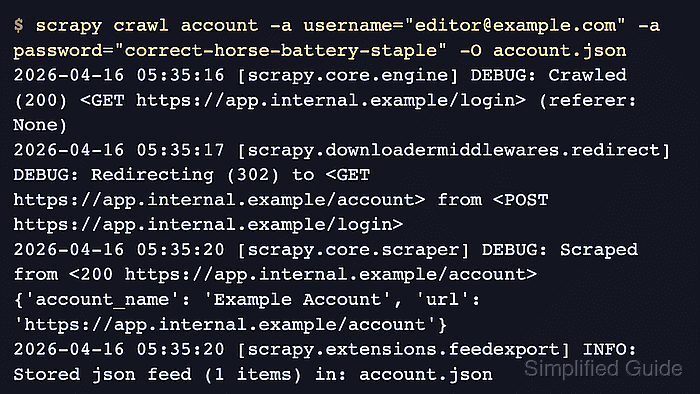
$ scrapy crawl account -a username="editor@example.com" -a password="correct-horse-battery-staple" -O account.json
2026-04-22 06:39:38 [scrapy.core.engine] DEBUG: Crawled (200) <GET https://app.internal.example/login> (referer: None)
2026-04-22 06:39:38 [scrapy.downloadermiddlewares.redirect] DEBUG: Redirecting (302) to <GET https://app.internal.example/account> from <POST https://app.internal.example/login>
2026-04-22 06:39:39 [scrapy.core.scraper] DEBUG: Scraped from <200 https://app.internal.example/account>
{'account_name': 'Example Account', 'url': 'https://app.internal.example/account'}
2026-04-22 06:39:39 [scrapy.extensions.feedexport] INFO: Stored json feed (1 items) in: account.json
Credentials passed with -a password=… can be written to shell history or exposed in process listings, so use a test account or move secret loading into environment variables or a secret manager for real crawls.
- Open the exported file and confirm the item came from the authenticated page instead of the login form.
$ cat account.json
[
{"account_name": "Example Account", "url": "https://app.internal.example/account"}
]