Cookies let a Scrapy spider reuse a server-issued session when the target site keeps authentication, region choice, or consent state in a browser cookie. Passing a known cookie can turn a redirect back to the login page into a normal response from the protected URL.
Scrapy sends request cookies through CookiesMiddleware when they are passed with Request.cookies. Response Set-Cookie values are stored in the active cookie jar and sent again on later requests, and the cookiejar request meta key keeps separate sessions isolated when a spider needs more than one logged-in state.
A raw Cookie header is not treated as a managed request cookie, and meta["dont_merge_cookies"]=True makes Scrapy ignore custom cookies and skip storing returned ones. COOKIES_DEBUG prints cookie values in plain text, so use it only long enough to confirm the request flow and keep real session tokens out of saved logs, screenshots, and source control.
Steps to use cookies in Scrapy:
- Open the spider file that needs the protected session.
$ vi cookiecrawl/spiders/account.py
- Export the known session cookie before running the spider.
$ export SCRAPY_SESSIONID='session-9d8f6b42'
Real session cookies grant account access, so do not commit them to source control or leave them in shell history, logs, screenshots, or shared crash output.
- Replace the spider with code that sends the cookie on the first request and keeps the same cookie jar on the follow-up request.
import os

import scrapy
from scrapy.exceptions import CloseSpider


class AccountSpider(scrapy.Spider):
    name = "account"
    allowed_domains = ["members.example.com"]

    account_url = "https://members.example.com/account"
    preferences_url = "https://members.example.com/preferences"

    async def start(self):
        session_id = os.environ.get("SCRAPY_SESSIONID")
        if not session_id:
            raise CloseSpider("Set SCRAPY_SESSIONID before running.")

        yield scrapy.Request(
            self.account_url,
            cookies={"sessionid": session_id},
            meta={"cookiejar": "account"},
            callback=self.parse_account,
            dont_filter=True,
        )

    def parse_account(self, response):
        if "login" in response.url.lower():
            raise CloseSpider("Cookie was rejected and the site returned to login.")

        account_name = response.css("h1::text").get(default="").strip()

        yield response.follow(
            self.preferences_url,
            meta={"cookiejar": response.meta["cookiejar"]},
            callback=self.parse_preferences,
            cb_kwargs={"account_name": account_name},
            dont_filter=True,
        )

    def parse_preferences(self, response, account_name):
        if "login" in response.url.lower():
            raise CloseSpider("Follow-up request lost the authenticated cookie jar.")

        yield {
            "account_name": account_name,
            "region": response.css(".region::text").get(default="").strip(),
            "url": response.url,
        }
Use cookies=[{"name":"sessionid","value":"session-9d8f6b42","domain":"members.example.com","path":"/"}] when the cookie must be scoped to a specific Domain or Path, and add a synchronous start_requests() method only when maintaining spiders for Scrapy releases older than 2.13.
- Update the cookie name, target URLs, and response selectors so they match the site that issued the session.
Keep passing response.meta["cookiejar"] on every follow-up request that should reuse the same session, because the cookiejar meta key is not sticky. Related: How to use request meta in Scrapy
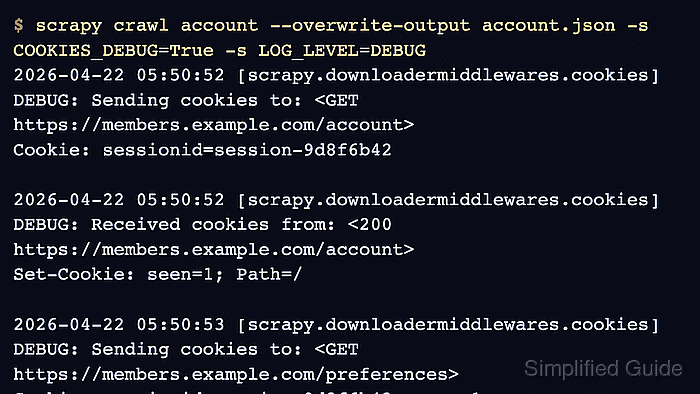
- Run the spider with cookie debugging enabled and overwrite the JSON export file.
$ scrapy crawl account --overwrite-output account.json -s COOKIES_DEBUG=True -s LOG_LEVEL=DEBUG
2026-04-22 05:50:52 [scrapy.downloadermiddlewares.cookies] DEBUG: Sending cookies to: <GET https://members.example.com/account>
Cookie: sessionid=session-9d8f6b42

2026-04-22 05:50:52 [scrapy.downloadermiddlewares.cookies] DEBUG: Received cookies from: <200 https://members.example.com/account>
Set-Cookie: seen=1; Path=/

2026-04-22 05:50:53 [scrapy.downloadermiddlewares.cookies] DEBUG: Sending cookies to: <GET https://members.example.com/preferences>
Cookie: sessionid=session-9d8f6b42; seen=1
##### snipped #####
2026-04-22 05:50:54 [scrapy.extensions.feedexport] INFO: Stored json feed (1 items) in: account.json
COOKIES_DEBUG logs cookie values in plain text, so disable it after confirming the request flow and avoid saving those logs when the cookie belongs to a real account.
- Open the exported items and confirm the protected follow-up page returned real account data.
$ python3 -m json.tool account.json [ { "account_name": "Example Account", "region": "United States", "url": "https://members.example.com/preferences" } ] - Remove the session cookie from the current shell after the test run.
$ unset SCRAPY_SESSIONID

Mohd Shakir Zakaria is a cloud architect with deep roots in software development and open-source advocacy. Certified in AWS, Red Hat, VMware, ITIL, and Linux, he specializes in designing and managing robust cloud and on-premises infrastructures.


