How to run an authenticated crawl in Scrapy
Running an authenticated crawl in Scrapy means logging in once, keeping the returned session alive, and continuing to crawl pages that should only be reachable in the logged-in browser state. A spider that stops checking that state can keep exporting login screens, redirects, or public fallbacks as if they were real results.
Current Scrapy login flows usually start from the live login form and submit it with FormRequest.from_response() so hidden inputs such as csrf_token and the initial session cookie stay aligned with the site. After that POST succeeds, CookiesMiddleware keeps the authenticated cookie jar on later requests, so pagination and detail links can be followed normally inside the same crawl.
The session proof should be something the anonymous view does not have, such as a Logout link, an account-only heading, or a protected URL that stops redirecting back to the login form. If that proof disappears on a later response, stop the spider instead of silently scraping the wrong page, and re-check the live login form for hidden token or redirect changes before retrying.
Steps to run an authenticated crawl in Scrapy:
- Change to the Scrapy project root that contains scrapy.cfg.
$ cd /srv/privatequotes
Run the crawl from the project root so Scrapy loads the intended spider module and settings. Related: How to create a Scrapy project
- Replace privatequotes/spiders/private_quotes.py with a login-first spider that follows the next page only after the authenticated response is confirmed.
- privatequotes/spiders/private_quotes.py
import scrapy
from scrapy.exceptions import CloseSpider
from scrapy.http import FormRequest


class PrivateQuotesSpider(scrapy.Spider):
    name = "private_quotes"
    allowed_domains = ["quotes.toscrape.com"]
    login_url = "https://quotes.toscrape.com/login"
    start_url = "https://quotes.toscrape.com/"

    def __init__(self, username=None, password=None, max_pages="2", *args, **kwargs):
        super().__init__(*args, **kwargs)
        if not username or not password:
            raise CloseSpider("Pass -a username=... -a password=...")
        self.username = username
        self.password = password
        self.max_pages = int(max_pages)

    async def start(self):
        yield scrapy.Request(self.login_url, callback=self.parse_login, dont_filter=True)

    def parse_login(self, response):
        yield FormRequest.from_response(
            response,
            formcss="form",
            formdata={
                "username": self.username,
                "password": self.password,
            },
            callback=self.after_login,
            dont_filter=True,
        )

    def after_login(self, response):
        if "Logout" not in response.text:
            raise CloseSpider("Login failed; logout link not found.")

        yield response.follow(
            self.start_url,
            callback=self.parse_quotes,
            cb_kwargs={"page_number": 1},
            dont_filter=True,
        )

    def parse_quotes(self, response, page_number):
        if "Logout" not in response.text:
            raise CloseSpider("Session lost; page no longer shows Logout.")

        for quote in response.css("div.quote"):
            yield {
                "page": page_number,
                "author": quote.css("small.author::text").get(default="").strip(),
                "text": quote.css("span.text::text").get(default="").strip(),
                "authenticated": True,
                "url": response.url,
            }

        next_href = response.css("li.next a::attr(href)").get()
        if next_href and page_number < self.max_pages:
            yield response.follow(
                next_href,
                callback=self.parse_quotes,
                cb_kwargs={"page_number": page_number + 1},
            )
FormRequest.from_response() keeps the live hidden fields and submit target from the login form, while CloseSpider stops the crawl immediately if the credentials are missing, the login fails, or a later page loses the authenticated state. Current Scrapy documentation uses async def start(); on older projects move the same initial request into start_requests() instead.
- Update the login URL, the authenticated-page proof, and the extraction selectors so they match the real target before running the crawl.
Logout is a practical proof for the public quotes.toscrape.com demo, but an internal application may need an account heading, a dashboard widget, or another member-only marker that anonymous users never see.
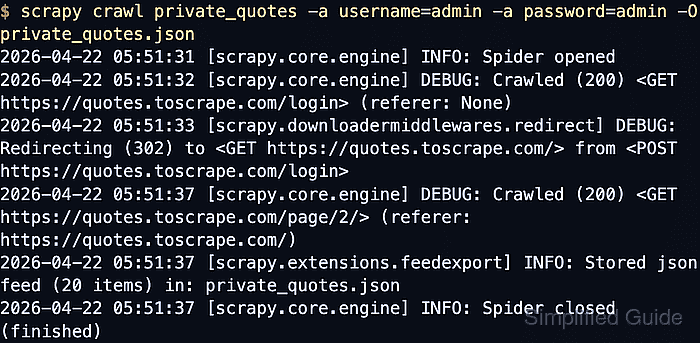
- Run the spider and overwrite the current JSON export file.
$ scrapy crawl private_quotes -a username=admin -a password=admin -O private_quotes.json
2026-04-22 05:51:31 [scrapy.core.engine] INFO: Spider opened
2026-04-22 05:51:32 [scrapy.core.engine] DEBUG: Crawled (200) <GET https://quotes.toscrape.com/login> (referer: None)
2026-04-22 05:51:33 [scrapy.downloadermiddlewares.redirect] DEBUG: Redirecting (302) to <GET https://quotes.toscrape.com/> from <POST https://quotes.toscrape.com/login>
2026-04-22 05:51:37 [scrapy.core.engine] DEBUG: Crawled (200) <GET https://quotes.toscrape.com/page/2/> (referer: https://quotes.toscrape.com/)
2026-04-22 05:51:37 [scrapy.extensions.feedexport] INFO: Stored json feed (20 items) in: private_quotes.json
2026-04-22 05:51:37 [scrapy.core.engine] INFO: Spider closed (finished)
Spider arguments passed on the command line can be written to shell history or exposed in process listings, so switch to environment variables or a secret store when the crawl uses real credentials instead of a disposable demo account.
- Open the exported file and confirm the items came from page 1 and page 2 while the spider kept marking them as authenticated.
$ cat private_quotes.json
[
{"page": 1, "author": "Albert Einstein", "text": "“The world as we have created it is a process of our thinking. It cannot be changed without changing our thinking.”", "authenticated": true, "url": "https://quotes.toscrape.com/"},
{"page": 1, "author": "J.K. Rowling", "text": "“It is our choices, Harry, that show what we truly are, far more than our abilities.”", "authenticated": true, "url": "https://quotes.toscrape.com/"},
##### snipped #####
{"page": 2, "author": "Allen Saunders", "text": "“Life is what happens to us while we are making other plans.”", "authenticated": true, "url": "https://quotes.toscrape.com/page/2/"}
]
If the export only shows page 1, drops the authenticated field, or starts returning the login form URL again, the follow-up requests are no longer using the authenticated session.