How to create a scikit-learn pipeline
Preprocessing fitted outside a model can accidentally learn from held-out rows or diverge between training and prediction. A scikit-learn Pipeline keeps the transformation sequence and classifier inside one estimator, so fit(), score(), and predict() follow the same path.
A Pipeline stores named steps in execution order. Each intermediate step must implement fit() and transform(), while the final step supplies classifier behavior such as predict() and predict_proba().
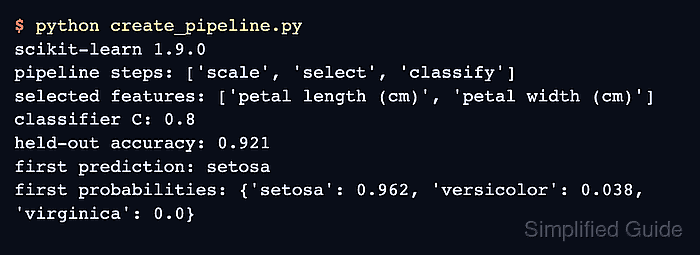
The Iris example combines StandardScaler, SelectKBest, and LogisticRegression with a stratified train-test split. The test rows remain outside fitting, while selected feature names, held-out accuracy, and a class-probability map expose the completed prediction path.
Steps to create a scikit-learn pipeline:
- Create create_pipeline.py with the imports and stratified Iris split.
- create_pipeline.py
from sklearn import __version__ as sklearn_version
from sklearn.datasets import load_iris
from sklearn.feature_selection import SelectKBest, f_classif
from sklearn.linear_model import LogisticRegression
from sklearn.model_selection import train_test_split
from sklearn.pipeline import Pipeline
from sklearn.preprocessing import StandardScaler


iris = load_iris()
X_train, X_test, y_train, y_test = train_test_split(
    iris.data,
    iris.target,
    test_size=0.25,
    stratify=iris.target,
    random_state=42,
)
- Append the named Pipeline definition after the training split.
model = Pipeline(
    steps=[
        ("scale", StandardScaler()),
        ("select", SelectKBest(score_func=f_classif, k=2)),
        ("classify", LogisticRegression(C=0.8, max_iter=300)),
    ]
)
The names become keys in named_steps. Parameter searches address nested values with the step name and a double underscore, such as classify__C.
Related: How to run grid search with scikit-learn - Append the fitting and prediction calls after the Pipeline definition.
model.fit(X_train, y_train)
selected_features = model[:-1].get_feature_names_out(iris.feature_names)
sample_prediction = model.predict(X_test[[0]])[0]
sample_probabilities = model.predict_proba(X_test[[0]])[0]
probability_map = {
    str(label): round(float(probability), 3)
    for label, probability in zip(iris.target_names, sample_probabilities)
}
- Append the outcome reporting after the probability map.
print(f"scikit-learn {sklearn_version}")
print(f"pipeline steps: {list(model.named_steps)}")
print(f"selected features: {selected_features.tolist()}")
print(f"held-out accuracy: {model.score(X_test, y_test):.3f}")
print(f"first prediction: {iris.target_names[sample_prediction]}")
print(f"first probabilities: {probability_map}")
- Run the completed pipeline script.
$ python create_pipeline.py
scikit-learn 1.9.0
pipeline steps: ['scale', 'select', 'classify']
selected features: ['petal length (cm)', 'petal width (cm)']
held-out accuracy: 0.921
first prediction: setosa
first probabilities: {'setosa': 0.962, 'versicolor': 0.038, 'virginica': 0.0}
The step order confirms that scaling and feature selection precede classification. The held-out accuracy and probability map come from pipeline methods applied to rows that were not used during fitting.