How to create a Rust workspace with Cargo
Cargo workspaces group related Rust packages under one root manifest so builds, tests, dependency resolution, and output artifacts can be managed from the repository root. They fit projects that split a reusable library, CLI, integration test harness, or helper crate into separate packages without losing a shared build workflow.
A virtual workspace root is a Cargo.toml that has [workspace] but no [package] section. Because that root has no package edition for Cargo to inspect, set resolver explicitly and list member directories that contain their own manifests.
A small library member and binary member under crates/ are enough to verify member discovery, the shared root Cargo.lock, and package selection from the root. The binary depends on the library by path, so a workspace-wide test and a package run prove more than two unrelated packages sitting under the same directory.
Steps to create a Rust workspace with Cargo:
- Create the workspace root directory.
$ mkdir demo-workspace
- Enter the workspace root.
$ cd demo-workspace
- Create the library member package.
$ cargo new crates/demo-lib --lib --vcs none
    Creating library `demo-lib` package
note: see more `Cargo.toml` keys and their definitions at https://doc.rust-lang.org/cargo/reference/manifest.html
Use existing package directories instead of cargo new when converting an existing repository. --vcs none leaves version control ownership to the workspace root.
- Create the binary member package.
$ cargo new crates/demo-cli --bin --vcs none Creating binary (application) `demo-cli` package note: see more `Cargo.toml` keys and their definitions at https://doc.rust-lang.org/cargo/reference/manifest.html - Create the virtual workspace manifest.
- Cargo.toml
[workspace]
members = ["crates/demo-cli", "crates/demo-lib"]
resolver = "3"
resolver = “3” matches the current resolver for Edition 2024 packages. Virtual workspaces should set it explicitly because the root manifest has no package edition.
- Replace the library source with a small function and test.
- crates/demo-lib/src/lib.rs
pub fn add(left: u64, right: u64) -> u64 {
    left + right
}

#[cfg(test)]
mod tests {
    use super::*;

    #[test]
    fn adds_two_numbers() {
        assert_eq!(add(2, 3), 5);
    }
}
- Add the library as a path dependency in the binary member manifest.
- crates/demo-cli/Cargo.toml
[package]
name = "demo-cli"
version = "0.1.0"
edition = "2024"

[dependencies]
demo-lib = { path = "../demo-lib" }
Cargo.toml uses the package name demo-lib, while Rust code imports it as demo_lib.
- Replace the binary entry point so it calls the library member.
- crates/demo-cli/src/main.rs
fn main() {
    println!("workspace total: {}", demo_lib::add(2, 3));
}
- Confirm that Cargo sees both workspace members.
$ cargo tree --workspace --depth 0
demo-cli v0.1.0 (/work/demo-workspace/crates/demo-cli)

demo-lib v0.1.0 (/work/demo-workspace/crates/demo-lib)
- Run the workspace test selection from the root.
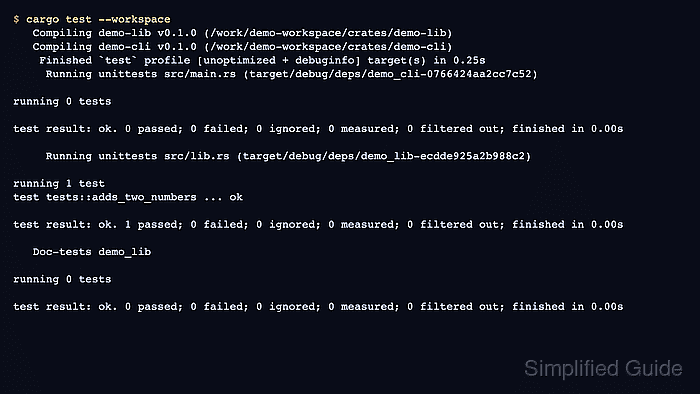
$ cargo test --workspace
   Compiling demo-lib v0.1.0 (/work/demo-workspace/crates/demo-lib)
   Compiling demo-cli v0.1.0 (/work/demo-workspace/crates/demo-cli)
    Finished `test` profile [unoptimized + debuginfo] target(s) in 0.36s
     Running unittests src/main.rs (target/debug/deps/demo_cli-0766424aa2cc7c52)

running 0 tests

test result: ok. 0 passed; 0 failed; 0 ignored; 0 measured; 0 filtered out; finished in 0.00s

     Running unittests src/lib.rs (target/debug/deps/demo_lib-ecdde925a2b988c2)

running 1 test
test tests::adds_two_numbers ... ok

test result: ok. 1 passed; 0 failed; 0 ignored; 0 measured; 0 filtered out; finished in 0.00s

   Doc-tests demo_lib

running 0 tests

test result: ok. 0 passed; 0 failed; 0 ignored; 0 measured; 0 filtered out; finished in 0.00s
Related: How to run Rust tests with Cargo
- Check that Cargo wrote one root lockfile.
$ cat Cargo.lock
# This file is automatically @generated by Cargo.
# It is not intended for manual editing.
version = 4

[[package]]
name = "demo-cli"
version = "0.1.0"
dependencies = [
 "demo-lib",
]

[[package]]
name = "demo-lib"
version = "0.1.0"
The lockfile lives beside the workspace root manifest rather than inside each member package.
- Run the binary package from the workspace root.
$ cargo run -p demo-cli --quiet
workspace total: 5
-p selects one package from the workspace when the root manifest has more than one runnable member.