Rust packages rely on Cargo to record external crates before the compiler can link them into a build. Adding a dependency through Cargo keeps Cargo.toml syntax, feature selection, and lockfile resolution aligned with the resolver instead of relying on a hand-edited manifest.
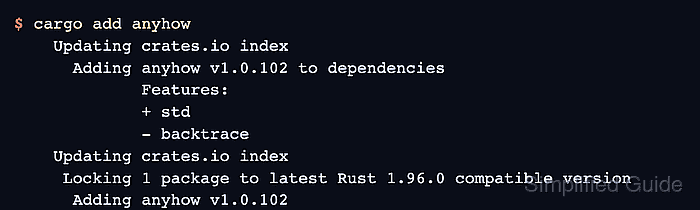
cargo add writes a dependency entry to the nearest Cargo.toml by default. For crates.io packages, Cargo selects a compatible version requirement, lists the dependency features, and updates Cargo.lock so the next build uses the resolved crate version.
Start from the package or workspace member that should receive the dependency. Use a normal dependency for code imported by the package, --dev for tests, examples, or benchmarks, and --build only for build scripts.
Steps to add a Rust dependency with Cargo:
- Open a terminal in the Rust package root.
The directory should contain the Cargo.toml file that needs the new dependency. In a workspace, add --package when only one member should receive the dependency.
- Add the crate from crates.io.
$ cargo add anyhow
    Updating crates.io index
      Adding anyhow v1.0.102 to dependencies
             Features:
             + std
             - backtrace
    Updating crates.io index
     Locking 1 package to latest Rust 1.96.0 compatible version
      Adding anyhow v1.0.102
Replace anyhow with the crate name. Add --dev for dev-dependencies or --build for build-dependencies when the crate is only used by tests, examples, benchmarks, or build scripts.
- Confirm the manifest entry.
$ cat Cargo.toml
[package]
name = "demo-cli"
version = "0.1.0"
edition = "2024"

[dependencies]
anyhow = "1.0.102"
Cargo writes a SemVer requirement. Use crate@version with cargo add when the project needs a specific compatible range, such as anyhow@1.
- Review the manifest and lockfile changes.
$ git diff -- Cargo.toml Cargo.lock
diff --git a/Cargo.lock b/Cargo.lock
index 980bbf2..7dd23df 100644
--- a/Cargo.lock
+++ b/Cargo.lock
@@ -2,6 +2,15 @@
 # It is not intended for manual editing.
 version = 4

+[[package]]
+name = "anyhow"
+version = "1.0.102"
+source = "registry+https://github.com/rust-lang/crates.io-index"
+checksum = "7f202df86484c868dbad7eaa557ef785d5c66295e41b460ef922eca0723b842c"
+
 [[package]]
 name = "demo-cli"
 version = "0.1.0"
+dependencies = [
+ "anyhow",
+]
diff --git a/Cargo.toml b/Cargo.toml
index 8a683d7..85d61aa 100644
--- a/Cargo.toml
+++ b/Cargo.toml
@@ -4,3 +4,4 @@ version = "0.1.0"
 edition = "2024"

 [dependencies]
+anyhow = "1.0.102"
Commit both Cargo.toml and Cargo.lock for applications. For library crates, keep the repository's existing Cargo.lock policy.
- Verify that Cargo resolved the dependency for the package.
$ cargo tree -i anyhow
 Downloading crates ...
  Downloaded anyhow v1.0.102
anyhow v1.0.102
└── demo-cli v0.1.0 (/work/demo-cli)
cargo tree -i shows why the selected package appears in the resolved dependency graph.
Related: How to inspect a Rust dependency tree with Cargo - Check the project after the dependency is added.
$ cargo check
   Compiling anyhow v1.0.102
    Checking demo-cli v0.1.0 (/work/demo-cli)
    Finished `dev` profile [unoptimized + debuginfo] target(s) in 0.37s
Run cargo test instead when the new crate is already covered by tests.
Related: How to check Rust code with Cargo

Mohd Shakir Zakaria is a cloud architect with deep roots in software development and open-source advocacy. Certified in AWS, Red Hat, VMware, ITIL, and Linux, he specializes in designing and managing robust cloud and on-premises infrastructures.


