How to write rsync output to a log file
Unattended file transfers need an audit trail that survives a closed terminal, a finished script, or a completed cron session. A dedicated rsync log preserves the changed paths and transfer summary without relying on shell redirection.
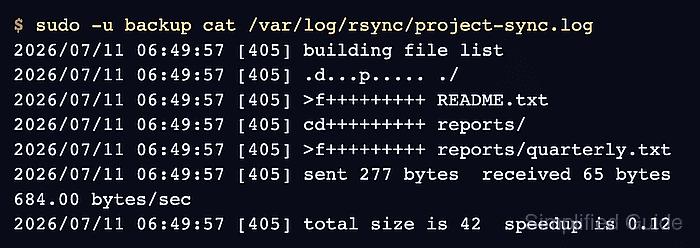
The --log-file option enables native client-side logging and uses "%i %n%L" as the default per-update format. Each changed item receives an itemized change code, while rsync also records its normal start and completion messages in the same file.
The account that runs the transfer must own or be able to append to the log path. Keep the directory restricted because filenames can reveal project structure, and include the file in the host's log-rotation policy so repeated runs do not grow it indefinitely.
Steps to write rsync output to a log file:
- Create a restricted log directory owned by the account that runs rsync.
$ sudo install -d -o backup -g backup -m 0750 /var/log/rsync
Replace backup with the user and primary group assigned to the transfer job. The account needs write access to the directory; broad write permission for other users is unnecessary.
- Run the transfer as that account with --log-file set to the operator-owned file.
$ sudo -u backup rsync --archive --verbose --log-file=/var/log/rsync/project-sync.log /srv/projects/source/ /srv/backups/project/
sending incremental file list
./
README.txt
reports/
reports/quarterly.txt

sent 277 bytes  received 65 bytes  684.00 bytes/sec
total size is 42  speedup is 0.12
The log stores transferred pathnames. Do not place it in a shared directory when those names expose confidential project, customer, or backup details.
The source trailing slash copies the contents of /srv/projects/source/ into /srv/backups/project/. Keep the same source and destination paths used by the intended transfer job.
- Check the log directory and file ownership after the first run.
$ stat -c '%A %U %G %n' /var/log/rsync /var/log/rsync/project-sync.log
drwxr-x--- backup backup /var/log/rsync
-rw-r--r-- backup backup /var/log/rsync/project-sync.log
The backup account created the file and can append later runs. Directory mode 0750 prevents unrelated users from listing its filenames.
- Read the saved log as the transfer account.
$ sudo -u backup cat /var/log/rsync/project-sync.log
2026/07/11 06:49:57 [405] building file list
2026/07/11 06:49:57 [405] .d...p..... ./
2026/07/11 06:49:57 [405] >f+++++++++ README.txt
2026/07/11 06:49:57 [405] cd+++++++++ reports/
2026/07/11 06:49:57 [405] >f+++++++++ reports/quarterly.txt
2026/07/11 06:49:57 [405] sent 277 bytes  received 65 bytes  684.00 bytes/sec
2026/07/11 06:49:57 [405] total size is 42  speedup is 0.12
Rows beginning with >f identify transferred files, while cd identifies a created directory. Keep monitoring the rsync exit status separately because the native log does not add a shell-level success or failure code.