How to preserve hard links with rsync
Hard-linked pathnames share one file's inode and data blocks, which lets package repositories, backup trees, and build outputs avoid duplicate storage. An ordinary copy can reproduce the bytes while losing that relationship, leaving separate destination files that consume space and no longer change together.
The rsync command preserves a source hard-link set only when --hard-links is active. --archive does not imply that option; the receiver creates a new inode for the copied data and points each corresponding destination name at that inode.
Every linked name must be present in the same transfer, and the destination filesystem must support hard links. After copying a two-name source set, both destination paths should report the same inode and a link count of 2; that inode does not need to match the source inode.
Steps to preserve hard links with rsync:
- Inspect the source link set before copying.
$ stat --format="%i %h %n" /srv/source/pkg/base.deb /srv/source/pkg/base-copy.deb /srv/source/pkg/unique.deb
392533 2 /srv/source/pkg/base.deb
392533 2 /srv/source/pkg/base-copy.deb
392564 1 /srv/source/pkg/unique.deb
The matching inode and link count of 2 identify base.deb and base-copy.deb as two names for one source file. unique.deb is the unlinked control file.
- Preview the copy with hard-link tracking enabled.
$ rsync --archive --hard-links --dry-run --itemize-changes /srv/source/ /srv/destination/
cd+++++++++ pkg/
>f+++++++++ pkg/base.deb
hf+++++++++ pkg/base-copy.deb => pkg/base.deb
>f+++++++++ pkg/unique.deb
The h itemized line shows rsync will create pkg/base-copy.deb as a hard link to pkg/base.deb. --hard-links can only join files that are both included in the transfer list.
Related: How to preview rsync changes before syncing
Related: How to read rsync itemized changes - Copy the tree after the preview shows the expected hard-link entry.
$ rsync --archive --hard-links --itemize-changes /srv/source/ /srv/destination/
cd+++++++++ pkg/
>f+++++++++ pkg/base.deb
>f+++++++++ pkg/unique.deb
hf+++++++++ pkg/base-copy.deb => pkg/base.deb
Do not add --inplace to a destination tree that already has hard links unless writes through shared inodes are intended. Updating one linked name can change content visible through another name.
- Inspect the destination link set.
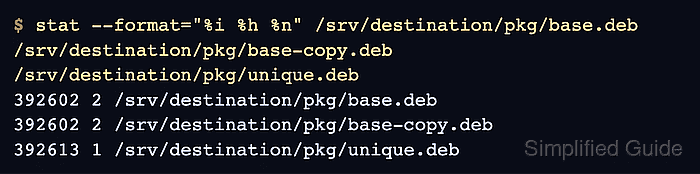
$ stat --format="%i %h %n" /srv/destination/pkg/base.deb /srv/destination/pkg/base-copy.deb /srv/destination/pkg/unique.deb
392602 2 /srv/destination/pkg/base.deb
392602 2 /srv/destination/pkg/base-copy.deb
392613 1 /srv/destination/pkg/unique.deb
The copied pair now shares destination inode 392602 with a link count of 2. The different source and destination inode numbers are expected because the copy created a separate filesystem object.
- Verify the copied linked file's content against its source.
$ cmp /srv/source/pkg/base.deb /srv/destination/pkg/base.deb
No output from cmp confirms that the shared destination inode contains the same bytes as the source file.