How to copy files from a list with rsync
Release bundles, partial restores, and handoffs often need a small named subset from a directory that contains many unrelated files. An rsync file list turns that selection into a reviewable manifest while retaining each selected file's relative location.
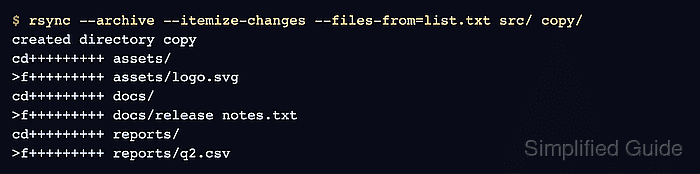
Each entry in list.txt is resolved from the rsync source argument. --files-from also enables relative path handling and creation of the needed directories, so docs/release notes.txt becomes copy/docs/release notes.txt.
A directory name in the list creates that directory but does not make --archive recurse into it in this mode. Name each required file explicitly, then compare the dry run with the manifest before allowing the destination to change.
Steps to copy files from a list with rsync:
- Create list.txt with one source-relative pathname per line.
assets/logo.svg
docs/release notes.txt
reports/q2.csv
A space is part of the pathname and does not need quoting in a line-delimited list. Use exact file paths; a line containing only reports would create that directory without copying its files.
- Preview the selected paths with itemized changes.
$ rsync --archive --dry-run --itemize-changes --files-from=list.txt src/ copy/
created directory copy
cd+++++++++ assets/
>f+++++++++ assets/logo.svg
cd+++++++++ docs/
>f+++++++++ docs/release notes.txt
cd+++++++++ reports/
>f+++++++++ reports/q2.csv
Review lists produced by scripts or other users before a live transfer. Each entry is resolved under src/, but an unintended path inside that source root can still copy the wrong file.
--files-from implies --relative and --dirs, which preserve the listed path components and create their parent directories.
Related: How to preview rsync changes before syncing
Related: How to read rsync itemized changes - Copy the approved selection by removing only --dry-run.
$ rsync --archive --itemize-changes --files-from=list.txt src/ copy/
created directory copy
cd+++++++++ assets/
>f+++++++++ assets/logo.svg
cd+++++++++ docs/
>f+++++++++ docs/release notes.txt
cd+++++++++ reports/
>f+++++++++ reports/q2.csv
- List the destination files.
$ find copy -type f -print
copy/docs/release notes.txt
copy/assets/logo.svg
copy/reports/q2.csv
The three manifest entries are present with their relative paths, while the nearby unlisted source file reports/draft.tmp is absent.
- Check the selected files for remaining content or archive-mode metadata differences.
$ rsync --archive --checksum --dry-run --itemize-changes --files-from=list.txt src/ copy/
No itemized rows means the selected source and destination files match. --checksum reads file contents on both sides, so reserve it for verification rather than every routine transfer.