How to deploy a Shiny app with Docker
A Shiny app depends on its R runtime and package library as well as its source files. Packaging those parts in one Docker image gives the app a repeatable process, port, and health signal on each host that runs the image.

The official r-base image supports common Linux architectures, while Debian's r-cran-shiny package installs Shiny and its runtime dependencies through the image package manager. The final process runs as the unprivileged nobody account, while root owns the read-only application source.
The published host port is restricted to 127.0.0.1 so the app is reachable from the Docker host without listening on every network interface. Put an authenticated TLS reverse proxy in front of the loopback port before exposing an app that handles private data.
Related: How to build a Docker image
Related: How to configure Nginx as a reverse proxy
Steps to deploy a Shiny app with Docker:
- Create the Shiny project directory.
$ mkdir -p shiny-demo/app
- Add the Shiny interface to shiny-demo/app/ui.R.
- ui.R
library(shiny)

fluidPage(
  titlePanel("Shiny container check"),
  mainPanel(
    sliderInput("bins", "Histogram bins", 5, 30, 12),
    plotOutput("histogram"),
    textOutput("status")
  )
)
- Add the histogram server logic to shiny-demo/app/server.R.
- server.R
function(input, output, session) {
  output$histogram <- renderPlot({
    hist(faithful$eruptions, breaks = input$bins, col = "#4c78a8")
  })

  output$status <- renderText({
    paste("Rendered with", input$bins, "bins")
  })
}
- Add the container recipe to shiny-demo/Dockerfile.
- Dockerfile
FROM r-base:4.6.1

RUN apt-get update \
    && apt-get install --yes --no-install-recommends r-cran-shiny \
    && rm -rf /var/lib/apt/lists/*

COPY app/ /srv/shiny/

RUN chmod -R a-w /srv/shiny

ENV HOME=/tmp

USER nobody

EXPOSE 3838

HEALTHCHECK --interval=10s --timeout=5s --start-period=10s --retries=3 \
  CMD wget --no-verbose --tries=1 --spider http://127.0.0.1:3838/ || exit 1

CMD ["Rscript", "-e", "shiny::runApp('/srv/shiny', host='0.0.0.0', port=3838)"]
The application files remain root-owned and read-only, HOME=/tmp gives the runtime a writable cache location, and USER nobody prevents the R process from starting as root.
Tool: Dockerfile Security Basics Checker - Enter the Shiny project directory.
$ cd shiny-demo
- Build the versioned Shiny image.
$ docker build --tag shiny-demo:4.6.1 .
##### snipped #####
#9 naming to docker.io/library/shiny-demo:4.6.1 done
#9 DONE 0.1s
- Confirm the image starts with an unprivileged account.
$ docker image inspect --format '{{.Config.User}}' shiny-demo:4.6.1
nobody
- Start the Shiny container on the host-only port.
$ docker run --detach --name shiny-demo --publish 127.0.0.1:3838:3838 shiny-demo:4.6.1
ef625edff38bf742eb93caebfa431de5bb02a2e0211db4e15da665dc1b79a878
- Inspect ownership and permissions for the served Shiny source.
$ docker exec shiny-demo stat --format '%U %G %A %n' /srv/shiny/ui.R /srv/shiny/server.R
root root -r--r--r-- /srv/shiny/ui.R
root root -r--r--r-- /srv/shiny/server.R
- Inspect the Shiny application health state in Docker.
$ docker inspect --format '{{.State.Health.Status}}' shiny-demo
healthy
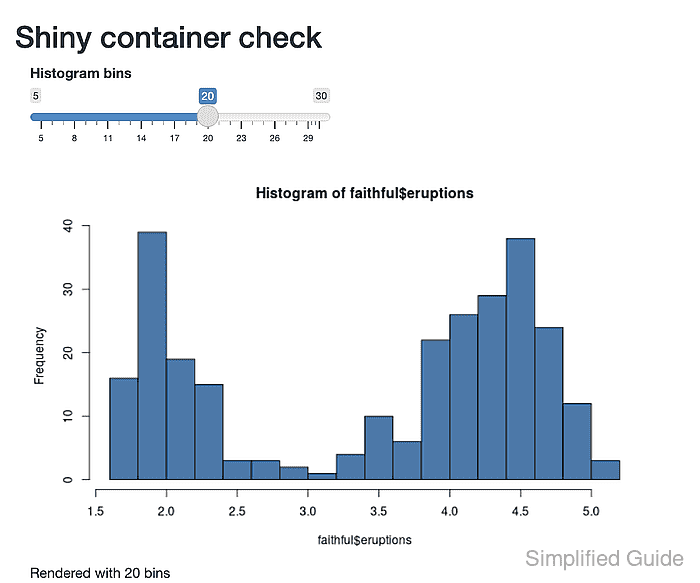
- Open the deployed Shiny app at http://127.0.0.1:3838/ in a browser.
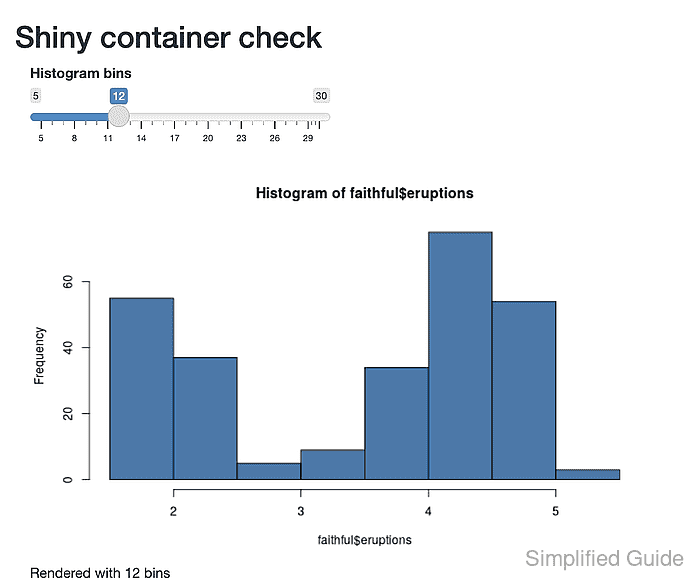
- Move the histogram slider to 20 bins.