How to enable deterministic operations in PyTorch
Reproducible PyTorch runs need more than a fixed random seed. Seeds control where random number generators start, while deterministic operation mode tells PyTorch to avoid known nondeterministic kernels or raise when no deterministic implementation is available.
The deterministic switch belongs near the beginning of the training or inference entrypoint, before model construction and tensor work can choose backend kernels. CUDA workloads that use cuBLAS-backed matrix operations also need CUBLAS_WORKSPACE_CONFIG set before the Python process starts.
Determinism narrows one source of run-to-run drift, but it does not promise matching results across PyTorch releases, hardware backends, drivers, or CPU versus GPU execution. Some deterministic kernels are slower, so keep the setting on while qualifying a workflow, debugging drift, or producing comparison evidence, then decide whether production runs should keep the same constraint.
Related: How to set a random seed in PyTorch
Related: How to select a device in PyTorch
Related: How to enable CUDA in PyTorch
Steps to enable PyTorch deterministic operations:
- Export the cuBLAS workspace setting before starting a CUDA-capable Python process.
$ export CUBLAS_WORKSPACE_CONFIG=:4096:8
CPU-only runs can skip this export. NVIDIA also documents :16:8 as a smaller workspace option when GPU memory overhead matters more than the larger workspace.
- Add the deterministic settings near the top of the PyTorch entrypoint.
import torch

torch.use_deterministic_algorithms(True)
torch.backends.cudnn.benchmark = False
torch.use_deterministic_algorithms(True) chooses deterministic implementations where PyTorch has them and raises a runtime error for known nondeterministic operations without a deterministic alternative. Use warn_only=True only while inventorying warnings during a dry run, then return to hard errors before accepting reproducibility evidence. PyTorch also fills memory returned by operations such as torch.empty() while deterministic mode is on and torch.utils.deterministic.fill_uninitialized_memory remains at its default True.
- Create a smoke script that resets the seed and compares two identical training steps.
- deterministic_ops_smoke.py
import os

import torch


def run_once():
    torch.manual_seed(1234)

    model = torch.nn.Sequential(
        torch.nn.Linear(4, 3),
        torch.nn.ReLU(),
        torch.nn.Linear(3, 1),
    )
    optimizer = torch.optim.SGD(model.parameters(), lr=0.05)

    inputs = torch.randn(5, 4)
    targets = torch.randn(5, 1)

    optimizer.zero_grad(set_to_none=True)
    loss = torch.nn.functional.mse_loss(model(inputs), targets)
    loss.backward()
    optimizer.step()

    params = torch.cat([parameter.detach().flatten() for parameter in model.parameters()])
    return round(loss.item(), 8), params


torch.use_deterministic_algorithms(True)
torch.backends.cudnn.benchmark = False

first_loss, first_params = run_once()
second_loss, second_params = run_once()

print(f"deterministic_enabled={torch.are_deterministic_algorithms_enabled()}")
print(f"cudnn_benchmark={torch.backends.cudnn.benchmark}")
print(f"cublas_workspace_config={os.environ.get('CUBLAS_WORKSPACE_CONFIG', 'not set')}")
print(f"loss_1={first_loss:.8f}")
print(f"loss_2={second_loss:.8f}")
print(f"losses_match={first_loss == second_loss}")
print(f"parameters_match={torch.equal(first_params, second_params)}")
For larger projects, keep seed setup in the same process that creates the model, data loader, and optimizer.
Related: How to set a random seed in PyTorch - Run the smoke script from the same shell.
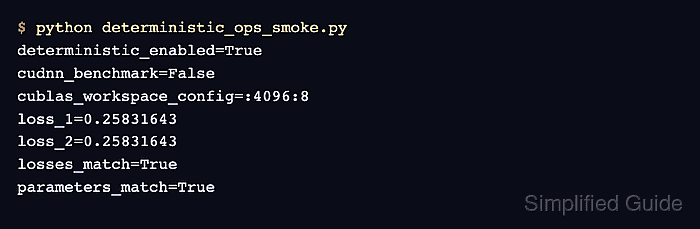
$ python deterministic_ops_smoke.py
deterministic_enabled=True
cudnn_benchmark=False
cublas_workspace_config=:4096:8
loss_1=0.25831643
loss_2=0.25831643
losses_match=True
parameters_match=True
deterministic_enabled=True confirms the global flag is active. Matching losses and parameters confirm the seeded smoke workload repeated the same update.
- Remove the temporary smoke script after the deterministic block is moved into the project entrypoint.
$ rm deterministic_ops_smoke.py