How to set a learning rate scheduler in PyTorch
Optimizers control the size of parameter updates, but one fixed learning rate may be too large for later training epochs. A PyTorch scheduler can reduce that rate at planned boundaries without changing the optimizer or model architecture.
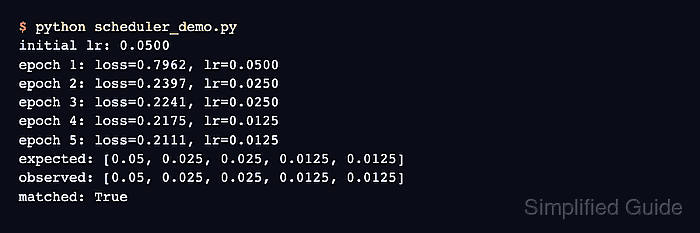
The StepLR scheduler wraps an existing optimizer and multiplies each parameter group's learning rate by gamma every step_size epochs. The sample starts at 0.05, keeps that rate through the first epoch, and halves it after every second scheduler step.
Epoch-based schedulers should run after the optimizer's final update for that epoch. The completed program reads the active rate with get_last_lr() and asserts the five observed values, so an incorrect step order or interval fails instead of printing an assumed success message.
Steps to set a PyTorch learning rate scheduler:
- Create scheduler_demo.py with deterministic training tensors, a linear model, and an SGD optimizer.
- scheduler_demo.py
import torch
from torch import nn


torch.manual_seed(11)

features = torch.tensor(
    [
        [0.0, 0.5],
        [1.0, 1.5],
        [2.0, 2.5],
        [3.0, 3.5],
    ],
    dtype=torch.float32,
)
targets = features @ torch.tensor([[0.4], [-0.2]]) + 0.1

model = nn.Linear(2, 1)
loss_fn = nn.MSELoss()
optimizer = torch.optim.SGD(model.parameters(), lr=0.05)
- Append the StepLR configuration below the optimizer declaration in scheduler_demo.py.
scheduler = torch.optim.lr_scheduler.StepLR(
    optimizer,
    step_size=2,
    gamma=0.5,
)
observed_lrs = []
step_size=2 schedules a decay every second epoch, while gamma=0.5 multiplies the active rate by one half.
- Append the five-epoch training loop below the scheduler setup in scheduler_demo.py.
for epoch in range(1, 6):
    optimizer.zero_grad(set_to_none=True)
    loss = loss_fn(model(features), targets)
    loss.backward()
    optimizer.step()
    scheduler.step()

    current_lr = scheduler.get_last_lr()[0]
    observed_lrs.append(round(current_lr, 4))
    print(f"epoch {epoch}: lr={current_lr:.4f}")
Calling scheduler.step() before optimizer.step() skips the first scheduled learning-rate value.
- Append the expected-rate assertion below the training loop in scheduler_demo.py.
expected_lrs = [0.05, 0.025, 0.025, 0.0125, 0.0125]
assert observed_lrs == expected_lrs, (
    f"expected {expected_lrs}, observed {observed_lrs}"
)
print(f"learning rates matched: {observed_lrs}")
- Run scheduler_demo.py to confirm StepLR reaches the configured epoch rates.
$ python3 scheduler_demo.py
epoch 1: lr=0.0500
epoch 2: lr=0.0250
epoch 3: lr=0.0250
epoch 4: lr=0.0125
epoch 5: lr=0.0125
learning rates matched: [0.05, 0.025, 0.025, 0.0125, 0.0125]