How to randomly split a dataset in PyTorch
Model evaluation depends on keeping training and validation samples separate. PyTorch provides random_split() to select non-overlapping source indices and return Subset objects that continue reading from the original dataset.
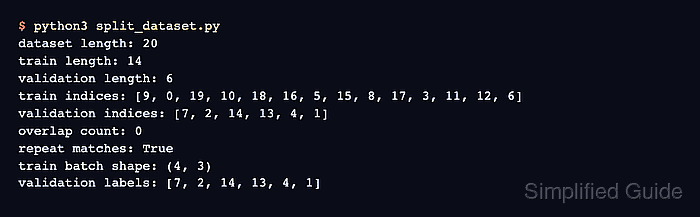
A dedicated torch.Generator makes the membership repeatable without resetting PyTorch's global random state. Recreating the generator with the same seed gives the split call the same random sequence, which keeps comparisons between runs consistent.
Integer lengths of 14 and 6 partition the 20-sample dataset into fixed counts. Integer lengths must add up to the dataset length; fraction lengths can instead add up to 1, after which PyTorch floors each share and distributes any remainder in round-robin order.
Related: How to create a custom Dataset in PyTorch
Related: How to set a random seed in PyTorch
Related: How to use a DataLoader in PyTorch
Steps to randomly split a PyTorch dataset:
- Create split_dataset.py with a 20-sample TensorDataset.
- split_dataset.py
import torch
from torch.utils.data import TensorDataset, random_split

features = torch.arange(60, dtype=torch.float32).reshape(20, 3)
labels = torch.arange(20)
dataset = TensorDataset(features, labels)
- Append a seeded 14/6 split after the dataset definition.
generator = torch.Generator().manual_seed(20260717)
train_dataset, validation_dataset = random_split(
    dataset, [14, 6], generator=generator
)
Integer split lengths must sum to len(dataset); fraction lengths must sum to 1.
- Append subset coverage and reproducibility checks after the split call.
repeat_train, _ = random_split(
    dataset,
    [14, 6],
    generator=torch.Generator().manual_seed(20260717),
)
train_indices = set(train_dataset.indices)
validation_indices = set(validation_dataset.indices)
covers_dataset = train_indices | validation_indices == set(range(len(dataset)))
repeatable = train_dataset.indices == repeat_train.indices

assert len(train_dataset) == 14 and len(validation_dataset) == 6
assert train_indices.isdisjoint(validation_indices)
assert covers_dataset
assert repeatable

print(f"train samples: {len(train_dataset)}")
print(f"validation samples: {len(validation_dataset)}")
print(f"overlap: {len(train_indices & validation_indices)}")
print(f"covers dataset: {covers_dataset}")
print(f"repeatable: {repeatable}")
Subset.indices exposes the source positions selected by random_split(), so the assertions fail if the subsets overlap, omit a sample, or change under the repeated seed.
- Run the completed split script to confirm that the subsets are exhaustive, disjoint, and repeatable.
$ python3 split_dataset.py
train samples: 14
validation samples: 6
overlap: 0
covers dataset: True
repeatable: True