How to debug DataLoader worker errors in PyTorch
Multiprocess data loading can hide the line that actually rejected a sample. When a PyTorch DataLoader reports an exception from a worker process, multiprocessing frames can separate the top-level error from the dataset or collate code that raised it.
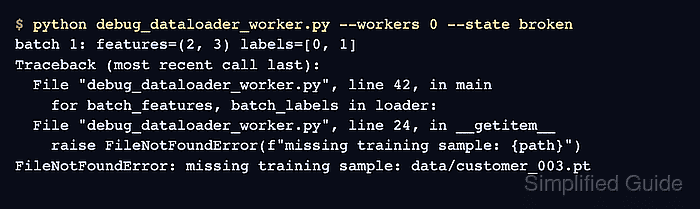
Setting num_workers to 0 moves data fetching into the main process, where PyTorch emits a shorter, direct traceback. Keep the batch size, sampler, transforms, and collate behavior unchanged during that diagnostic run so the failing record follows the same path.
A correction is complete only when the loader succeeds first in single-process mode and then with the original worker count. A failure that disappears at zero workers but returns after workers are restored points to multiprocessing state, pickling, process startup, or CPU-versus-CUDA tensor handling rather than the sample error exposed by the direct traceback.
Related: How to use a DataLoader in PyTorch
Related: How to create a custom Dataset in PyTorch
Steps to debug PyTorch DataLoader worker errors:
- Create the dataset portion of dataloader_worker_probe.py with one invalid record.
- dataloader_worker_probe.py
import torch
from torch.utils.data import DataLoader, Dataset


class SampleDataset(Dataset):
    def __init__(self):
        self.records = [
            [0.10, 0.20, 0.30],
            [0.60, 0.40, 0.90],
            None,
            [0.20, 0.70, 0.50],
        ]

    def __len__(self):
        return len(self.records)

    def __getitem__(self, index):
        values = self.records[index]
        if values is None:
            raise ValueError(f"record {index} has no feature values")
        return torch.tensor(values, dtype=torch.float32)
The null record represents a broken path, parser result, transform, or manifest row in a real dataset. The exception includes its dataset index so the direct traceback can identify the failing input.
- Append a worker-enabled loader builder to dataloader_worker_probe.py.
def build_loader():
    return DataLoader(
        SampleDataset(),
        batch_size=2,
        num_workers=2,
    )
The builder keeps the worker configuration separate from the dataset contract so num_workers can change without altering sample behavior.
- Append the batch loop and guarded entry point to dataloader_worker_probe.py.
def main():
    loader = build_loader()
    batch_count = 0
    for batch_count, features in enumerate(loader, start=1):
        print(f"batch {batch_count}: shape={tuple(features.shape)}", flush=True)
    print(f"completed batches: {batch_count}")


if __name__ == "__main__":
    main()
Module-scope dataset, collate, worker initialization, and entry-point definitions support platforms that start workers with spawn.
- Run the probe with two worker processes to reproduce the wrapped exception.
$ python dataloader_worker_probe.py
Traceback (most recent call last):
##### snipped #####
ValueError: Caught ValueError in DataLoader worker process 1.
Original Traceback (most recent call last):
##### snipped #####
  File "dataloader_worker_probe.py", line 20, in __getitem__
    raise ValueError(f"record {index} has no feature values")
ValueError: record 2 has no feature values
The outer error identifies worker process 1. The lower Original Traceback identifies getitem() and record 2 as the source of the failure.
- Set num_workers to 0 in dataloader_worker_probe.py.
    return DataLoader(
        SampleDataset(),
        batch_size=2,
        num_workers=0,
    )
num_workers=0 keeps loading in the main process. Unchanged loader options isolate the process boundary as the diagnostic variable.
- Run the probe again to expose the dataset exception in the main process.
$ python dataloader_worker_probe.py
batch 1: shape=(2, 3)
Traceback (most recent call last):
##### snipped #####
  File "dataloader_worker_probe.py", line 20, in __getitem__
    raise ValueError(f"record {index} has no feature values")
ValueError: record 2 has no feature values
This traceback reaches the dataset method without the worker-process wrapper. The same technique exposes errors raised by collate_fn, transforms, file decoders, and sample parsers.
- Correct the dataset input or code location named by the direct traceback.
        self.records = [
            [0.10, 0.20, 0.30],
            [0.60, 0.40, 0.90],
            [0.55, 0.80, 0.35],
            [0.20, 0.70, 0.50],
        ]
The probe replaces the invalid feature row. The equivalent project correction belongs in the file path, manifest entry, transform, parser branch, or collate code named by the project traceback.
- Run the corrected loader in single-process mode.
$ python dataloader_worker_probe.py
batch 1: shape=(2, 3)
batch 2: shape=(2, 3)
completed batches: 2
- Restore num_workers to 2 in dataloader_worker_probe.py.
    return DataLoader(
        SampleDataset(),
        batch_size=2,
        num_workers=2,
    )
The project retest uses its original worker count rather than the probe's value when those values differ.
- Run the corrected loader with workers enabled to confirm that both batches finish.
$ python dataloader_worker_probe.py
batch 1: shape=(2, 3)
batch 2: shape=(2, 3)
completed batches: 2
If the loader passes with num_workers=0 but still fails with workers, inspect multiprocessing-only causes such as unpicklable dataset state, nested collate_fn or worker_init_fn functions, missing if __name__ == "__main__" protection on spawn-based platforms, or CUDA tensors returned from workers.