How to partition a table in PostgreSQL
A PostgreSQL table that keeps all event or audit rows in one heap can make recent-range queries scan old data and turn retention into large delete operations. Range partitioning moves that pressure into smaller child tables so current data, old data, and future data can be managed as separate physical pieces under one logical table.
PostgreSQL declarative partitioning uses a parent table with no storage of its own and attached partitions that hold rows for non-overlapping key ranges. A monthly RANGE partition on a timestamp column lets PostgreSQL route inserts to the right child table and lets the planner skip partitions whose bounds cannot match the query predicate.
Partitioning only helps when the partition key appears in common filters and future partitions exist before incoming rows need them. PRIMARY KEY and UNIQUE constraints on a partitioned table must include the partition key, a DEFAULT partition needs monitoring so it does not hide missed ranges, and too many partitions can increase planning and maintenance overhead.
Steps to partition a table in PostgreSQL:
- Connect to the target database using psql with a role that can create tables.
$ psql -d appdb -c "SELECT current_database();"
 current_database
------------------
 appdb
(1 row)
- Create the partitioned parent table using RANGE partitioning on the timestamp column.
$ psql -d appdb -c "CREATE TABLE events (event_id bigint GENERATED ALWAYS AS IDENTITY, event_ts timestamptz NOT NULL, user_id bigint NOT NULL, event_type text NOT NULL, payload jsonb, PRIMARY KEY (event_ts, event_id)) PARTITION BY RANGE (event_ts);"
CREATE TABLE
PRIMARY KEY and UNIQUE constraints on a partitioned table must include all partition key columns.
- Create the first monthly child partition.
$ psql -d appdb -c "CREATE TABLE events_2026_01 PARTITION OF events FOR VALUES FROM ('2026-01-01 00:00:00+00') TO ('2026-02-01 00:00:00+00');" CREATE TABLE - Create the next monthly child partition with a non-overlapping range.
$ psql -d appdb -c "CREATE TABLE events_2026_02 PARTITION OF events FOR VALUES FROM ('2026-02-01 00:00:00+00') TO ('2026-03-01 00:00:00+00');"
CREATE TABLE
RANGE lower bounds are inclusive and upper bounds are exclusive, so adjacent partitions can share the boundary timestamp.
- Create a DEFAULT partition to catch rows that do not match a defined range.
$ psql -d appdb -c "CREATE TABLE events_default PARTITION OF events DEFAULT;"
CREATE TABLE
Without a matching partition or a DEFAULT partition, inserts fail with no partition of relation found for row.
- Create the user lookup index on the parent table.
$ psql -d appdb -c "CREATE INDEX events_user_id_idx ON events (user_id);"
CREATE INDEX
- Create the event-type lookup index on the parent table.
$ psql -d appdb -c "CREATE INDEX events_event_type_idx ON events (event_type);"
CREATE INDEX
Indexes created on the partitioned parent become partitioned indexes, and PostgreSQL maintains matching indexes on attached partitions.
- List the attached partitions to confirm the partition key, indexes, and bounds.
$ psql -d appdb -c "\d+ events" Partitioned table "public.events" Column | Type | Collation | Nullable | Default | Storage | Compression | Stats target | Description ------------+--------------------------+-----------+----------+------------------------------+----------+-------------+--------------+------------- event_id | bigint | | not null | generated always as identity | plain | | | event_ts | timestamp with time zone | | not null | | plain | | | user_id | bigint | | not null | | plain | | | event_type | text | | not null | | extended | | | payload | jsonb | | | | extended | | | Partition key: RANGE (event_ts) Indexes: "events_pkey" PRIMARY KEY, btree (event_ts, event_id) "events_event_type_idx" btree (event_type) "events_user_id_idx" btree (user_id) ##### snipped ##### Partitions: events_2026_01 FOR VALUES FROM ('2026-01-01 00:00:00+00') TO ('2026-02-01 00:00:00+00'), events_2026_02 FOR VALUES FROM ('2026-02-01 00:00:00+00') TO ('2026-03-01 00:00:00+00'), events_default DEFAULT - Insert test rows into the parent table to confirm automatic partition routing.
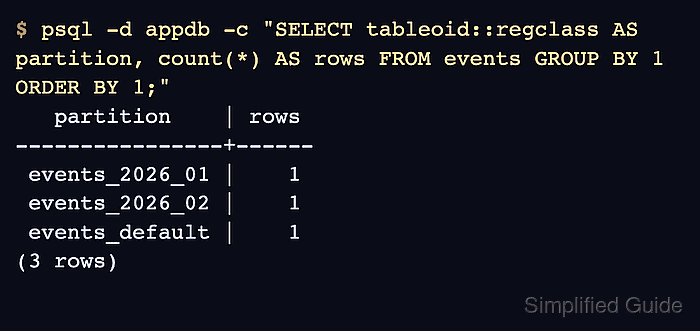
$ psql -d appdb -c "INSERT INTO events (event_ts, user_id, event_type) VALUES ('2026-01-15 12:34:56+00', 1001, 'login'), ('2026-02-05 08:00:00+00', 1002, 'logout'), ('2030-01-01 00:00:00+00', 1003, 'login');" INSERT 0 3 - Confirm which partition stores each row using tableoid.
$ psql -d appdb -c "SELECT tableoid::regclass AS partition, count(*) AS rows FROM events GROUP BY 1 ORDER BY 1;"
   partition    | rows
----------------+------
 events_2026_01 |    1
 events_2026_02 |    1
 events_default |    1
(3 rows)
- Confirm partition pruning is enabled before using plans as proof.
$ psql -d appdb -c "SHOW enable_partition_pruning;"
 enable_partition_pruning
--------------------------
 on
(1 row)
- Verify partition pruning with a query that filters directly on the partition key.
$ psql -d appdb -c "EXPLAIN SELECT count(*) FROM events WHERE event_ts >= '2026-02-01 00:00:00+00'::timestamptz AND event_ts < '2026-03-01 00:00:00+00'::timestamptz;"
                                                                            QUERY PLAN
------------------------------------------------------------------------------------------------------------------------------------------------------------------
 Aggregate  (cost=12.67..12.68 rows=1 width=8)
   ->  Bitmap Heap Scan on events_2026_02 events  (cost=4.19..12.66 rows=4 width=0)
         Recheck Cond: ((event_ts >= '2026-02-01 00:00:00+00'::timestamp with time zone) AND (event_ts < '2026-03-01 00:00:00+00'::timestamp with time zone))
         ->  Bitmap Index Scan on events_2026_02_pkey  (cost=0.00..4.19 rows=4 width=0)
               Index Cond: ((event_ts >= '2026-02-01 00:00:00+00'::timestamp with time zone) AND (event_ts < '2026-03-01 00:00:00+00'::timestamp with time zone))
(5 rows)
The plan names only events_2026_02 because the timestamp predicate excludes the other partition bounds.
- Add the next partition before new data for that range arrives.
$ psql -d appdb -c "CREATE TABLE events_2026_03 PARTITION OF events FOR VALUES FROM ('2026-03-01 00:00:00+00') TO ('2026-04-01 00:00:00+00');"
CREATE TABLE
If a DEFAULT partition already contains rows for the new range, move those rows before adding or attaching the new partition.
- Detach an old partition from the parent table when its range is ready for archival or removal.
$ psql -d appdb -c "ALTER TABLE events DETACH PARTITION events_2026_01;"
ALTER TABLE
A detached partition remains as a standalone table and can be backed up, queried directly, or dropped later.
- Drop the detached partition only after the retention policy or backup has been confirmed.
$ psql -d appdb -c "DROP TABLE events_2026_01;"
DROP TABLE
Dropping a partition table permanently deletes the rows stored in that partition.