How to tune planner cost settings in PostgreSQL
When PostgreSQL keeps choosing plans that do not match SSD-backed storage, cached data, or parallel-query behavior, planner cost settings let the optimizer compare plan shapes with assumptions closer to the real server. Tune them from measured query plans first, then persist only values that improve the workload you actually run.
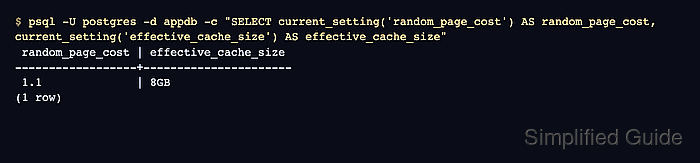
The planner cost constants are relative weights, not milliseconds. Settings such as random_page_cost, effective_cache_size, parallel_setup_cost, and parallel_tuple_cost change estimated costs for index access, cached data, and parallel workers, while table statistics still decide row-count estimates.
Cost settings can help one query and hurt another, so avoid changing them as a substitute for missing indexes, stale statistics, or bad SQL. Test candidate values in one psql session with EXPLAIN (ANALYZE, BUFFERS) before writing them to postgresql.auto.conf with ALTER SYSTEM.
Related: How to explain a query plan in PostgreSQL \\
Related: How to optimize PostgreSQL performance
Steps to tune planner cost settings in PostgreSQL:
- Refresh planner statistics for the target table before comparing plans.
$ psql -U postgres -d appdb -c "ANALYZE public.orders;"
ANALYZE
Use an administrator role or the postgres system user when local peer authentication requires it. ANALYZE can consume I/O and CPU on large tables, so run it during a maintenance window when the table is busy.
- Record the current planner cost values.
$ psql -U postgres -d appdb <<'SQL' SELECT name, current_setting(name) AS setting FROM (VALUES ('random_page_cost'), ('seq_page_cost'), ('effective_cache_size'), ('parallel_setup_cost'), ('parallel_tuple_cost') ) AS t(name) ORDER BY name; SQL name | setting ----------------------+--------- effective_cache_size | 4GB parallel_setup_cost | 1000 parallel_tuple_cost | 0.1 random_page_cost | 4 seq_page_cost | 1 (5 rows) - Capture a baseline plan for a representative read-only query.
$ psql -U postgres -d appdb -c "EXPLAIN (ANALYZE, BUFFERS) SELECT id, total FROM public.orders WHERE customer_id = 42 ORDER BY created_at DESC LIMIT 50;"
                                                                       QUERY PLAN
---------------------------------------------------------------------------------------------------------------------------------------------------------
 Limit  (cost=0.29..183.16 rows=50 width=22) (actual time=0.008..0.103 rows=50.00 loops=1)
   Buffers: shared hit=52
   ->  Index Scan using orders_customer_id_created_at_idx on orders  (cost=0.29..366.03 rows=100 width=22) (actual time=0.007..0.099 rows=50.00 loops=1)
         Index Cond: (customer_id = 42)
         Index Searches: 1
         Buffers: shared hit=52
 Planning:
   Buffers: shared hit=123
 Planning Time: 0.169 ms
 Execution Time: 0.116 ms
(10 rows)
EXPLAIN (ANALYZE) executes the SQL statement, so avoid data-changing statements unless you wrap the test in a transaction and roll it back.
- Test candidate cost values in the same session as the comparison plan.
$ psql -U postgres -d appdb <<'SQL'
SET random_page_cost = 1.1;
SET effective_cache_size = '8GB';
SET parallel_setup_cost = 200;
SET parallel_tuple_cost = 0.05;
EXPLAIN (ANALYZE, BUFFERS) SELECT id, total FROM public.orders WHERE customer_id = 42 ORDER BY created_at DESC LIMIT 50;
SQL
SET
SET
SET
SET
                                                                       QUERY PLAN
---------------------------------------------------------------------------------------------------------------------------------------------------------
 Limit  (cost=0.29..51.21 rows=50 width=22) (actual time=0.010..0.127 rows=50.00 loops=1)
   Buffers: shared hit=52
   ->  Index Scan using orders_customer_id_created_at_idx on orders  (cost=0.29..102.14 rows=100 width=22) (actual time=0.009..0.123 rows=50.00 loops=1)
         Index Cond: (customer_id = 42)
         Index Searches: 1
         Buffers: shared hit=52
 Planning:
   Buffers: shared hit=123
 Planning Time: 0.215 ms
 Execution Time: 0.144 ms
(10 rows)
Lower random_page_cost only when random reads are much cheaper than the default assumption, such as on fast SSD storage or heavily cached data. effective_cache_size is an estimate for planner decisions, not a memory allocation.
- Compare the baseline and trial plan before changing server defaults.
In this sample, the plan shape stays as an index scan while estimated cost falls from 183.16 to 51.21. Keep the change only if actual time, buffer reads, and plan choices improve across several important queries.
- Persist the chosen cost values with ALTER SYSTEM.
$ psql -U postgres -d appdb <<'SQL'
ALTER SYSTEM SET random_page_cost = 1.1;
ALTER SYSTEM SET effective_cache_size = '8GB';
ALTER SYSTEM SET parallel_setup_cost = 200;
ALTER SYSTEM SET parallel_tuple_cost = 0.05;
SQL
ALTER SYSTEM
ALTER SYSTEM
ALTER SYSTEM
ALTER SYSTEM
ALTER SYSTEM writes to postgresql.auto.conf. Use ALTER DATABASE or ALTER ROLE instead when only one database or client class needs different planner defaults.
- Reload the PostgreSQL configuration.
$ psql -U postgres -d appdb -c "SELECT pg_reload_conf();"
 pg_reload_conf
----------------
 t
(1 row)
- Confirm that the tuned values are active from the configuration file.
$ psql -U postgres -d appdb <<'SQL' SELECT s.name, current_setting(s.name) AS setting, s.source FROM pg_settings AS s WHERE s.name IN ( 'random_page_cost', 'effective_cache_size', 'parallel_setup_cost', 'parallel_tuple_cost' ) ORDER BY s.name; SQL name | setting | source ----------------------+---------+-------------------- effective_cache_size | 8GB | configuration file parallel_setup_cost | 200 | configuration file parallel_tuple_cost | 0.05 | configuration file random_page_cost | 1.1 | configuration file (4 rows) - Reset the persisted values if the tuned plans regress other queries.
$ psql -U postgres -d appdb <<'SQL'
ALTER SYSTEM RESET random_page_cost;
ALTER SYSTEM RESET effective_cache_size;
ALTER SYSTEM RESET parallel_setup_cost;
ALTER SYSTEM RESET parallel_tuple_cost;
SELECT pg_reload_conf();
SQL
ALTER SYSTEM
ALTER SYSTEM
ALTER SYSTEM
ALTER SYSTEM
 pg_reload_conf
----------------
 t
(1 row)