How to configure Playwright browser projects
A Playwright project matrix runs one test suite under named browser and device profiles. It is the configuration layer that turns a one-browser local suite into checks for Chromium, Firefox, WebKit, and selected mobile emulation without copying test files.
Playwright reads project definitions from playwright.config.ts when npx playwright test starts. Each project has a name and a use block, and device descriptors from @playwright/test apply browser, viewport, user agent, and touch settings for common desktop and mobile profiles.
Short stable project names make CI filters and local --project runs easier to read. The matrix can still use official device descriptors, so a command-friendly name such as mobile-chrome can point at the Pixel 5 profile while the desktop projects use the standard browser profiles.
Related: How to run Playwright tests
Related: How to run specific Playwright tests
Related: How to emulate devices in Playwright
Steps to configure Playwright browser projects:
- Open playwright.config.ts in the Playwright project root.
JavaScript projects can use playwright.config.js with the same projects structure. Keep unrelated settings such as webServer, use, timeout, or custom reporters if they already exist.
- Add a browser project for each desktop and mobile profile.
- playwright.config.ts
import { defineConfig, devices } from '@playwright/test';

export default defineConfig({
  testDir: './tests',
  reporter: 'list',
  projects: [
    {
      name: 'chromium',
      use: { ...devices['Desktop Chrome'] },
    },
    {
      name: 'firefox',
      use: { ...devices['Desktop Firefox'] },
    },
    {
      name: 'webkit',
      use: { ...devices['Desktop Safari'] },
    },
    {
      name: 'mobile-chrome',
      use: { ...devices['Pixel 5'] },
    },
  ],
});
Names with spaces are valid, but lowercase hyphenated names are easier to pass to --project in shells and CI files. Keep an existing reporter if the project already sends results to HTML, JSON, JUnit, or a CI reporter.
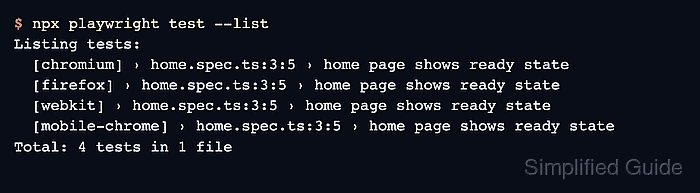
- List the tests to confirm each project appears once.
$ npx playwright test --list
Listing tests:
  [chromium] › home.spec.ts:3:5 › home page shows ready state
  [firefox] › home.spec.ts:3:5 › home page shows ready state
  [webkit] › home.spec.ts:3:5 › home page shows ready state
  [mobile-chrome] › home.spec.ts:3:5 › home page shows ready state
Total: 4 tests in 1 file
Four entries for one file show that the runner expanded the suite into project-specific test entries before opening a browser.
- Run one project by name to verify targeted execution.
$ npx playwright test --project=mobile-chrome

Running 1 test using 1 worker

  ✓  1 [mobile-chrome] › tests/home.spec.ts:3:5 › home page shows ready state (256ms)

  1 passed (1.7s)
If the project name contains spaces, quote it in the shell, such as --project="Mobile Chrome".
- Run the full matrix to confirm all configured browser projects pass together.
$ npx playwright test

Running 4 tests using 4 workers

  ✓  1 [mobile-chrome] › tests/home.spec.ts:3:5 › home page shows ready state (468ms)
  ✓  3 [chromium] › tests/home.spec.ts:3:5 › home page shows ready state (373ms)
  ✓  4 [firefox] › tests/home.spec.ts:3:5 › home page shows ready state (2.8s)
  ✓  2 [webkit] › tests/home.spec.ts:3:5 › home page shows ready state (2.2s)

  4 passed (6.9s)
A browser or device dependency failure at this point means the project is selected correctly, but the runner cannot launch that browser on the current machine or CI image.