How to debug PHP cURL with verbose output
When a PHP cURL request fails before the application can explain the response, verbose output shows the transfer events that happened around the request. The trace can expose connection attempts, proxy negotiation, TLS setup, request headers, response headers, and low-level cURL errors that never appear in the response body.
Verbose mode writes diagnostic output to stderr by default. Redirect it with CURLOPT_STDERR to keep the trace separate from the response body, then keep CURLOPT_RETURNTRANSFER enabled so curl_exec() still returns the body as a PHP value.
Use verbose output only while collecting evidence for a failed request. The trace can include request headers, cookies, bearer tokens, query strings, and response details, so redact sensitive values before sharing it in tickets, logs, or chat threads.
Related: How to handle HTTP errors with PHP cURL
Related: How to configure SSL verification in PHP cURL
Related: How to use a proxy with PHP cURL
Related: How to set a timeout in PHP cURL
Steps to debug PHP cURL with verbose output:
- Confirm that the PHP cURL extension is loaded in the runtime that will run the script.
$ php -r 'var_export(extension_loaded("curl")); echo PHP_EOL;'
true
If this prints false, enable the cURL extension for the same PHP runtime used by the application before testing verbose output.
- Create a local JSON endpoint that gives the request a repeatable target.
- debug-api.php
<?php
$path = parse_url($_SERVER['REQUEST_URI'], PHP_URL_PATH);

header('Content-Type: application/json');

if ($path === '/debug') {
    echo json_encode([
        'status' => 'ok',
        'trace' => 'captured'
    ]);
    return;
}

http_response_code(404);
echo json_encode([
    'error' => 'not found'
]);
- Start the local endpoint in a second terminal.
$ php -S 127.0.0.1:8080 debug-api.php
The local server keeps the trace stable and avoids sending diagnostic requests to a production API. Stop it with Ctrl+C after the checks are complete.
- Create a PHP cURL client that redirects verbose output to a temporary stream.
- debug-curl.php
<?php
$baseUrl = rtrim(getenv('API_BASE_URL') ?: 'http://127.0.0.1:8080', '/');
$url = $baseUrl . '/debug';

$debug = fopen('php://temp', 'w+');

$ch = curl_init($url);
curl_setopt_array($ch, [
    CURLOPT_RETURNTRANSFER => true,
    CURLOPT_VERBOSE => true,
    CURLOPT_STDERR => $debug,
    CURLOPT_HTTPHEADER => [
        'Accept: application/json',
    ],
    CURLOPT_TIMEOUT => 10,
]);

$body = curl_exec($ch);
$errno = curl_errno($ch);
$error = curl_error($ch);
$status = curl_getinfo($ch, CURLINFO_HTTP_CODE);
curl_close($ch);

rewind($debug);
$trace = stream_get_contents($debug);
fclose($debug);

if ($body === false) {
    echo "cURL error {$errno}: {$error}" . PHP_EOL;
    echo "Verbose trace:" . PHP_EOL;
    echo $trace;
    exit(1);
}

echo "HTTP status: {$status}" . PHP_EOL;
echo "Response body: " . trim($body) . PHP_EOL;
echo "Verbose trace:" . PHP_EOL;
echo $trace;
Read curl_errno(), curl_error(), and curl_getinfo() before the handle is discarded. The trace stream can be printed for a local test or written to an application log after secrets are redacted.
- Run the client and confirm that the response body and verbose trace are separate.
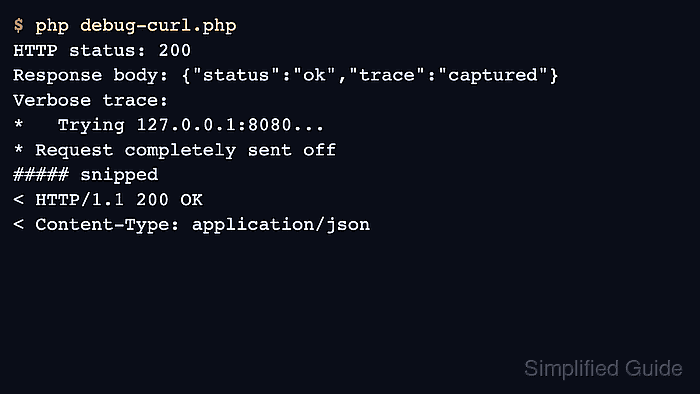
$ php debug-curl.php
HTTP status: 200
Response body: {"status":"ok","trace":"captured"}
Verbose trace:
*   Trying 127.0.0.1:8080...
* Established connection to 127.0.0.1 (127.0.0.1 port 8080) from 127.0.0.1 port 53578
* using HTTP/1.x
> GET /debug HTTP/1.1
Host: 127.0.0.1:8080
Accept: application/json

* Request completely sent off
< HTTP/1.1 200 OK
< Content-Type: application/json
##### snipped
* shutting down connection #0
The response body stays in the application result, while the trace shows the request line and headers that cURL sent plus the response headers it received.
- Point the same client at an unused local port to capture a cURL-level failure.
$ API_BASE_URL=http://127.0.0.1:8099 php debug-curl.php
cURL error 7: Failed to connect to 127.0.0.1 port 8099 after 0 ms: Could not connect to server
Verbose trace:
*   Trying 127.0.0.1:8099...
* connect to 127.0.0.1 port 8099 from 127.0.0.1 port 40368 failed: Connection refused
* Failed to connect to 127.0.0.1 port 8099 after 0 ms: Could not connect to server
* closing connection #0
A cURL error means the transfer did not produce an HTTP response for the application to classify. Use the trace to separate connection, TLS, proxy, and timeout failures from server-side HTTP errors.
- Remove or gate verbose tracing after the failure has been captured.
$debugEnabled = getenv('CURL_DEBUG') === '1';

if ($debugEnabled) {
    $debug = fopen('php://temp', 'w+');
    curl_setopt($ch, CURLOPT_VERBOSE, true);
    curl_setopt($ch, CURLOPT_STDERR, $debug);
}
Do not leave unredacted verbose traces enabled for normal production traffic. Header lines can contain credentials or session identifiers, and query strings can contain account or user-specific values.