How to send a JSON POST request with PHP cURL
A JSON POST request with PHP cURL needs the request body encoded as a JSON string before the transfer starts. Passing a PHP array to CURLOPT_POSTFIELDS sends form-style data instead, so an API that expects application/json can reject the request or receive a body that does not match the endpoint contract.
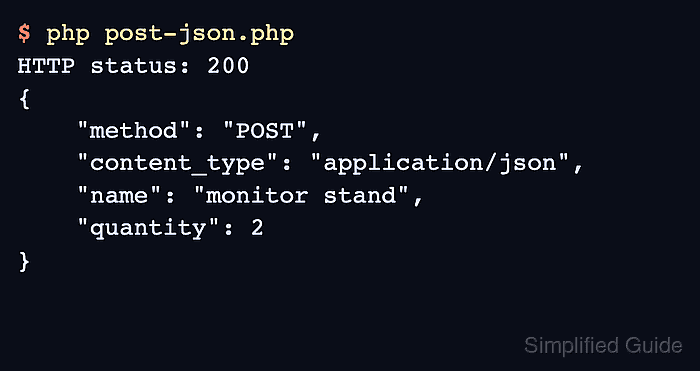
The request needs two checks after the transfer: whether cURL completed the network operation and whether the server returned a successful HTTP status. With CURLOPT_RETURNTRANSFER enabled, curl_exec() returns boolean false only for cURL-level failures, while HTTP responses such as 400 or 500 still need to be read with curl_getinfo().
Use json_encode() with JSON_THROW_ON_ERROR to build the body, set Content-Type: application/json for the request payload, and send Accept: application/json when the response should be JSON too. A local PHP endpoint can echo the method, content type, and decoded fields before the same client script is pointed at the real API.
Related: How to send a GET request with PHP cURL
Related: How to decode a JSON response with PHP cURL
Related: How to handle HTTP errors with PHP cURL
Related: How to set a timeout in PHP cURL
Steps to send a JSON POST request with PHP cURL:
- Confirm that the PHP cURL extension is loaded in the runtime that will run the script.
$ php -r 'var_export(extension_loaded("curl")); echo PHP_EOL;'
true
Install or enable the platform cURL extension package, such as php-curl on Debian or Ubuntu systems, when this command prints false.
- Create a local endpoint that reads the raw request body and decodes it as JSON.
- json-post-api.php
<?php
$method = $_SERVER['REQUEST_METHOD'];
$contentType = $_SERVER['CONTENT_TYPE'] ?? '';
$body = file_get_contents('php://input');

header('Content-Type: application/json');

try {
    $payload = json_decode($body, true, 512, JSON_THROW_ON_ERROR);
} catch (JsonException $e) {
    http_response_code(400);
    echo json_encode([
        'error' => 'invalid json',
        'message' => $e->getMessage(),
    ], JSON_PRETTY_PRINT | JSON_UNESCAPED_SLASHES) . PHP_EOL;
    return;
}

echo json_encode([
    'method' => $method,
    'content_type' => $contentType,
    'name' => $payload['name'] ?? null,
    'quantity' => $payload['quantity'] ?? null,
], JSON_PRETTY_PRINT | JSON_UNESCAPED_SLASHES) . PHP_EOL;
php://input reads the raw request body. JSON POST data does not populate $_POST the way form-encoded data does.
- Start the local endpoint in a second terminal while testing the client script.
$ php -S 127.0.0.1:8080 json-post-api.php
Stop the built-in server with Ctrl+C after the request test is complete.
- Create the PHP cURL client script that sends a JSON string and checks the HTTP status.
- post-json.php
<?php
$url = $argv[1] ?? 'http://127.0.0.1:8080/orders';

$payload = [
    'name' => 'monitor stand',
    'quantity' => 2,
];

try {
    $json = json_encode($payload, JSON_THROW_ON_ERROR | JSON_UNESCAPED_SLASHES);
} catch (JsonException $e) {
    fwrite(STDERR, 'JSON encode error: ' . $e->getMessage() . PHP_EOL);
    exit(1);
}

$ch = curl_init($url);
if ($ch === false) {
    fwrite(STDERR, 'Could not initialize cURL' . PHP_EOL);
    exit(1);
}

curl_setopt_array($ch, [
    CURLOPT_RETURNTRANSFER => true,
    CURLOPT_POST => true,
    CURLOPT_POSTFIELDS => $json,
    CURLOPT_HTTPHEADER => [
        'Content-Type: application/json',
        'Accept: application/json',
    ],
    CURLOPT_TIMEOUT => 10,
]);

$response = curl_exec($ch);

if ($response === false) {
    fwrite(STDERR, 'cURL error: ' . curl_error($ch) . PHP_EOL);
    curl_close($ch);
    exit(1);
}

$status = curl_getinfo($ch, CURLINFO_HTTP_CODE);
curl_close($ch);

echo "HTTP status: {$status}" . PHP_EOL;
echo $response;

if ($status < 200 || $status >= 300) {
    exit(1);
}
The body passed to CURLOPT_POSTFIELDS is the JSON string from json_encode(). Do not pass the original PHP array when the endpoint expects an application/json body.
Tool: JSON Validator can inspect a captured request body when the payload is built from templates, files, or user input instead of a fixed PHP array.
- Run the client script and confirm that the endpoint received a POST request with an application/json body.
$ php post-json.php
HTTP status: 200
{
    "method": "POST",
    "content_type": "application/json",
    "name": "monitor stand",
    "quantity": 2
}
The 200 status, POST method, application/json content type, and echoed field values prove that PHP sent the JSON body and captured the response for the status check.
- Replace the local URL with the target API endpoint after the local request works.
$ php post-json.php https://api.example.com/orders
Use https:// API URLs for real requests, keep certificate verification enabled, and keep bearer tokens, Basic auth passwords, API keys, and production hostnames out of saved transcripts and screenshots.