How to reduce pandas DataFrame memory usage
Text-heavy DataFrames can consume far more RAM than their row counts suggest, especially when an analysis creates temporary copies. A smaller in-memory representation leaves more headroom for filtering, joins, and grouped calculations without discarding records.
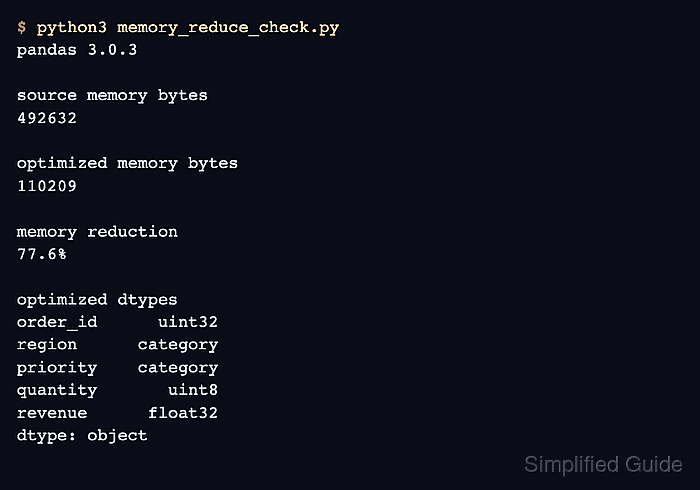
The memory_usage(deep=True) method reports per-column bytes and includes deeper accounting for text-like data. Repeated labels can use the category dtype, while integer and floating-point columns can sometimes use narrower numeric dtypes.
Every conversion must follow the column's data contract. Unsigned integers cannot represent negative values, categorical storage becomes less effective as values approach one unique label per row, and float32 trades precision for lower memory use.
Steps to reduce pandas DataFrame memory usage:
- Create memory_reduce_check.py with a representative DataFrame and an untouched baseline copy.
- memory_reduce_check.py
import pandas as pd


rows = 10_000
df = pd.DataFrame(
    {
        "order_id": range(100_000, 100_000 + rows),
        "region": ["EMEA", "APAC", "AMER", "EMEA"] * (rows // 4),
        "priority": ["low", "normal", "urgent", "normal"] * (rows // 4),
        "quantity": [1, 2, 3, 4] * (rows // 4),
        "revenue": [149.95, 89.50, 212.25, 65.00] * (rows // 4),
    }
)

baseline = df.copy()
optimized = df.copy()
before = baseline.memory_usage(deep=True).sum()
For project use, the sample df construction corresponds to the existing DataFrame loader. The baseline copy remains available until the optimized values pass every check.
- Append the repeated-label conversion block to memory_reduce_check.py.
label_columns = ["region", "priority"]
print("unique label counts")
print(baseline[label_columns].nunique(dropna=False).to_string())

for column in label_columns:
    optimized[column] = optimized[column].astype("category")
The category dtype suits columns whose labels repeat enough to reduce memory. It can use the same or more memory when nearly every row has a unique value.
- Append the numeric downcast block to memory_reduce_check.py.
optimized["order_id"] = pd.to_numeric(
    optimized["order_id"], downcast="unsigned"
)
optimized["quantity"] = pd.to_numeric(
    optimized["quantity"], downcast="unsigned"
)
optimized["revenue"] = pd.to_numeric(
    optimized["revenue"], downcast="float"
)
The downcast=“integer” mode supports columns that can contain negative values. A float32 conversion needs an explicit tolerance for calculations that drive totals, thresholds, or reports.
- Append the memory and value assertions to memory_reduce_check.py.
after = optimized.memory_usage(deep=True).sum()
reduction = (1 - after / before) * 100
revenue_delta = (baseline["revenue"] - optimized["revenue"]).abs().max()

pd.testing.assert_frame_equal(
    baseline.drop(columns="revenue"),
    optimized.drop(columns="revenue"),
    check_dtype=False,
    check_categorical=False,
)
pd.testing.assert_series_equal(
    baseline["revenue"],
    optimized["revenue"],
    check_dtype=False,
    rtol=1e-6,
    atol=1e-6,
)
assert after < before

print()
print(f"pandas {pd.__version__}")
print(f"source memory bytes: {before}")
print(f"optimized memory bytes: {after}")
print(f"memory reduction: {reduction:.1f}%")
print()
print("optimized dtypes")
print(optimized.dtypes.to_string())
print()
print(f"rows before and after: {len(baseline)} {len(optimized)}")
print(f"maximum revenue delta: {revenue_delta:.8f}")
The exact-value assertion covers identifiers, labels, and quantities. The separate revenue assertion allows only the declared floating-point tolerance.
- Run memory_reduce_check.py to confirm the reduced memory footprint and preserved values.
$ python3 memory_reduce_check.py
unique label counts
region      3
priority    3

pandas 3.0.3
source memory bytes: 1312632
optimized memory bytes: 110453
memory reduction: 91.6%

optimized dtypes
order_id      uint32
region      category
priority    category
quantity       uint8
revenue      float32

rows before and after: 10000 10000
maximum revenue delta: 0.00000305
A lower byte count is acceptable only when the script exits without an assertion error and the reported dtypes match the intended column contracts.