How to set OpenTelemetry resource attributes
OpenTelemetry resource attributes identify the process or service that produced telemetry, so traces, metrics, and logs arrive with the service name, deployment, and version fields that backends use for grouping and filtering. Set them before an instrumented process starts when the default service name would otherwise appear as unknown_service or when the same service runs in several environments.
The SDK reads OTEL_SERVICE_NAME for service.name and OTEL_RESOURCE_ATTRIBUTES for additional comma-separated key-value pairs. OTEL_SERVICE_NAME takes precedence when service.name also appears in OTEL_RESOURCE_ATTRIBUTES, so keep the service name in the dedicated variable and reserve the resource attribute list for namespace, version, deployment, host, or custom values.
Resource attributes describe the telemetry producer rather than one request, span, metric point, or log record. Set request-specific fields such as http.route or enduser.id as signal attributes, and use semantic convention names such as deployment.environment.name when they match the resource being described.
Steps to set OpenTelemetry resource attributes:
- Choose the resource attributes that should identify the service.
Use service.name for the logical service, service.namespace for a group of related services, service.version for the deployed build, and deployment.environment.name for values such as production, staging, test, or development. deployment.environment.name does not make staging and production separate services by itself.
- Set the service name in the process environment.
$ export OTEL_SERVICE_NAME="checkout-api"
OTEL_SERVICE_NAME overrides service.name when both are set. Keep service.name out of OTEL_RESOURCE_ATTRIBUTES unless the language SDK or runtime path does not honor OTEL_SERVICE_NAME.
- Set the remaining resource attributes in the process environment.
$ export OTEL_RESOURCE_ATTRIBUTES="service.namespace=shop,service.version=1.7.3,deployment.environment.name=staging"
OTEL_RESOURCE_ATTRIBUTES uses comma-separated key=value pairs. Percent-encode literal commas or equals signs inside a key or value before starting the process.
- Create a temporary span emitter in an environment that already has the OpenTelemetry Python SDK.
- resource-check.py
from opentelemetry import trace
from opentelemetry.sdk.trace import TracerProvider
from opentelemetry.sdk.trace.export import ConsoleSpanExporter, SimpleSpanProcessor

provider = TracerProvider()
provider.add_span_processor(SimpleSpanProcessor(ConsoleSpanExporter()))
trace.set_tracer_provider(provider)

tracer = trace.get_tracer("resource-attribute-check")
with tracer.start_as_current_span("checkout-resource-check"):
    pass
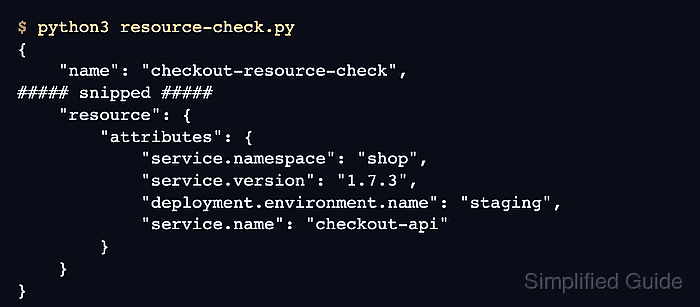
The ConsoleSpanExporter prints the exported span and resource block to standard output, which is enough for a local resource-attribute smoke test.
- Run the smoke test from the same environment.
$ python3 resource-check.py
{
    "name": "checkout-resource-check",
##### snipped #####
    "resource": {
        "attributes": {
##### snipped #####
            "service.namespace": "shop",
            "service.version": "1.7.3",
            "deployment.environment.name": "staging",
            "service.name": "checkout-api"
        },
        "schema_url": ""
    }
}
The resource.attributes block must include the service, namespace, version, and deployment values set in the environment.
- Apply the same variables where the real instrumented service starts.
For systemd, containers, and Kubernetes workloads, put the variables in the unit, container spec, deployment manifest, or runtime configuration. SDKs read resource environment variables during startup, so restart or roll out the workload after changing them.
- Remove the temporary smoke-test file.
$ rm resource-check.py
Use the same resource attribute check against the real exporter or Collector debug output before relying on backend filters or dashboards.