Checking OpenTelemetry semantic conventions in emitted telemetry catches stale, misspelled, or custom attribute names before dashboards, alerts, and backend queries depend on them. Run the check after adding instrumentation, changing Collector processors, or upgrading instrumentation libraries that may switch from experimental to stable attribute names.
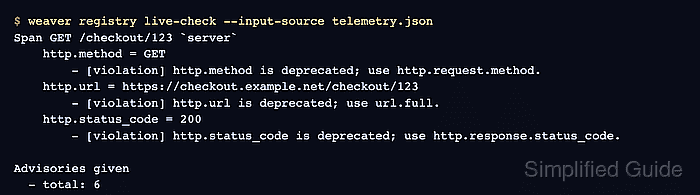
OpenTelemetry Weaver compares sample spans, metrics, or logs with a semantic convention registry and reports advisories for deprecated, unstable, or mismatched fields. The registry live-check command can read a small JSON sample created from a test fixture, an SDK exporter, or selected fields copied from Collector debug exporter output.
The HTTP span sample uses renamed attributes that are easy to recognize. Names such as http.method, http.url, and http.status_code should move to current names such as http.request.method, url.full, and http.response.status_code. For database, messaging, resource, metric, or log checks, build the sample around that signal's own semantic convention table instead of copying HTTP names.
Steps to check OpenTelemetry semantic conventions in telemetry:
- Create a small telemetry sample from the signal that needs review.
- telemetry.json
[
  {
    "span": {
      "name": "GET /checkout/123",
      "kind": "server",
      "attributes": [
        {
          "name": "http.method",
          "value": "GET"
        },
        {
          "name": "http.url",
          "value": "https://checkout.example.net/checkout/123"
        },
        {
          "name": "http.status_code",
          "value": 200
        }
      ]
    }
  }
]
Use sanitized sample values. Remove credentials, tenant IDs, user identifiers, raw query tokens, and production hostnames before saving telemetry fixtures.
When starting from Collector debug output, copy only the span name, kind, and attributes needed for the check.
Related: How to test OpenTelemetry Collector pipelines with the debug exporter - Run Weaver against the current OpenTelemetry semantic convention registry.
$ weaver registry live-check --input-source telemetry.json
Span GET /checkout/123 `server`
    http.method = GET
        - [violation] Attribute 'http.method' is deprecated; reason = 'renamed', note = 'Replaced by `http.request.method`.'.
        - [improvement] Attribute 'http.method' is not stable; stability = development.
    http.url = https://checkout.example.net/checkout/123
        - [violation] Attribute 'http.url' is deprecated; reason = 'renamed', note = 'Replaced by `url.full`.'.
        - [improvement] Attribute 'http.url' is not stable; stability = development.
    http.status_code = 200
        - [violation] Attribute 'http.status_code' is deprecated; reason = 'renamed', note = 'Replaced by `http.response.status_code`.'.
        - [improvement] Attribute 'http.status_code' is not stable; stability = development.

Advisories given
  - total: 6
Weaver exits nonzero when violation-level findings are present, which makes the same check suitable for CI once the sample is a sanitized fixture.
- Replace each finding with the current attribute name for that signal.
- telemetry.json
[
  {
    "span": {
      "name": "GET /checkout/{order_id}",
      "kind": "server",
      "attributes": [
        {
          "name": "http.request.method",
          "value": "GET"
        },
        {
          "name": "url.full",
          "value": "https://checkout.example.net/checkout/123"
        },
        {
          "name": "url.scheme",
          "value": "https"
        },
        {
          "name": "server.address",
          "value": "checkout.example.net"
        },
        {
          "name": "http.route",
          "value": "/checkout/{order_id}"
        },
        {
          "name": "http.response.status_code",
          "value": 200
        }
      ]
    }
  }
]
Use the finding's replacement note and the signal-specific semantic convention table before changing production instrumentation. Some fields are required only for a specific signal, span kind, or condition.
Related: How to set OpenTelemetry resource attributes
Related: How to transform attributes in the OpenTelemetry Collector - Re-run the live check after the instrumentation or sample has been corrected.
$ weaver registry live-check --input-source telemetry.json Span GET /checkout/{order_id} `server` http.request.method = GET url.full = https://checkout.example.net/checkout/123 url.scheme = https server.address = checkout.example.net http.route = /checkout/{order_id} http.response.status_code = 200 Samples - total: 7 - by highest advice level: - no advice: 7 Advisories given - total: 0 - Pin the registry version when the check runs in CI.
$ weaver registry live-check \
  --registry https://github.com/open-telemetry/semantic-conventions.git@v1.42.0[model] \
  --input-source telemetry.json
The default registry follows the current upstream semantic conventions. Pinning the registry keeps CI results stable until the team intentionally reviews a semantic convention upgrade.
- Remove one-off sample files after the review.
$ rm telemetry.json
Keep the file only when it is a sanitized regression fixture used by CI or instrumentation tests.

Mohd Shakir Zakaria is a cloud architect with deep roots in software development and open-source advocacy. Certified in AWS, Red Hat, VMware, ITIL, and Linux, he specializes in designing and managing robust cloud and on-premises infrastructures.


