How to create a custom metric counter with OpenTelemetry
A custom OpenTelemetry counter records application events that automatic instrumentation cannot infer, such as completed checkouts, queued jobs, or cache hits. Adding one gives a service a business-level metric that can travel through the same Collector pipeline as traces and runtime metrics.
The Python SDK creates a synchronous counter, calls add() inside the work path, and exports metrics over OTLP/HTTP to a local Collector. The counter is monotonic, so each measurement adds to the cumulative count instead of setting the total directly.
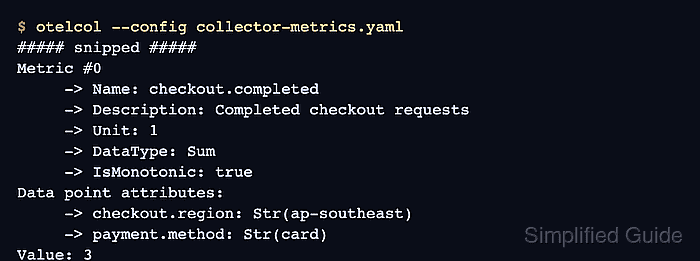
The local Collector uses the debug exporter so the metric name, resource attributes, data point attributes, and value are visible before any production backend is involved. Keep detailed debug output local because service names, route labels, customer segments, and other metric attributes can reveal operational details.
Steps to create a custom OpenTelemetry counter in Python:
- Install the OpenTelemetry API, SDK, and OTLP/HTTP metric exporter in the application environment.
$ python3 -m pip install opentelemetry-api opentelemetry-sdk opentelemetry-exporter-otlp-proto-http
- Create a local Collector configuration for OTLP/HTTP metrics.
- collector-metrics.yaml
receivers:
  otlp:
    protocols:
      http:
        endpoint: 127.0.0.1:4318

exporters:
  debug:
    verbosity: detailed

service:
  pipelines:
    metrics:
      receivers: [otlp]
      exporters: [debug]
The debug exporter prints metric names and attributes to the Collector log. Use it for local proof, then replace it with the backend exporter used by the environment.
Related: How to test OpenTelemetry Collector pipelines with the debug exporter
Tool: OpenTelemetry Collector Config Generator - Start the local Collector in a separate terminal.
$ otelcol --config collector-metrics.yaml info Starting HTTP server {"endpoint":"127.0.0.1:4318"} info Everything is ready. Begin running and processing data. - Create the application counter script.
- checkout_counter.py
from opentelemetry import metrics
from opentelemetry.exporter.otlp.proto.http.metric_exporter import OTLPMetricExporter
from opentelemetry.sdk.metrics import MeterProvider
from opentelemetry.sdk.metrics.export import PeriodicExportingMetricReader
from opentelemetry.sdk.resources import Resource

resource = Resource.create(
    {
        "service.name": "checkout-service",
        "deployment.environment.name": "dev",
    }
)

exporter = OTLPMetricExporter(endpoint="http://localhost:4318/v1/metrics")
reader = PeriodicExportingMetricReader(exporter, export_interval_millis=1000)
provider = MeterProvider(resource=resource, metric_readers=[reader])
metrics.set_meter_provider(provider)

meter = metrics.get_meter("checkout.metrics")
checkout_counter = meter.create_counter(
    "checkout.completed",
    unit="1",
    description="Completed checkout requests",
)

checkout_counter.add(
    1,
    {
        "checkout.region": "ap-southeast",
        "payment.method": "card",
    },
)
checkout_counter.add(
    2,
    {
        "checkout.region": "ap-southeast",
        "payment.method": "card",
    },
)

provider.force_flush()
provider.shutdown()

print("recorded checkout.completed count=3 region=ap-southeast payment=card")
print("exported metrics to http://localhost:4318/v1/metrics")
Create the counter once and reuse it from the application code path that represents the event. Use an UpDownCounter or Gauge instead when the value can decrease.
- Run the script while the Collector is still active.
$ python3 checkout_counter.py
recorded checkout.completed count=3 region=ap-southeast payment=card
exported metrics to http://localhost:4318/v1/metrics
- Check the Collector terminal for the exported counter point.
Resource attributes:
     -> service.name: Str(checkout-service)
     -> deployment.environment.name: Str(dev)
Metric #0
     -> Name: checkout.completed
     -> Description: Completed checkout requests
     -> Unit: 1
     -> DataType: Sum
     -> IsMonotonic: true
Data point attributes:
     -> checkout.region: Str(ap-southeast)
     -> payment.method: Str(card)
Value: 3
The counter is exported when the Collector shows the expected metric name, service resource, attributes, and cumulative value.
- Stop the local debug Collector after the smoke test.
Ctrl+C
Keep the counter name and attribute keys stable before sending the metric to a shared backend, because changing them later can split dashboards and alerts into separate time series.