How to route telemetry by attributes in the OpenTelemetry Collector
Routing telemetry by attributes in the OpenTelemetry Collector sends matching records to different downstream pipelines before they reach a backend. It is useful when production traffic, tenant-specific data, or selected services need separate exporters while unmatched telemetry still follows a default path.
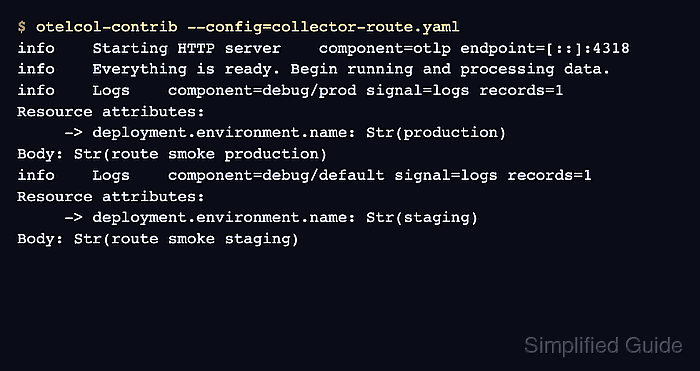
The routing connector sits between Collector pipelines as an exporter on the incoming pipeline and a receiver on the routed pipelines. Its route table evaluates OTTL conditions against resource, span, metric, datapoint, log, or request context, then forwards matching telemetry to the pipeline names listed for that route.
A local smoke test can route OTLP/HTTP log records with deployment.environment.name set to production to debug/prod and send all other records to debug/default. Replace the debug exporters with real backend exporters after the split is proven because detailed debug output can contain service names, attributes, and log bodies.
Steps to route telemetry by attributes in the OpenTelemetry Collector:
- Open the active Collector Contrib configuration file.
$ sudoedit /etc/otelcol-contrib/config.yaml
The routing connector is available in Collector builds that include contrib connectors, such as otelcol-contrib or a custom distribution built with that connector.
- Add an OTLP/HTTP receiver, two test exporters, and a routing connector.
- /etc/otelcol-contrib/config.yaml
receivers:
  otlp:
    protocols:
      http:
        endpoint: 0.0.0.0:4318

exporters:
  debug/prod:
    verbosity: detailed
  debug/default:
    verbosity: detailed

connectors:
  routing:
    default_pipelines: [logs/default]
    table:
      - context: resource
        condition: 'attributes["deployment.environment.name"] == "production"'
        pipelines: [logs/prod]

service:
  telemetry:
    logs:
      level: info
  pipelines:
    logs/in:
      receivers: [otlp]
      exporters: [routing]
    logs/prod:
      receivers: [routing]
      exporters: [debug/prod]
    logs/default:
      receivers: [routing]
      exporters: [debug/default]
logs/in receives the original data and exports it to the connector. logs/prod and logs/default receive from the connector, so each routed pipeline can use its own exporters.
- Validate the Collector configuration.
$ otelcol-contrib validate --config=/etc/otelcol-contrib/config.yaml
No output with a zero exit status means the receiver, connector, exporters, and pipeline references are valid for the Collector build.
- Start the Collector with the routing configuration.
$ otelcol-contrib --config=/etc/otelcol-contrib/config.yaml
2026-06-18T07:39:47.586Z info Starting HTTP server {"otelcol.component.id":"otlp","otelcol.component.kind":"receiver","endpoint":"[::]:4318"}
2026-06-18T07:39:47.586Z info Everything is ready. Begin running and processing data.
Leave this terminal open while sending the smoke payloads from another terminal.
- Create a production log payload.
- log-production.json
{
  "resourceLogs": [
    {
      "resource": {
        "attributes": [
          {
            "key": "service.name",
            "value": {
              "stringValue": "checkout-api"
            }
          },
          {
            "key": "deployment.environment.name",
            "value": {
              "stringValue": "production"
            }
          }
        ]
      },
      "scopeLogs": [
        {
          "scope": {
            "name": "manual-routing-smoke"
          },
          "logRecords": [
            {
              "timeUnixNano": "1717260000000000000",
              "severityText": "INFO",
              "body": {
                "stringValue": "route smoke production"
              }
            }
          ]
        }
      ]
    }
  ]
}
- Send the production payload to the local OTLP/HTTP receiver.
$ curl --silent --show-error --include --request POST http://127.0.0.1:4318/v1/logs \ --header 'Content-Type: application/json' \ --data @log-production.json HTTP/1.1 200 OK Content-Type: application/json Content-Length: 21 {"partialSuccess":{}} - Check the Collector terminal for the production route.
2026-06-18T07:40:01.473Z info Logs {"otelcol.component.id":"debug/prod","otelcol.component.kind":"exporter","otelcol.signal":"logs","resource logs":1,"log records":1}
Resource attributes:
     -> service.name: Str(checkout-api)
     -> deployment.environment.name: Str(production)
InstrumentationScope manual-routing-smoke
LogRecord #0
SeverityText: INFO
Body: Str(route smoke production)
The debug/prod component ID proves that the production resource attribute matched the route table entry.
- Create a staging log payload for the fallback route.
- log-staging.json
{
  "resourceLogs": [
    {
      "resource": {
        "attributes": [
          {
            "key": "service.name",
            "value": {
              "stringValue": "checkout-api"
            }
          },
          {
            "key": "deployment.environment.name",
            "value": {
              "stringValue": "staging"
            }
          }
        ]
      },
      "scopeLogs": [
        {
          "scope": {
            "name": "manual-routing-smoke"
          },
          "logRecords": [
            {
              "timeUnixNano": "1717260001000000000",
              "severityText": "INFO",
              "body": {
                "stringValue": "route smoke staging"
              }
            }
          ]
        }
      ]
    }
  ]
}
- Send the staging payload to the local OTLP/HTTP receiver.
$ curl --silent --show-error --include --request POST http://127.0.0.1:4318/v1/logs \ --header 'Content-Type: application/json' \ --data @log-staging.json HTTP/1.1 200 OK Content-Type: application/json Content-Length: 21 {"partialSuccess":{}} - Check the Collector terminal for the fallback route.
2026-06-18T07:40:01.499Z info Logs {"otelcol.component.id":"debug/default","otelcol.component.kind":"exporter","otelcol.signal":"logs","resource logs":1,"log records":1}
Resource attributes:
     -> service.name: Str(checkout-api)
     -> deployment.environment.name: Str(staging)
InstrumentationScope manual-routing-smoke
LogRecord #0
SeverityText: INFO
Body: Str(route smoke staging)
The debug/default component ID proves that telemetry without a matching production value used default_pipelines.
- Replace the smoke-test exporters with the production exporters.
- /etc/otelcol-contrib/config.yaml
exporters:
  otlp/prod:
    endpoint: telemetry-prod.example.net:4317
    tls:
      insecure: false
  otlp/default:
    endpoint: telemetry-default.example.net:4317
    tls:
      insecure: false

service:
  pipelines:
    logs/prod:
      receivers: [routing]
      exporters: [otlp/prod]
    logs/default:
      receivers: [routing]
      exporters: [otlp/default]
Keep debug exporters and verbosity: detailed out of normal traffic unless logs are protected and the output is intentionally temporary.
- Remove the temporary smoke payload files after validation.
$ rm log-production.json log-staging.json