How to monitor OpenTelemetry Collector health and metrics
Monitoring OpenTelemetry Collector health and internal metrics confirms whether the Collector process is ready and whether its own runtime signals are visible to operations tooling. The health endpoint works well for liveness or readiness probes, while internal metrics expose process, runtime, and Collector component counters that can be scraped before pipeline symptoms reach an observability backend.
The health_check extension publishes a small HTTP status endpoint after it is configured and enabled under service.extensions. Collector self-telemetry uses the service.telemetry.metrics section; current Collector configuration exposes a Prometheus pull endpoint through a metrics reader instead of the older metrics.address setting.
Diagnostic endpoints should stay local to the Collector host or behind a protected container port. A 200 OK health response means the Collector process has reported readiness, not that every exporter backend is accepting data, so pair the probe with internal metrics and normal pipeline smoke tests when troubleshooting delivery problems.
Steps to monitor OpenTelemetry Collector health and metrics:
- Open the active Collector configuration file.
$ sudoedit /etc/otelcol/config.yaml
Packaged Linux services commonly read /etc/otelcol/config.yaml, but containers and custom services may pass another file with --config.
- Add the health endpoint and internal metrics reader to the Collector configuration.
- /etc/otelcol/config.yaml
extensions:
  health_check:
    endpoint: 0.0.0.0:13133

receivers:
  otlp:
    protocols:
      grpc:
        endpoint: 0.0.0.0:4317
      http:
        endpoint: 0.0.0.0:4318

exporters:
  debug:
    verbosity: basic

service:
  extensions: [health_check]
  telemetry:
    metrics:
      level: normal
      readers:
        - pull:
            exporter:
              prometheus:
                host: 0.0.0.0
                port: 8888
  pipelines:
    traces:
      receivers: [otlp]
      exporters: [debug]
Binding diagnostic endpoints to 0.0.0.0 exposes them on every interface visible to the process. Use 127.0.0.1 for same-host checks, or restrict the host port, service, firewall, or Kubernetes policy before exposing 13133 or 8888 on a shared network.
Merge the extensions, service.extensions, and service.telemetry.metrics blocks into an existing Collector file instead of replacing production receivers, processors, exporters, or pipelines. The debug exporter keeps a small local validation config self-contained.
Tool: OpenTelemetry Collector Config Generator - Validate the Collector configuration.
$ otelcol validate --config=/etc/otelcol/config.yaml
No output with a zero exit status means the Collector parsed the file and found the referenced extension, receiver, exporter, and pipeline components in the running distribution.
- Start the Collector with the updated configuration.
$ otelcol --config=/etc/otelcol/config.yaml
2026-06-18T07:27:11.579Z info Starting health_check extension {"endpoint":"0.0.0.0:13133"}
2026-06-18T07:27:11.582Z info Starting GRPC server {"endpoint":"[::]:4317"}
2026-06-18T07:27:11.582Z info Starting HTTP server {"endpoint":"[::]:4318"}
2026-06-18T07:27:11.583Z info Everything is ready. Begin running and processing data.
For a packaged service, restart the unit that owns the Collector process and read the same startup lines from the service logs.
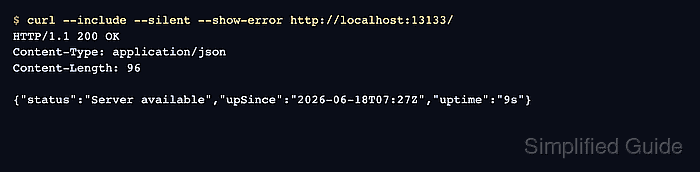
- Check the health endpoint.
$ curl --include --silent --show-error http://localhost:13133/
HTTP/1.1 200 OK
Content-Type: application/json
Content-Length: 96

{"status":"Server available","upSince":"2026-06-18T07:27:11Z","uptime":"9s"}
The default health_check path is /. Configure path under the extension when a load balancer, readiness probe, or platform convention expects a different URL.
- Scrape the Collector internal metrics endpoint.
$ curl --silent --show-error http://localhost:8888/metrics
# HELP otelcol_process_cpu_seconds Total CPU user and system time in seconds [Alpha]
# TYPE otelcol_process_cpu_seconds counter
otelcol_process_cpu_seconds 0.17
# HELP otelcol_process_memory_rss Total physical memory (resident set size) [Alpha]
# TYPE otelcol_process_memory_rss gauge
otelcol_process_memory_rss 1.82976512e+08
# HELP otelcol_process_uptime Uptime of the process [Alpha]
# TYPE otelcol_process_uptime counter
otelcol_process_uptime 9.36591024
##### snipped #####
target_info{service_name="otelcol-contrib",service_version="0.154.0"} 1
Metrics such as otelcol_process_uptime, otelcol_process_memory_rss, and target_info confirm that the Collector's internal Prometheus endpoint is answering. Exporter, receiver, queue, and processor metrics appear when those components are active and emitting their own telemetry.
- Add the metrics endpoint to the monitoring scraper.
- prometheus.yml
scrape_configs:
  - job_name: otelcol
    static_configs:
      - targets:
          - collector.example.net:8888
Use the private DNS name, service name, or loopback address that reaches the protected metrics listener. Keep public internet paths away from Collector diagnostic endpoints unless an authenticated proxy owns access.
- Keep the health endpoint as a process-readiness probe, not a pipeline-delivery proof.
When telemetry is missing from a backend, check the debug exporter, exporter retry queue metrics, and backend response logs after the health endpoint returns 200 OK.
Related: How to test OpenTelemetry Collector pipelines with the debug exporter
Related: How to configure retry and queue settings in the OpenTelemetry Collector