How to test a mutual TLS client certificate using OpenSSL
Mutual TLS changes a normal TLS handshake into a two-sided identity exchange. When an API gateway, reverse proxy, or service rejects a client certificate, OpenSSL can separate certificate-material problems from application behavior before the final client is changed.
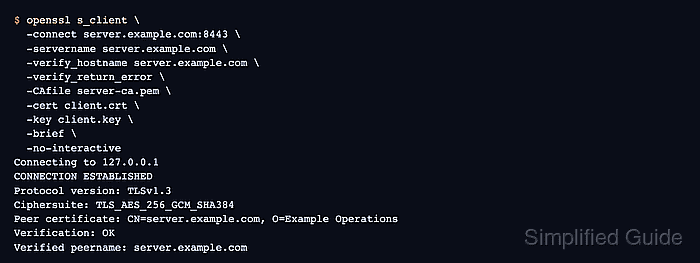
The openssl s_client command acts as the test client. It sends the server name with -servername, verifies the server certificate with -verify_hostname and -CAfile, and presents the client identity with -cert and -key. The server still decides whether that client certificate chains to a trusted issuer and satisfies its TLS client-auth policy.
Start with the same DNS name, port, client certificate, private key, and CA files that the application will use. Keep private keys out of shared logs and tickets, and treat a successful TLS handshake as transport-layer proof only; the application may still apply separate authorization after the TLS session exists.
Steps to test a mutual TLS client certificate using OpenSSL:
- Record the endpoint and certificate files for the test.
TLS endpoint: server.example.com:8443
TLS server name: server.example.com
Server trust file: server-ca.pem
Client CA trusted by the server: client-ca.pem
Client certificate: client.crt
Client private key: client.key
The -CAfile option in openssl s_client verifies the server certificate. It does not configure which client certificates the server accepts.
- Verify the client certificate against the CA that the server trusts.
$ openssl verify -CAfile client-ca.pem -purpose sslclient client.crt
client.crt: OK
Use the CA bundle or root file that represents the server's client-certificate trust policy. Add -untrusted for intermediate certificates when the client chain needs them.
Related: How to verify a certificate chain using OpenSSL - Review the client certificate identity and usage extension.
$ openssl x509 -in client.crt -noout -subject -issuer -ext extendedKeyUsage
subject=CN=client.example.com, O=Example Operations
issuer=CN=client-ca.example.com, O=Example Operations
X509v3 Extended Key Usage:
    TLS Web Client Authentication
The subject should match the intended client identity, and TLS Web Client Authentication shows that the certificate was issued for client-auth use.
Related: How to check whether a certificate matches a private key using OpenSSL
Tool: SSL Matcher (Certificate, CSR, and Key) - Run the mutual TLS handshake with the client certificate and key.
$ openssl s_client \
  -connect server.example.com:8443 \
  -servername server.example.com \
  -verify_hostname server.example.com \
  -verify_return_error \
  -CAfile server-ca.pem \
  -cert client.crt \
  -key client.key \
  -brief \
  -no-interactive
Connecting to 127.0.0.1
CONNECTION ESTABLISHED
Protocol version: TLSv1.3
Ciphersuite: TLS_AES_256_GCM_SHA384
##### snipped #####
Peer certificate: CN=server.example.com, O=Example Operations
Verification: OK
Verified peername: server.example.com
Verification: OK and Verified peername prove that the server certificate was trusted for the requested name. A completed handshake without a client-auth alert shows that the server accepted the supplied client certificate at the TLS layer.
- Repeat the handshake without the client certificate when the endpoint should require mutual TLS.
$ openssl s_client \
  -connect server.example.com:8443 \
  -servername server.example.com \
  -verify_hostname server.example.com \
  -verify_return_error \
  -CAfile server-ca.pem \
  -brief \
  -no-interactive
Connecting to 127.0.0.1
CONNECTION ESTABLISHED
Protocol version: TLSv1.3
Ciphersuite: TLS_AES_256_GCM_SHA384
##### snipped #####
error:0A00045C:SSL routines:ssl3_read_bytes:tlsv13 alert certificate required
If the no-certificate test still succeeds, the listener may not require client certificates at the TLS layer. Check the proxy, gateway, or service configuration before blaming the client certificate.