How to detect a QR code with OpenCV
QR images often enter an application as screenshots, product labels, camera frames, or downloaded files before any business logic can trust their payload. OpenCV can turn that image input into decoded text plus corner coordinates, which makes it useful for a local smoke test before a QR reader moves into a camera or batch pipeline.
QRCodeDetector accepts a grayscale or color BGR image and returns the decoded payload with the quadrangle around the detected code. The Python script reads one image, draws the returned corners on a copy, and writes an annotated PNG that can be reviewed without opening a GUI window.
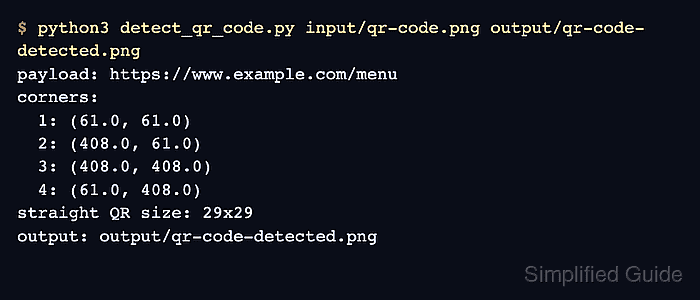
A QR symbol needs visible finder squares, contrast, and quiet zone around the code for detection to work. A successful run prints the payload, four corner points, the rectified QR matrix size, and the annotated output path; an unreadable or missing symbol exits with QR code not detected or decoded instead of continuing with an empty payload.
Steps to detect a QR code with OpenCV:
- Create folders for the input image and annotated output.
$ mkdir -p input output
- Place a QR image with the full quiet zone at input/qr-code.png.
$ cp ~/Pictures/menu-qr.png input/qr-code.png
Replace ~/Pictures/menu-qr.png with your own QR image. Keep the blank margin around the symbol so QRCodeDetector can find the outer quadrangle.
Tool: Quick Response (QR) Code Generator - Create detect_qr_code.py.
- detect_qr_code.py
#!/usr/bin/env python3
import argparse
from pathlib import Path

import cv2 as cv


parser = argparse.ArgumentParser(description="Detect and decode one QR code with OpenCV.")
parser.add_argument("input_image", type=Path)
parser.add_argument("output_image", type=Path)
args = parser.parse_args()

image = cv.imread(str(args.input_image))
if image is None:
    raise SystemExit(f"could not read image: {args.input_image}")

detector = cv.QRCodeDetector()
payload, points, straight_qrcode = detector.detectAndDecode(image)

if points is None or not payload:
    raise SystemExit("QR code not detected or decoded")

corners = points.reshape(-1, 2)
annotated = image.copy()
cv.polylines(annotated, [corners.astype(int)], isClosed=True, color=(0, 255, 0), thickness=3)

for index, (x_coord, y_coord) in enumerate(corners, start=1):
    point = (int(round(x_coord)), int(round(y_coord)))
    cv.circle(annotated, point, 6, (0, 0, 255), -1)
    cv.putText(
        annotated,
        str(index),
        (point[0] + 8, point[1] - 8),
        cv.FONT_HERSHEY_SIMPLEX,
        0.6,
        (0, 0, 255),
        2,
        cv.LINE_AA,
    )

args.output_image.parent.mkdir(parents=True, exist_ok=True)
if not cv.imwrite(str(args.output_image), annotated):
    raise SystemExit(f"could not write image: {args.output_image}")

print(f"payload: {payload}")
print("corners:")
for index, (x_coord, y_coord) in enumerate(corners, start=1):
    print(f"  {index}: ({x_coord:.1f}, {y_coord:.1f})")

if straight_qrcode is not None and straight_qrcode.size:
    height, width = straight_qrcode.shape[:2]
    print(f"straight QR size: {width}x{height}")

print(f"output: {args.output_image}")
- Run the detector against the QR image.
$ python3 detect_qr_code.py input/qr-code.png output/qr-code-detected.png
payload: https://www.example.com/menu
corners:
  1: (61.0, 61.0)
  2: (408.0, 61.0)
  3: (408.0, 408.0)
  4: (61.0, 408.0)
straight QR size: 29x29
output: output/qr-code-detected.png
An empty payload with no printed corners means OpenCV did not both locate and decode the symbol. Use a sharper crop, more blank margin, or stronger light-dark separation before treating the input as unreadable.
- Check the annotated output image.
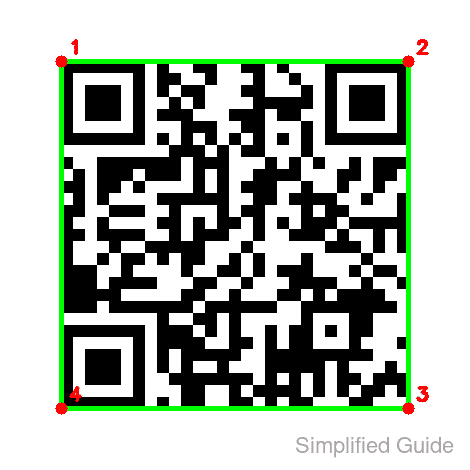
The green outline should follow the QR corner points printed by the script. A shifted or incomplete outline usually means the source image is cropped, tilted, blurred, or too low contrast for this detector pass.