How to match features with ORB in OpenCV
Feature matching compares distinctive points across related images so a vision pipeline can tell which parts of one frame correspond to another. In OpenCV, ORB supplies fast binary descriptors for this job when a script needs a lightweight match set before alignment, registration, or stitching.
The Python workflow reads two images, detects ORB keypoints and descriptors with cv.ORB_create(), matches descriptor pairs with a brute-force matcher, and draws the best matches into a review image. The query image is the image being searched for matching features, while the train image is the image searched against.
Use images that share enough visible structure for ORB to find repeatable corners or edges. The default ORB descriptor uses cv.NORM_HAMMING for matching; change the matcher norm to cv.NORM_HAMMING2 only when the detector uses WTA_K set to 3 or 4.
Related: How to read and write an image with OpenCV
Related: How to stitch images with OpenCV
Related: How to install OpenCV on Ubuntu
Steps to match features with ORB in OpenCV:
- Create an input directory for the image pair.
$ mkdir -p input
- Copy the first source image into the query path.
$ cp stitch-left.png input/scene-left.png
Replace stitch-left.png with the image whose features should be matched against the second image.
- Copy the second source image into the train path.
$ cp stitch-right.png input/scene-right.png
Use a related image with overlapping objects, marks, or scene content. Images with flat backgrounds or repeated texture can produce few useful matches.
- Create the ORB feature matching script.
- match_orb.py
from argparse import ArgumentParser
from pathlib import Path

import cv2 as cv


parser = ArgumentParser()
parser.add_argument("--query", default="input/scene-left.png", help="First image to match")
parser.add_argument("--train", default="input/scene-right.png", help="Second image to match")
parser.add_argument("--output", default="output/orb-matches.png", help="Path for the match visualization")
parser.add_argument("--max-features", type=int, default=1000)
parser.add_argument("--keep", type=int, default=30, help="Number of best matches to draw")
args = parser.parse_args()

query_path = Path(args.query)
train_path = Path(args.train)
output_path = Path(args.output)

query_gray = cv.imread(str(query_path), cv.IMREAD_GRAYSCALE)
train_gray = cv.imread(str(train_path), cv.IMREAD_GRAYSCALE)
query_color = cv.imread(str(query_path), cv.IMREAD_COLOR)
train_color = cv.imread(str(train_path), cv.IMREAD_COLOR)

if query_gray is None:
    raise SystemExit(f"could not read query image: {query_path}")
if train_gray is None:
    raise SystemExit(f"could not read train image: {train_path}")

orb = cv.ORB_create(nfeatures=args.max_features)
query_keypoints, query_descriptors = orb.detectAndCompute(query_gray, None)
train_keypoints, train_descriptors = orb.detectAndCompute(train_gray, None)

if query_descriptors is None:
    raise SystemExit(f"no ORB descriptors found in {query_path}")
if train_descriptors is None:
    raise SystemExit(f"no ORB descriptors found in {train_path}")

matcher = cv.BFMatcher(cv.NORM_HAMMING, crossCheck=True)
matches = matcher.match(query_descriptors, train_descriptors)
matches = sorted(matches, key=lambda match: match.distance)
kept_matches = matches[: args.keep]

if not kept_matches:
    raise SystemExit("no cross-checked ORB matches found")

match_view = cv.drawMatches(
    query_color,
    query_keypoints,
    train_color,
    train_keypoints,
    kept_matches,
    None,
    flags=cv.DrawMatchesFlags_NOT_DRAW_SINGLE_POINTS,
)

output_path.parent.mkdir(parents=True, exist_ok=True)
if not cv.imwrite(str(output_path), match_view):
    raise SystemExit(f"could not write output image: {output_path}")

print(f"query keypoints: {len(query_keypoints)}")
print(f"train keypoints: {len(train_keypoints)}")
print(f"cross-checked matches: {len(matches)}")
print(f"drawn matches: {len(kept_matches)}")
print(f"best distance: {kept_matches[0].distance:.1f}")
print(f"wrote: {output_path}")
- Run the script with a 30-match drawing limit.
$ python3 match_orb.py --keep 30
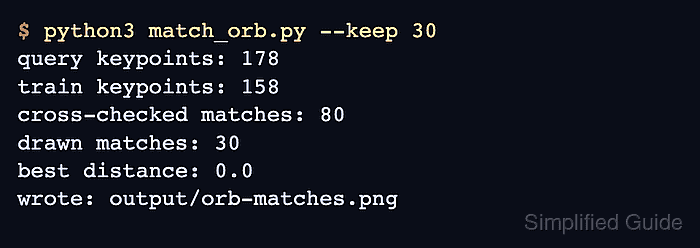
query keypoints: 178
train keypoints: 158
cross-checked matches: 80
drawn matches: 30
best distance: 0.0
wrote: output/orb-matches.png
Increase --max-features when the images have many small details. Lower --keep when the match image becomes too crowded to inspect.
- Keep the brute-force matcher on Hamming distance for default ORB descriptors.
matcher = cv.BFMatcher(cv.NORM_HAMMING, crossCheck=True)
crossCheck=True keeps only mutual best matches, which gives a smaller and easier-to-review match set than one-way descriptor matching.
- Sort matches by distance before drawing the review image.
matches = sorted(matches, key=lambda match: match.distance)
kept_matches = matches[: args.keep]
Lower DMatch.distance values indicate more similar binary descriptors, so the first retained entries are the strongest matches.
- Review the saved match visualization.
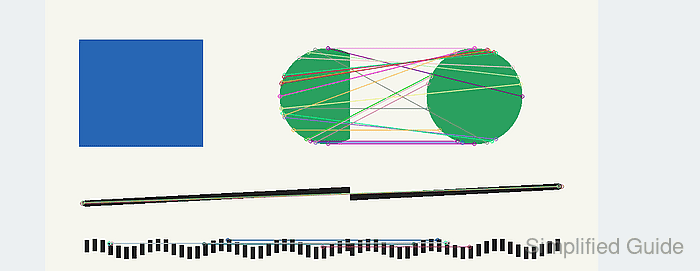
The retained lines should connect corresponding points in the overlapping shapes. A visualization with scattered or crossing lines usually means the image pair needs stronger texture, fewer repeated patterns, or a stricter match filter.
- Verify that OpenCV can reopen the match image.
$ python3 - <<'PY' import cv2 as cv image = cv.imread("output/orb-matches.png") print(f"output readable: {image.shape[1]}x{image.shape[0]}") PY output readable: 1240x480 - Remove the sample script after moving the matching logic into the project.
$ rm match_orb.py