How to detect Harris corners with OpenCV
Corner detectors mark image locations where intensity changes in two directions, such as checkerboard intersections, document corners, and structured scene points. OpenCV exposes the Harris detector through cv.cornerHarris() when a script needs repeatable point candidates before matching, tracking, or geometric checks.
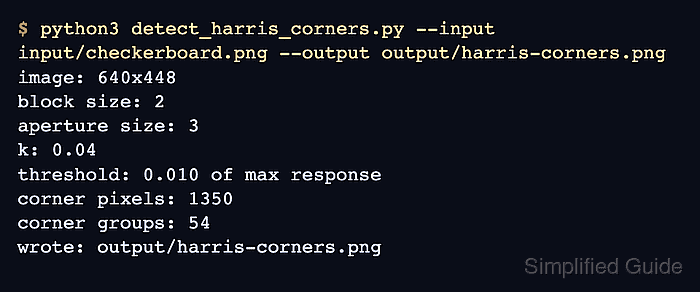
The detector returns a response map rather than a ready-made list of points. Thresholding that map against the strongest response isolates high-response pixels, while connected-component counts make the output easier to compare between tuning runs.
The Python script keeps the run file-based for terminal validation. It loads input/checkerboard.png, converts the image to grayscale float32 data, marks thresholded Harris responses, draws component centers, and writes output/harris-corners.png for visual review.
Related: How to read and write an image with OpenCV
Related: How to match features with ORB in OpenCV
Related: How to install OpenCV on Ubuntu
Steps to detect Harris corners with OpenCV:
- Create an input directory for the source image.
$ mkdir -p input
- Copy the image into the expected path.
$ cp checkerboard.png input/checkerboard.png
Replace checkerboard.png with the image that contains the corners to mark. Keep the input/checkerboard.png path or update the script command to match the project layout.
- Create the Harris corner detection script.
- detect_harris_corners.py
from argparse import ArgumentParser
from pathlib import Path

import cv2 as cv
import numpy as np


parser = ArgumentParser()
parser.add_argument("--input", required=True, help="Source image")
parser.add_argument("--output", required=True, help="Annotated output image")
parser.add_argument("--threshold", type=float, default=0.01)
parser.add_argument("--block-size", type=int, default=2)
parser.add_argument("--aperture-size", type=int, default=3)
parser.add_argument("--k", type=float, default=0.04)
args = parser.parse_args()

image = cv.imread(args.input)
if image is None:
    raise SystemExit(f"could not read input image: {args.input}")

gray = cv.cvtColor(image, cv.COLOR_BGR2GRAY)
response = cv.cornerHarris(
    np.float32(gray),
    args.block_size,
    args.aperture_size,
    args.k,
)
response = cv.dilate(response, None)

max_response = float(response.max())
threshold_value = args.threshold * max_response
corner_mask = response > threshold_value
corner_pixels = int(np.count_nonzero(corner_mask))

components, labels, stats, centroids = cv.connectedComponentsWithStats(
    corner_mask.astype("uint8"),
    connectivity=8,
)
corner_groups = components - 1

annotated = image.copy()
annotated[corner_mask] = (0, 0, 255)
for centroid in centroids[1:]:
    x, y = centroid
    cv.circle(annotated, (int(round(x)), int(round(y))), 4, (0, 255, 0), 1)

output_path = Path(args.output)
output_path.parent.mkdir(parents=True, exist_ok=True)
if not cv.imwrite(str(output_path), annotated):
    raise SystemExit(f"could not write output image: {output_path}")

height, width = gray.shape
print(f"image: {width}x{height}")
print(f"block size: {args.block_size}")
print(f"aperture size: {args.aperture_size}")
print(f"k: {args.k:.2f}")
print(f"threshold: {args.threshold:.3f} of max response")
print(f"corner pixels: {corner_pixels}")
print(f"corner groups: {corner_groups}")
print(f"wrote: {output_path}")
cv.cornerHarris() works on a single-channel image for this response calculation. The script converts the source image to grayscale and np.float32 before detection.
- Run the script and confirm the Harris response counts.
$ python3 detect_harris_corners.py --input input/checkerboard.png --output output/harris-corners.png
image: 640x448
block size: 2
aperture size: 3
k: 0.04
threshold: 0.010 of max response
corner pixels: 1350
corner groups: 54
wrote: output/harris-corners.png
--threshold is the fraction of the strongest response kept for marking. Increase it to keep only stronger corners, or decrease it when faint intersections matter.
- Review the annotated output image.
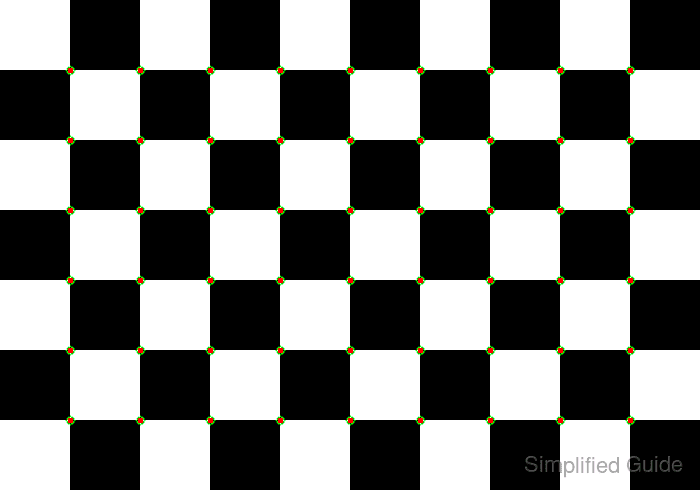
Red pixels show thresholded Harris responses, and green circles show connected-component centers. A checkerboard should mark the grid intersections, not the flat square centers.
- Confirm that OpenCV can reopen the annotated image.
$ python3 - <<'PY' import cv2 as cv image = cv.imread("output/harris-corners.png") print(f"output readable: {image.shape[1]}x{image.shape[0]}") PY output readable: 640x448 - Remove the sample script after adapting the pattern.
$ rm detect_harris_corners.py