How to undistort a camera image with OpenCV
Lens correction turns calibration data into corrected pixels before measuring lines, matching features, or stitching camera frames. In OpenCV, a distorted image needs the camera matrix and distortion coefficients estimated for that same camera so curved edges and shifted feature positions can be compensated.
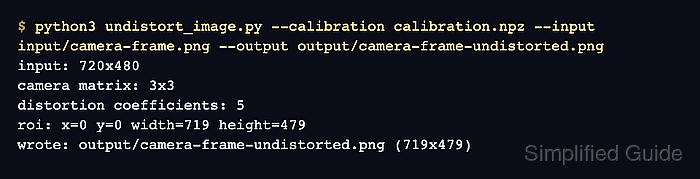
A NumPy archive named calibration.npz stores the camera_matrix and dist_coeffs arrays used by the undistortion pass. The script reads one frame with cv2.imread(), computes a refined matrix with cv2.getOptimalNewCameraMatrix(), applies cv2.undistort(), crops the valid region of interest, and writes the corrected image with cv2.imwrite().
Use calibration values from the same camera and resolution whenever possible. If the input images were resized after calibration, scale the camera matrix to the new dimensions first; otherwise the script can still write an output file while leaving straight lines, measurements, or feature positions visibly wrong.
Related: How to calibrate a camera with OpenCV
Related: How to read and write an image with OpenCV
Related: How to install OpenCV on Ubuntu
Steps to undistort a camera image with OpenCV:
- Put the distorted camera frame at input/camera-frame.png.
Use a frame captured by the same camera and lens setting that produced the calibration data.
- Put the calibration output at calibration.npz.
The archive should contain a 3×3 camera_matrix array and a dist_coeffs array from the calibration step.
Related: How to calibrate a camera with OpenCV - Create the undistortion script.
- undistort_image.py
from argparse import ArgumentParser
from pathlib import Path

import cv2
import numpy as np


parser = ArgumentParser()
parser.add_argument("--calibration", required=True, help="Path to calibration.npz")
parser.add_argument("--input", required=True, help="Distorted input image")
parser.add_argument("--output", required=True, help="Undistorted output image")
parser.add_argument(
    "--alpha",
    type=float,
    default=0.0,
    help="0 crops invalid pixels; 1 keeps more of the original field of view",
)
args = parser.parse_args()

data = np.load(args.calibration)
camera_matrix = data["camera_matrix"]
dist_coeffs = data["dist_coeffs"]

image = cv2.imread(args.input)
if image is None:
    raise SystemExit(f"could not read input image: {args.input}")

height, width = image.shape[:2]
new_camera_matrix, roi = cv2.getOptimalNewCameraMatrix(
    camera_matrix,
    dist_coeffs,
    (width, height),
    args.alpha,
    (width, height),
)

undistorted = cv2.undistort(image, camera_matrix, dist_coeffs, None, new_camera_matrix)
x, y, roi_width, roi_height = roi
if roi_width > 0 and roi_height > 0:
    undistorted = undistorted[y : y + roi_height, x : x + roi_width]

output_path = Path(args.output)
output_path.parent.mkdir(parents=True, exist_ok=True)
if not cv2.imwrite(str(output_path), undistorted):
    raise SystemExit(f"could not write output image: {output_path}")

print(f"input: {width}x{height}")
print(f"camera matrix: {camera_matrix.shape[0]}x{camera_matrix.shape[1]}")
print(f"distortion coefficients: {dist_coeffs.size}")
print(f"roi: x={x} y={y} width={roi_width} height={roi_height}")
print(f"wrote: {output_path} ({undistorted.shape[1]}x{undistorted.shape[0]})")
--alpha 0 crops to the valid pixel region. Use --alpha 1 when retaining more of the original field of view matters and black border pixels are acceptable.
- Run the script against the distorted frame.
$ python3 undistort_image.py --calibration calibration.npz --input input/camera-frame.png --output output/camera-frame-undistorted.png
input: 720x480
camera matrix: 3x3
distortion coefficients: 5
roi: x=0 y=0 width=719 height=479
wrote: output/camera-frame-undistorted.png (719x479)
- Verify that OpenCV can reopen the corrected image.
$ python3 - <<'PY'
import cv2
image = cv2.imread("output/camera-frame-undistorted.png")
print(f"output readable: {image.shape[1]}x{image.shape[0]}")
PY
output readable: 719x479
A readable output file with the cropped dimensions confirms that the undistortion pass wrote an image that downstream OpenCV code can load.