Table of Contents
How to run a model arena test in Open WebUI
Open WebUI model arena tests compare answers from connected models through the evaluation system instead of switching model names by hand. An arena run helps an admin or team lead decide which model should handle support, coding, knowledge-base, or other shared chat workloads.
The arena appears as Arena Model in the chat model picker. It can use all visible base models by default, or a smaller custom arena set from Admin Panel → Settings → Evaluations. Ratings become model-comparison evidence when the response is part of a sibling-response comparison, because the feedback record needs both the selected model and the other model IDs in the comparison.
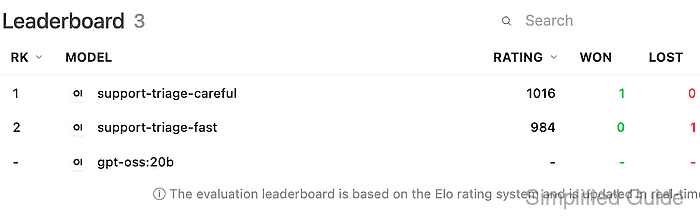
Start with at least two working models and a prompt that does not expose secrets, customer records, or private evaluation data. The successful end state is a leaderboard entry where the preferred model has a higher rating and a recorded win against the other model.
Steps to run a model arena test in Open WebUI:
- Sign in to Open WebUI with an account that can use the candidate models and submit message ratings.
Use an admin account if the arena setting or evaluation leaderboard is not visible to ordinary users.
- Confirm that at least two candidate models can answer a normal chat prompt.
The arena setting can be present with only one connected model, but a useful arena comparison needs at least two base models.
- Open Admin Panel → Settings → Evaluations and confirm that Arena Models is enabled.
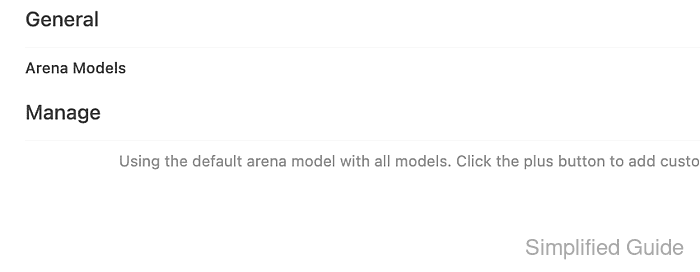
The default arena model uses all available models. Use the plus button only when the test should compare a specific model subset.
- Start a new chat and select Arena Model from the model picker.
If a custom arena model was created, select that custom arena name instead of the default Arena Model.
- Send a short prompt that every candidate model can answer.
Summarize the support-triage policy in one sentence.
- Generate a sibling answer for the same prompt by using the response regeneration or alternate-response controls.
A leaderboard comparison requires sibling responses. Rating a single standalone answer records ordinary feedback, but it does not create a pairwise model result.
- Compare the answers for accuracy, completeness, and fit for the intended workload.
Avoid choosing by visible model name when possible. The value of the arena is the response quality, not prior preference for a provider or model family.
- Rate the better answer with the thumbs-up control, and add a reason or tag when the prompt represents a recurring workload.
Evaluation feedback can store prompt and response snapshots. Keep production secrets, private customer text, and regulated data out of arena prompts unless retention and access controls are approved.
- Open Admin Panel → Evaluations → Leaderboard and confirm that the winning model has a recorded win, the other model has a recorded loss, and the rating values changed.
Open WebUI uses an Elo-style leaderboard, so one prompt is enough to verify the workflow but not enough to make a final model choice. Repeat the same process across a small prompt set before changing a shared default model.
Troubleshooting model arena tests
- If Arena Model is missing from the model picker, revisit Admin Panel → Settings → Evaluations and refresh the model list after saving the arena setting.
- If the same model always appears to answer, verify that more than one base model is connected and that any custom arena definition includes all intended candidates.
- If the leaderboard does not change after a rating, confirm that the rated answer has a sibling answer for the same prompt and that the signed-in user can submit evaluation feedback.