How to enable LDAP authentication in Open WebUI
Directory-backed login keeps Open WebUI accounts tied to existing directory usernames, passwords, and mail attributes. Enabling LDAP is useful when a team already manages access in OpenLDAP, Active Directory, or another LDAP-compatible directory and wants Open WebUI sign-in to use that identity source.
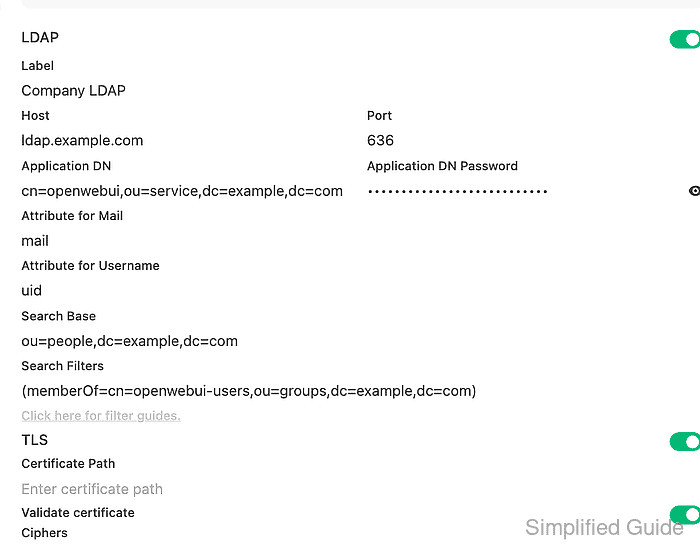
The LDAP settings are available under Admin Panel → Settings → Authentication. Open WebUI can also read LDAP environment variables on first startup, but existing sites with persistent configuration should change the same values in the admin settings panel unless persistent configuration is disabled.
Plan the bind account, search base, user attribute, mail attribute, and TLS mode before saving the setting. The directory search should return one user with a mail value, and a private-window sign-in should create or match an Open WebUI account with the default role or the role/group mapping your site expects.
Related: How to enable SSO in Open WebUI
Related: How to create an RBAC group in Open WebUI
Steps to enable LDAP authentication in Open WebUI:
- Sign in to Open WebUI as an administrator.
- Confirm the application bind account can find a test user from the Open WebUI network path.
$ ldapsearch -x -H ldap://ldap.example.com:389 \
  -D "cn=openwebui,ou=service,dc=example,dc=com" -W \
  -b "ou=people,dc=example,dc=com" "(uid=jdoe)" uid mail dn
Enter LDAP Password:
# extended LDIF
#
# LDAPv3
# base <ou=people,dc=example,dc=com> with scope subtree
# filter: (uid=jdoe)
# requesting: uid mail dn
#

# jdoe, people, example.com
dn: uid=jdoe,ou=people,dc=example,dc=com
uid: jdoe
mail: jdoe@example.com

# search result
search: 2
result: 0 Success

# numResponses: 2
# numEntries: 1
Use the same hostname, bind DN, search base, username attribute, and mail attribute that Open WebUI will use. The Host field in Open WebUI should be only the host name or IP address, not a URL with ldap:// or ldaps://.
- Confirm the directory user can bind with the expected password.
$ ldapwhoami -x -H ldap://ldap.example.com:389 \
  -D "uid=jdoe,ou=people,dc=example,dc=com" -W
Enter LDAP Password:
dn:uid=jdoe,ou=people,dc=example,dc=com
A failed direct bind usually points to the user DN, password, account state, or directory policy before Open WebUI is involved.
- Open Admin Panel → Settings → Authentication, expand LDAP, and turn on LDAP.
- Enter the server and bind account fields.
Label: Company LDAP
Host: ldap.example.com
Port: 389
Application DN: cn=openwebui,ou=service,dc=example,dc=com
Application DN Password: directory bind password
Port must be a number, and Host must not include a protocol. Quoted port values or URL-style hosts can prevent LDAP authentication from starting.
- Enter the user lookup fields.
Attribute for Mail: mail
Attribute for Username: uid
Search Base: ou=people,dc=example,dc=com
Search Filters: (memberOf=cn=openwebui-users,ou=groups,dc=example,dc=com)
Leave Search Filters empty for broad tests. When using it for group membership, include only the additional condition because Open WebUI adds the username filter itself.
- Set the TLS controls for the directory listener.
Plain LDAP: Port 389, TLS off
LDAPS: Port 636, TLS on, Validate certificate on
StartTLS: Port 389, TLS on, Validate certificate on
Do not disable certificate validation for production LDAPS or StartTLS. A TLS setting that does not match the directory listener can produce SSL handshake errors during login.
- Click Save.
- Restart the Open WebUI service or container.
$ docker compose restart open-webui
[+] Restarting 1/1
 ✔ Container open-webui-open-webui-1 Started
Use the service manager that runs your instance when Open WebUI is not deployed with Docker Compose.
- Open a private browser window and sign in with the directory username.
Login ID: jdoe
Password: directory user password
Select the Company LDAP provider if the login page shows more than one sign-in method.
- Check the signed-in user under Admin Panel → Users.
Email: jdoe@example.com
Name: Jane Doe
Role: pending
The role should match Default User Role, LDAP group mapping, or the approval policy configured for the site. A pending role means the LDAP bind worked, but the account still needs approval or role assignment before normal access.